


Your Spotify save rate is the share of your listeners who save a song to their library. You calculate it as saves divided by listeners, times 100. Hypebot’s widely cited explainer puts typical results at 3% to 7% and calls anything above 10% good. Spotify itself publishes no official target. Below, we walk through the math, where to find the numbers, how to read them, and what moves them.
TL;DR
- Save rate = (saves ÷ listeners) × 100, measured for the same song and the same time window.
- Typical rates run 3% to 7%, and above 10% is considered strong. Spotify does not publish an official benchmark.
- A save means a listener tapped the Plus (+) button, so it is a deliberate “I want this again” action, not a passive play.
- Read save rate next to streams per listener, and compare only like with like: same song, same window, same traffic source.
- The biggest levers are who you send to the song, how the track sounds in the first seconds, and how clean the release is.
Table of Contents
- What a Spotify save rate actually measures
- How to calculate your save rate
- What is a good Spotify save rate?
- Read save rate alongside other metrics
- Why saves matter
- How to improve your save rate
- Our perspective
- How Twisby can help
- FAQ
- Sources
What a Spotify save rate actually measures
A save rate tells you how many of the people who heard a song liked it enough to keep it. It is a ratio, so it does not reward big audiences or punish small ones. A song with 200 listeners and 20 saves has a 10% save rate. So does a song with 20,000 listeners and 2,000 saves.
That is why we like it. Stream counts can be inflated by one fan looping a track or by a playlist that plays it in the background. A save requires a decision.
What counts as a save
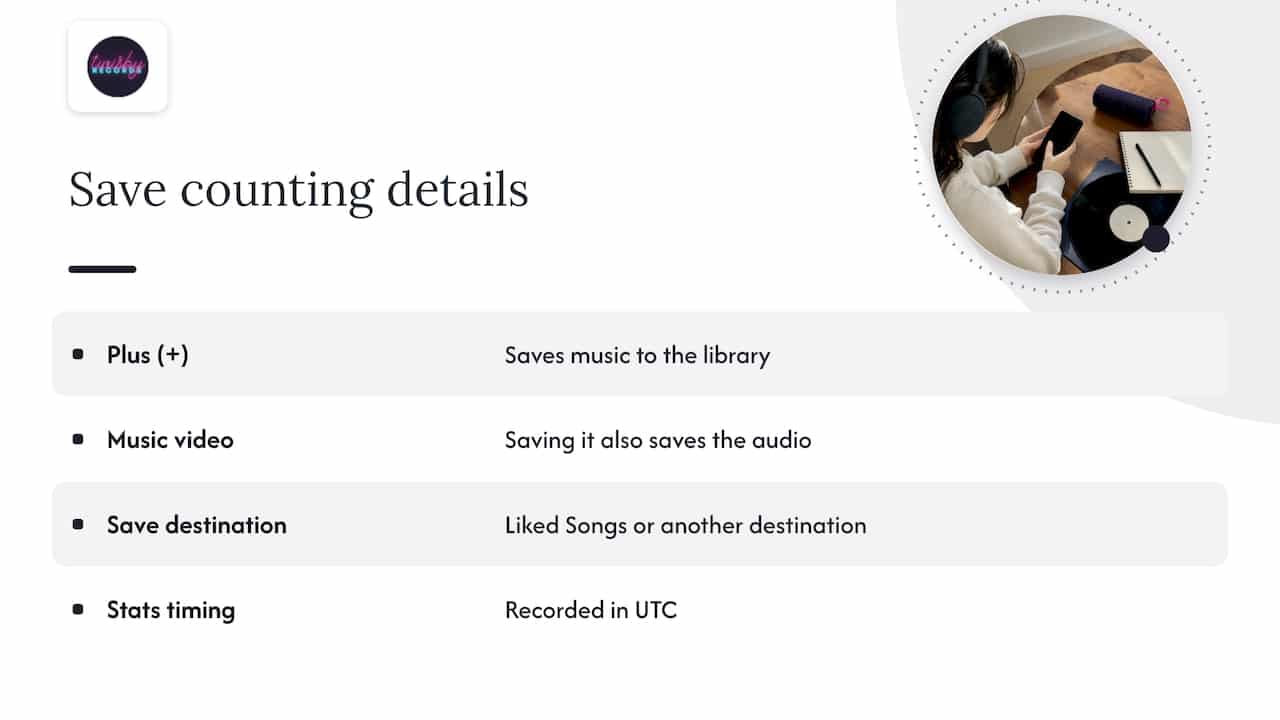
Per Spotify’s own explanation of how saves are counted, a save registers when a listener taps the Plus (+) button and the music goes to their library. If someone saves from a music video, the audio track is saved too.
The Plus button replaced the old Heart and “Add to playlist” controls, and it lets listeners save to Liked Songs or to another destination, according to Spotify’s 2023 announcement. So a listener who files your song into a playlist of their own is making a similar commitment.
One practical detail: Spotify for Artists records its statistics in Coordinated Universal Time (UTC), as the same support page explains. If you are in Pittsburgh or anywhere else in the U.S., a late-evening listen can land on the next UTC day. Keep that in mind when you compare a release-day number against what you saw on your phone.
How to calculate your save rate
The formula is simple:
Save rate = (saves ÷ listeners) × 100
Hypebot gives a worked example in the same explainer: 25.3 thousand saves and 258.6 thousand listeners. Divide 25.3 by 258.6 and multiply by 100, and you get about 9.78%.
Here is a smaller, everyday example. Say your new single has 1,400 listeners in its first 28 days and 98 saves.
- Divide 98 by 1,400. You get 0.07.
- Multiply by 100. Your save rate is 7%.
The rule that keeps the number honest: use listeners, not streams, in the denominator, and use the same date range for both figures. If you divide saves by streams instead, you get a different metric (saves per stream), which will always look smaller.
Where to find the numbers
Both figures live in Spotify for Artists. Open the song’s stats, pick a date range, and note the listeners and saves for that range. Spotify also lets you download some statistics as .csv files, including song stream counts and the Songs and Playlists tables in Music. That is handy if you want to track every release in one spreadsheet.
If you are new to the dashboard, our guide to what to track in Spotify for Artists analytics covers the other tabs you will use alongside this one.
A simple tracking sheet needs five columns: song, date range, listeners, saves, save rate. Add a sixth for the main traffic source if you ran ads that week.
What is a good Spotify save rate?
Here is the honest answer: it depends on where your listeners came from and how big your audience is. Hypebot reports it typically sees 3% to 7% on average and treats above 10% as good, and it notes that Spotify does not publish guidelines. Other blogs and forums quote different numbers, some far higher and some lower, because they measure different windows and different audiences.
Use this as a working frame, not a rule:
| Save rate | How we would read it |
|---|---|
| Under 3% | Worth investigating: check who is hearing the song and how the first 30 seconds land |
| 3% to 7% | Typical range, a normal starting point for most releases |
| 7% to 10% | Healthy: the song is connecting with the people hearing it |
| Above 10% | Strong, particularly if the audience is not made up only of your closest fans |
The last row has a catch. A tiny audience of friends and family can produce a very high save rate that says little about how strangers will respond. A 40% rate across 50 listeners is a nice surprise, not a benchmark.
Why your numbers will not match someone else’s
Three things change the result more than the song does:
- Audience source. People who already follow you tend to save more than cold listeners from a broad ad or a passive playlist.
- Time window. Seven days after release and ninety days after release are different measurements. Compare like with like.
- Scope. One song versus a whole release versus your catalog gives you different denominators.
If you want one rule: benchmark against your own previous releases first. Your trend matters more than any number from a blog.
Read save rate alongside other metrics
Save rate alone can fool you. A high rate on very few listeners and a low rate on a huge audience both need context.
Streams per listener
Pair saves with streams per listener. If people save your song and also come back to play it several times, that is a healthy pattern. If they save it and never return, the save may have been a polite gesture. If they play it many times but do not save, the song might be working as background music, and that is worth knowing.
Intent rate on Spotify’s own tools
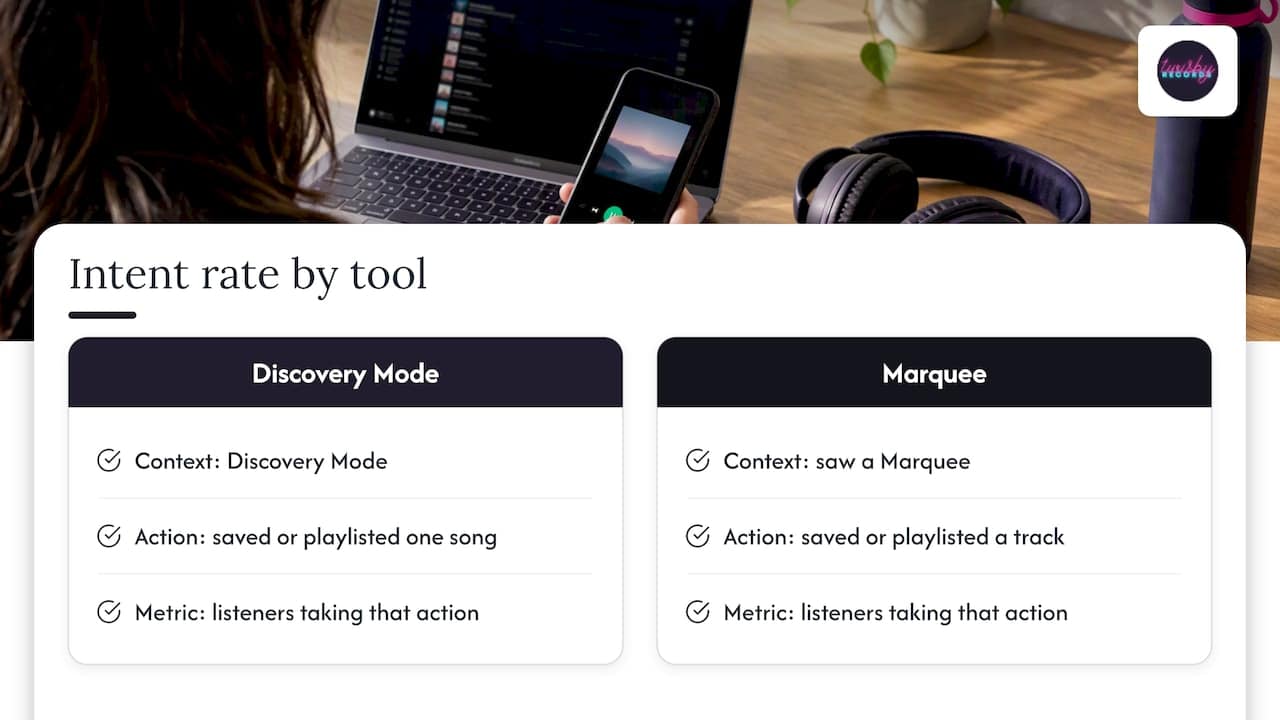
Spotify’s own reporting shows how seriously it treats this action. In its Discovery Mode reports, intent rate is the percentage of listeners who saved or playlisted at least one song from Discovery Mode contexts. The same page describes saves as a high-value fan action that signals intent to stream in the future, and it cautions that results can also be shaped by organic trends and other marketing. For Marquee, Spotify reports a similar intent rate: the share of listeners who saw a Marquee and then saved or playlisted a track from the promoted release.
The takeaway for you: Spotify’s own paid tools measure success by saves and playlist adds, not just plays. You should too.
Playlist adds, skips and follows
Read the whole picture:
- High saves, low streams: the song is landing but not reaching enough people. That is a reach problem.
- High streams, low saves: people are hearing it but not keeping it. That is a fit or a first-impression problem.
- High saves, high skips in the first seconds: the intro may be losing people who would otherwise have stayed.
- Followers rising after a release: a good sign that listeners want more than one song.
To understand how a release performs over time, see our look at Spotify’s popularity score and why it can lag by days, so you do not panic over a number that has not updated yet.
Why saves matter
Saves matter because they predict repeat listening. Spotify’s own user research found that when people save songs and podcasts, they are more likely to listen to them again. For an independent artist, repeat listening is the whole business: it turns a one-time stream into a fan who streams, follows, buys a ticket and shares your next release.
What about the algorithm? Many artists treat saves as one of the signals that help a song travel to more listeners, and we think that is a sensible way to work. But Spotify does not publish a save threshold, and nobody outside the company can tell you an exact cutoff. So we treat saves as a quality signal to improve, not a magic number to hit. We cover the launch side in our 48 to 72 hour plan for algorithmic playlists.
How to improve your save rate
You cannot ask for saves honestly and expect much if the song is not ready or the audience is wrong. Work through these in order.
1. Send the song to the right people
The single biggest driver of save rate is audience fit. A great pop-punk track played to country listeners will get skipped. Whether you are posting on social or running ads, aim at listeners of artists who sound like you. Our post on how Fans Also Like works and how to shape it explains how your related artists form, which tells you who Spotify thinks your listeners are.
2. Link straight to the song
Send people to the track, not your profile. One fewer tap means more people actually hear it. If you are building a landing page for a release, the same rule applies: one button, one song.
3. Make the first 30 seconds count
If the song takes a minute to start, listeners decide before it does. Tighten intros, bring the hook or the voice in early, and check that the mix translates on phone speakers and earbuds, since that is how most people listen.
4. Ask, plainly
A short call to action works: “If this one hits, tap the plus.” Ask once on release day and again after a few days. Do not beg, and do not offer rewards for saves. You want genuine saves from people who like the music, because those are the ones who return.
5. Use pre-saves, then follow through
Pre-saves can give a release a strong first day, but they only help if the song then holds people. Our pre-save campaign guide shows how to run one without hurting your launch numbers.
6. Track the result of ads against saves
If you run paid campaigns, measure them on saves and listeners, not just clicks. Our guides to tracking music ad conversions and verifying Spotify conversion tracking walk through how to set that up, and the Spotify conversion ads checklist covers the campaign build. For wider growth ideas, see how to increase Spotify streams as an indie artist.
Our perspective
We have been working on records for more than 35 years, and the pattern is consistent: songs get saved when the music and the mix both feel finished.
A weak save rate is rarely about marketing alone. We often hear it in the song itself: a vocal that sits too far back, low end that disappears on a phone, a master that is quieter or harsher than the tracks around it on a playlist. Listeners will not tell you that. They just do not tap the plus.
That is why we handle mixing and mastering as personal, creative work, with experienced engineers, real analog gear and Apple Digital Masters certification, rather than a one-click preset. When the record is right, the advertising has something worth spending on, and the saves follow the audience we target.
Our advice: fix the song first, then find its listeners, then measure with saves per listener. Do it in that order and the number takes care of itself far more often than not.
Kreg
How Twisby can help
If your save rate is lagging, we work on both halves of the problem. On the audio side, our mastering service is $50 per song, and we also offer mixing and recording, which you can ask us to quote.

On the audience side, our advertising packages run Facebook and Instagram campaigns for music releases, with audience research, custom landing pages, reporting and optimization. The Standard package is $25 per month plus a 20% fee on ad spend, with a one-time $99 onboarding fee. Premium packages are also listed on that page. If you want a number on your mix first, request a mix quote.
FAQ
What is a good Spotify save rate?
Most artists see around 3% to 7%, and above 10% is generally considered strong, according to Hypebot. Spotify does not publish an official benchmark. Compare against your own earlier releases and the same time window.
How do I calculate my Spotify save rate?
Divide saves by listeners for the same song and date range, then multiply by 100. For example, 98 saves from 1,400 listeners gives 7%. Both numbers are in Spotify for Artists.
Does a save count if the listener adds the song to a playlist instead?
Spotify’s Plus button lets people save to Liked Songs or to another destination. Spotify’s own reports pair saves and playlist adds together as an intent signal. We suggest watching both numbers for each release.
Why is my save rate low even with lots of streams?
The audience may not match your sound, or the song may play as background music in a passive setting. Check your traffic source, the first 30 seconds of the song, and how the mix sounds on phones. Then test a tighter audience.
Can I ask fans to save my song?
Yes. A short, honest call to action works, ideally linking straight to the track. Avoid incentives for saves, since you want listeners who actually like the song.
Sources
- How we count saves, Spotify for Artists support
- Exporting data, Spotify for Artists support
- Save Your Favorite Songs, Podcasts, and More With Spotify’s Plus Button
- The Importance Of Spotify Save Rates, How To Get On Discover Weekly, Hypebot
- Understanding your Discovery Mode performance report, Spotify for Artists support
- Amplify Your New Release With Marquee, Spotify for Artists