


The Meta Pixel is the tool that turns a smartlink into a data source that Meta can actually optimize against. Install it on your smartlink, wire the outbound click to a streaming platform as a custom conversion, and pair the Pixel with the Conversions API so you’re not flying blind when iOS or an ad blocker kills a browser event. Skip any of those three steps, and you’re paying to guess.
TL;DR:
- Pixel data should be paired with Conversions API to mitigate privacy restrictions and ad blockers that can block or delay event reporting.
- Tracking outbound clicks to streaming platforms like Spotify, rather than page views, provides more accurate signals for ad optimization and audience building.
- Proper setup involves creating and testing Pixels, custom conversions, and shared event IDs to ensure reliable data during campaign execution.
- Broad automation should be avoided early on; focus on detailed interest testing, vertical video formats, and allowing the algorithm to calibrate within the first 48 to 72 hours.
- Outsourcing Pixel and CAPI setup can save time and reduce errors, but requires clear communication on reporting frequency, deduplication, and optimization goals.
Table of Contents
- What Is the Facebook Pixel for Music and How Does It Work?
- Why Pixel Tracking Matters for Music Advertising
- How Do You Set Up a Facebook Pixel on a Smartlink?
- Which Conversion Event Should You Track for Streaming Campaigns?
- Why You Should Pair Pixel Tracking With Conversions API
- How Do You Test and Fix Common Pixel Setup Mistakes?
- How Do You Use Pixel Data to Build Better Ad Audiences?
- What Creative and Budget Settings Work Best With Pixel Optimization?
- Twisby Records and Pixel-Driven Music Advertising
- Should You Set Up Your Own Pixel or Hire It Out?
- Get Pixel and CAPI Setup Handled by Twisby Records
- Where to Verify Pixel Setup and Documentation
- Sources
- FAQ
What Is the Facebook Pixel for Music and How Does It Work?
The Meta Pixel is a small piece of JavaScript you paste into your smartlink or landing page. It sits quietly in the background of the page, and every time someone loads that page or clicks something on it, the Pixel fires an event straight from their browser back to Meta. That’s the whole mechanism: browser-side tracking, no magic involved.
For most websites, a PageView event is enough. Music promotion is different. A fan landing on your smartlink and doing nothing tells you almost nothing. What you actually care about is whether they clicked through to Spotify or Apple Music, and that click out to a DSP is the event worth tracking — not the page load, not a generic ViewContent.
Here’s the catch nobody mentions in the setup tutorials:
- iOS privacy settings routinely block or delay Pixel events on Safari and in-app browsers
- Instagram’s and Facebook’s own in-app browsers can behave inconsistently with third-party pixels
- Ad blockers, which a meaningful chunk of your audience runs, strip Pixel calls before they ever fire
None of that means the Pixel is useless. It means you can’t treat it as a perfect record, and you’ll want a backup, which we’ll get to shortly.
Why Pixel Tracking Matters for Music Advertising
Cost per stream lives or dies on what you tell Meta to optimize for. If you’re running a Traffic campaign, Meta finds you cheap clicks, full stop. It has no idea whether those clicks turned into a fan hitting play. Feed it real conversion data from smartlink click-outs instead, and Meta starts finding people who behave like your actual listeners, not just people who click things.
Pro Tip: A Conversions objective campaign built on clean Pixel data will almost always beat a Traffic campaign on cost per real listener, even when the cost per click looks worse on paper.
The bigger payoff shows up downstream. Every click-out you capture becomes a seed audience. You can build lookalikes from people who actually left your page for Spotify, which is a far stronger signal than page visitors alone. Marketing guidance for musicians is consistent on one point: ads amplify a release that already has strong creative — Pixel data just makes sure that amplification is aimed at people who convert.
How Do You Set Up a Facebook Pixel on a Smartlink?
Setup takes less time than mixing a single track, but skip a step and your whole campaign optimizes toward nothing. Here’s the order that actually works:
- Create the Pixel in Meta Events Manager. Go to Events Manager, create a new Pixel, name it after your artist project, and copy the Pixel ID it generates.
- Paste the Pixel ID into your smartlink platform. Most smartlink tools, including ToneDen, Feature.fm, and Hypeddit, have a dedicated field for this in their tracking or integrations settings, and they typically expose a distinct event for outbound clicks rather than lumping everything into a generic page load. If you’re self-hosting a landing page, you’ll paste the same snippet into your site’s header code.
- Create a custom conversion that matches the click-out event. In Events Manager, define a custom conversion tied to the specific event your smartlink fires when a fan clicks through to a streaming service. Name it something you’ll recognize later, like “spotify_clickout.”
- Test before you spend a dollar. Open Meta’s Test Events tool inside Events Manager, click through your own smartlink, and confirm the event shows up with the right name and parameters. Install the Meta Pixel Helper Chrome extension too. It sits in your browser toolbar and flags exactly which events fired and whether any threw an error.
Pro Tip: Test in an incognito window with any ad blocker disabled. Testing in your everyday browser, with extensions running, is the single most common reason people think their Pixel is broken when it’s actually working fine.
Our own Meta Pixel walkthrough for Spotify campaigns covers this same sequence with screenshots if you want a visual reference alongside these steps.
Which Conversion Event Should You Track for Streaming Campaigns?
The click-out to a DSP is the event that matters. Not PageView, not a five-second video watch, not an Add to Cart repurposed from an e-commerce template. The moment a fan lands on your smartlink and clicks through to Spotify or Apple Music is the closest thing you have to a real conversion, and it’s the redirect action Meta should optimize toward.
A few practical notes on getting this right:
- Name your custom conversion something specific and consistent, like “dsp_clickout,” so you’re never guessing which one to select in Ads Manager
- Set your attribution window to 7-day click, which fits how music discovery actually plays out. Fans rarely click an ad and stream instantly; they browse, get distracted, and come back later
- If you’re sending the same click-out event through both the Pixel and CAPI, they need a shared event ID or Meta will count it twice and quietly inflate your results
Get the event name wrong once, early on, and every optimization decision downstream is built on the wrong signal.
Why You Should Pair Pixel Tracking With Conversions API
Browser-side tracking alone has a hole in it, and that hole is getting bigger every year. iOS privacy protections, Safari’s tracking restrictions, and the growing popularity of ad blockers all interfere with Pixel events before Meta ever sees them. The Conversions API sends the same event data server-side, bypassing the browser-level blocks entirely.
You have a few paths into CAPI depending on your setup:
- Some smartlink platforms now offer native CAPI support you can toggle on without touching code
- Middleware tools like Stape or a serverless function can bridge your smartlink and Meta’s server-side endpoint without a full custom build
- A developer can implement CAPI directly if you’re running your own landing page infrastructure
Pro Tip: Whichever path you choose, always send a matching event ID between your Pixel and CAPI events. Skipping deduplication is the fastest way to make your conversion count look great and your actual cost-per-fan math completely wrong.
How Do You Test and Fix Common Pixel Setup Mistakes?
Before any real budget touches a campaign, confirm the Pixel is actually doing its job. Two tools handle nearly everything you need:
- Open Test Events in Meta Events Manager and click through your smartlink exactly as a fan would. You should see the click-out event appear within seconds, with the correct parameters attached.
- Install the Meta Pixel Helper extension and check it while browsing your own smartlink. It flags firing errors, duplicate events, and missing pixel IDs directly in the toolbar.
- Watch for the three mistakes that show up constantly: optimizing a campaign for PageView instead of the click-out event, firing the custom conversion on the wrong button or trigger, and running Pixel plus CAPI without deduplication.
- When something looks off, retest in an incognito window with ad blockers disabled. Half of “broken pixel” reports turn out to be a browser extension quietly eating the event.
How Do You Use Pixel Data to Build Better Ad Audiences?
Once events are firing cleanly, the Pixel becomes an audience-building engine, not just a tracking tool. Start with retargeting: build a list of everyone who visited your smartlink page, and a separate, higher-value list of people who actually clicked through to a DSP. Give the visitor list a shorter retention window, maybe 14 days, and let the converter list run longer since those fans already showed real intent.
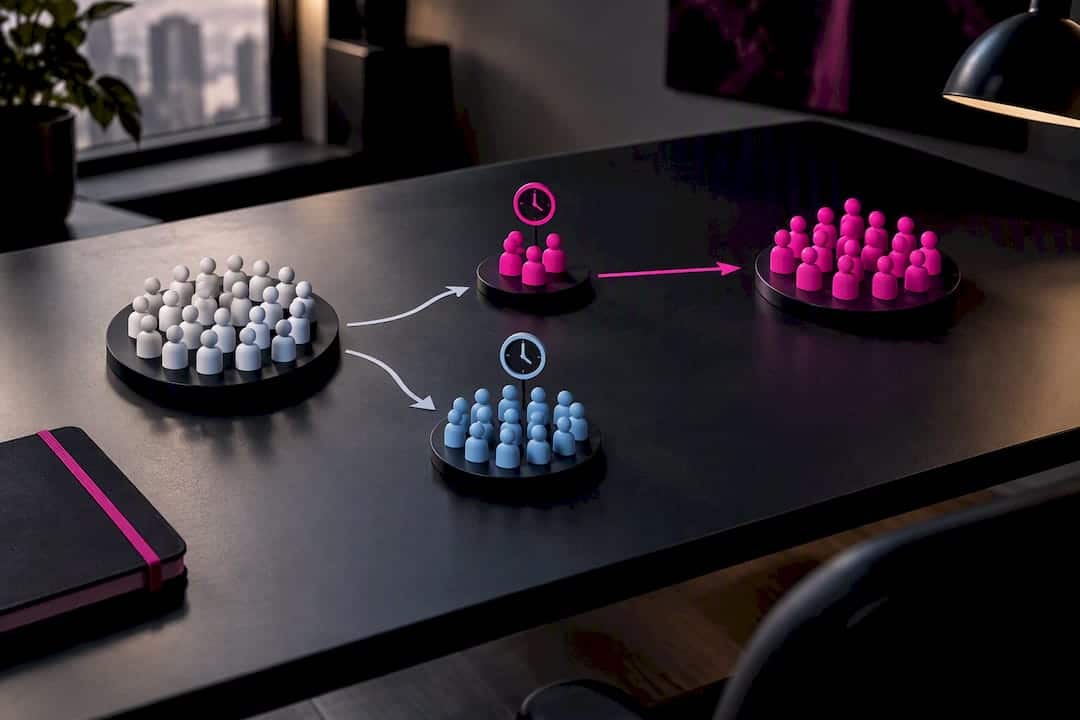
Lookalikes are where the real leverage shows up. Structurally, keep campaigns on the Conversions objective and control your own audience targeting manually rather than defaulting to Advantage+ while you’re still learning what works. Broad automation is great once you have data; it’s a coin flip when you don’t. For placements, prioritize Instagram Reels and Facebook Feed, where Pixel data compounds fastest.
Our guide on whether Facebook ads actually work for musicians breaks down how these audience layers interact with real campaign budgets in more detail.
What Creative and Budget Settings Work Best With Pixel Optimization?
Pixel data only optimizes what you feed it, and creative is most of what determines whether anyone clicks through in the first place. Vertical 9:16 video in the 15 to 30 second range consistently outperforms square or horizontal formats, and the hook needs to land in the first two to three seconds or the scroll wins. Test raw, phone-shot footage against something more polished. Music audiences don’t reward slickness the way other categories do.
- Prioritize Instagram Reels and Stories placements; skip Audience Network and Messenger for music discovery tests, where performance tends to be weak
- Run interest tests at $10 to $50 a day and let each ad set reach roughly 50 conversions before judging it, which is generally what it takes to exit Meta’s learning phase
- Resist touching creative or targeting in the first 48 to 72 hours of a new campaign. Meta needs that window to calibrate, and constant tweaking resets the clock
For creative ideas specific to indie releases, our music ad creative roundup has 10 formats worth testing. If you need quick, low-cost visuals for vertical creative, a tool like an AI poster generator can fill gaps between full production shoots.
Pro Tip: Run your interest test with a release that already has a finished mix and master. Pixel optimization can only route traffic efficiently; it can’t rescue a track that isn’t ready to be heard.
Twisby Records and Pixel-Driven Music Advertising
An experienced music production team works with independent artists on the technical side of getting music heard, with Apple Digital Masters certification on the production end. That combination matters here because Pixel and CAPI setup, campaign optimization, and smartlink integration only pay off when the release behind them is mixed and mastered to hold up against professional competition on a fan’s feed.
Beyond advertising setup, the full chain includes smartlink configuration, managed campaign optimization once data starts flowing, and mixing and mastering work that makes a track worth advertising in the first place.
Should You Set Up Your Own Pixel or Hire It Out?
DIY makes sense if you’re running modest daily budgets and comfortable poking around smartlink settings and Events Manager. It gets harder to justify once you’re layering in CAPI, running multiple campaigns at once, or need creative that actually performs.
If you hire out, ask three questions upfront: how often will you get reporting, how do they handle Pixel and CAPI deduplication, and which KPIs do they actually optimize toward. A vague answer on any of those three is a warning sign.
— Kreg
Get Pixel and CAPI Setup Handled by Twisby Records
An advertising service can build the Pixel and CAPI integration, set up the custom conversion on your smartlink click-out, and manage the campaign optimization from there, making the setup steps easier to execute.
Standard Packages run $25 a month plus a 20% adspend fee, with a one-time $99 onboarding fee to get your Pixel, CAPI, and smartlink wired correctly from day one. If your release still needs its mix tightened up before you spend a dollar on ads, mastering starts at $50 as a one-off project. Check out our advertising services page to see current package details and get started.
Where to Verify Pixel Setup and Documentation
Cross-check your setup against Meta’s own Events Manager and Test Events tools, the Meta Pixel Helper extension, and your smartlink provider’s own integration documentation before launching any paid campaign.
Sources
- How to Set Up the Meta Pixel for Music Ads | VLVTN
- Facebook Conversion API vs Facebook Pixel (Stape blog)
- How to optimize the setup of your Music Ads campaigns on META ? | Music Tomorrow Help Center
- 5 things musicians get wrong about music promotion | DIY Musician
FAQ
Is the Facebook Pixel Still Used?
Yes. Meta’s Pixel remains the standard browser-side tracking tool for Facebook and Instagram ad campaigns, though it’s increasingly paired with the Conversions API to cover events that browser tracking alone misses.
How Do I Use the Facebook Pixel for Music Promotion?
Install the Pixel on your smartlink, then create a custom conversion tied to the outbound click to Spotify or Apple Music rather than a generic page view. Test the event with Meta’s Test Events tool before running any paid campaign.
What’s the Difference Between Pixel and Conversions API?
The Pixel fires events from a visitor’s browser, while CAPI sends the same event data directly from a server. Server-side events aren’t affected by iOS privacy restrictions or ad blockers, which is why pairing the two reduces lost conversion data.
Which Smartlink Platforms Support Facebook Pixel Integration?
Most major smartlink tools, including ToneDen, Feature.fm, and Hypeddit, let you paste a Pixel ID directly into their settings and expose a dedicated outbound-click event you can map to a custom conversion.
Does Twisby Records Set Up Meta Pixel and CAPI for Artists?
Yes. Twisby Records’ advertising service includes Pixel and CAPI setup, smartlink integration, and ongoing campaign optimization as part of its Standard and Premium Packages.









