

Every Apple Digital Masters submission demands a native 24-bit master at an approved sample rate (44.1, 48, 88.2, 96, 176.4, or 192 kHz), encoded and verified through Apple’s own audition tools. Before you send anything to a distributor, run the file through Apple’s AAC encoder, check the decode with afclip, and fix any intersample clipping. Target a conservative true peak headroom to avoid distortion. Skip any of these steps and your master gets rejected, no exceptions.
TL;DR:
- Masters must originate at 24-bit depth and at the sample rate of 44.1, 48, 88.2, 96, 176.4, or 192 kHz, with no upsampling or bit-padding allowed.
- Testing tools like the Apple Digital Masters Droplet, AURoundTripAAC, Sonnox Pro-Codec V2, and afclip are essential to ensure no intersample peaks exceed 0 dBFS after AAC encoding.
- Keeping true peaks below -1.5 dBTP reduces the risk of encoder-induced intersample clipping that causes afclip to flag problematic samples.
- Submission requires a final native 24-bit master in WAV, AIFF, or FLAC, with accurate metadata and confirmation of passing afclip testing from your distributor.
- A single certified master serves both AAC downloads and ALAC streams on Apple Music, avoiding the need for separate formats or re-qualifications.
Table of Contents
- What Are the Apple Digital Masters Requirements for File Format?
- What Tools Should You Use to Test an ADM Submission?
- Why Do Masters Fail Afclip Even When the Source Looks Clean?
- How Do You Submit and Get the Apple Digital Masters Badge?
- Twisby Records’ Practical ADM Checklist and QA Routine
- Does an Apple Digital Master Work the Same on Apple Music and iTunes?
- What Legal Considerations Apply to Apple Digital Masters Submissions?
- Where to Find Apple’s Official ADM Documentation
- The Checklist Culture Beats the Spec Sheet
- Get Your Master ADM-Certified Without the Guesswork
- Sources
- FAQ
What Are the Apple Digital Masters Requirements for File Format?
Apple Digital Masters, often shortened to ADM, is Apple’s certification for masters prepared specifically for AAC encoding and Apple Music’s lossless ALAC delivery. The specs are strict but not complicated, and most rejections trace back to one of four mistakes: wrong bit depth, wrong sample rate, upsampled files, or missing headroom.
Start with bit depth. Apple requires a native 24-bit source. Not 16-bit converted to 24-bit. Not a CD master dressed up to look like something it isn’t. The Apple Video and Audio Asset Guide is explicit that the source format must have originated at 24-bit, minimum, with a sample rate no lower than 44.1 kHz.
Sample rate comes next. Apple accepts 44.1, 48, 88.2, 96, 176.4, and 192 kHz. If your session runs at 96 kHz and you deliver a 96 kHz master, you qualify for Hi-Res Lossless on Apple Music. Drop that same session down to 44.1 kHz for delivery and you lose that tier, even though the file still passes ADM certification at the lower rate.
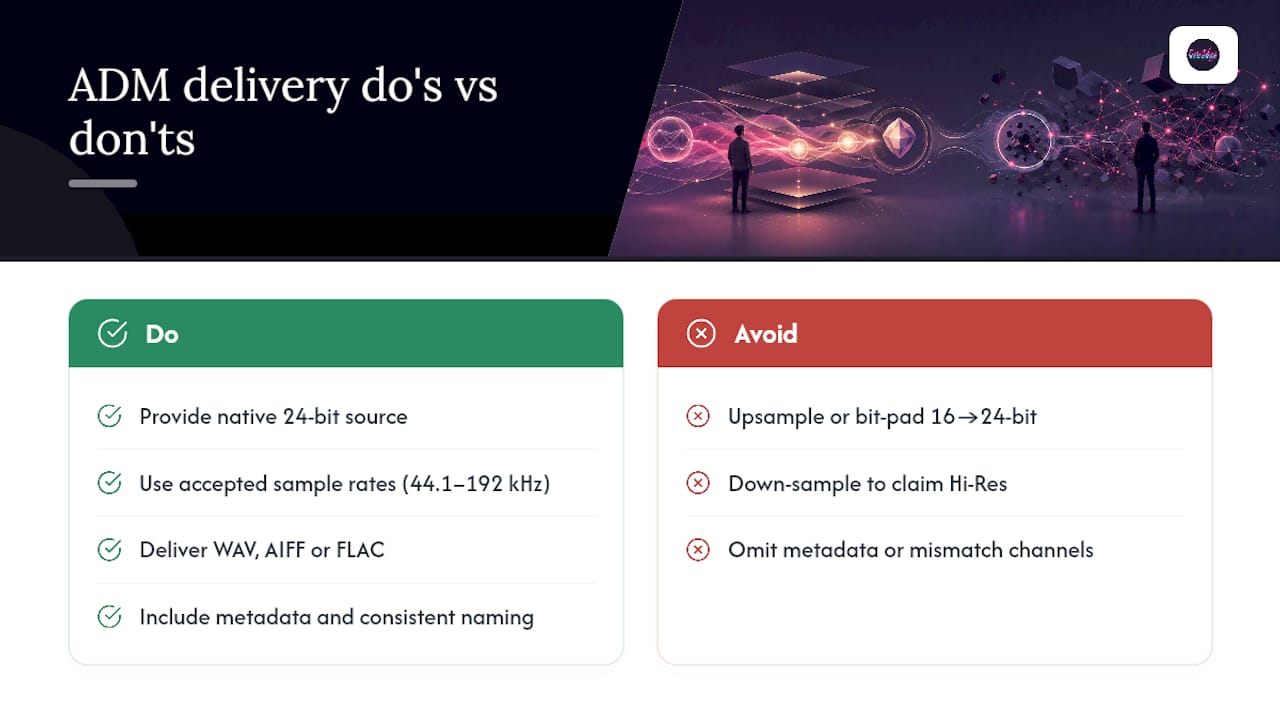
Accepted delivery formats are WAV, AIFF, and FLAC, with ALAC reserved for the lossless streaming side of distribution. One certified master file covers both the AAC download version and the ALAC streaming version, according to Apple’s own Digital Masters page, so there’s no need to prepare separate deliverables for each format.
Never upsample or bit-pad. A 16-bit file converted to 24-bit contains zero additional resolution. It’s padding, and Apple’s guidance treats it as a disqualifying move, not a workaround. If your original mix lives at 44.1 kHz, deliver at 44.1 kHz. Manufacturing a higher number doesn’t create audio information that never existed.
For stereo masters, deliver a standard interleaved stereo file. For projects delivering stems or alternate mixes, keep file naming and channel configuration consistent across every asset, and include basic metadata (track title, artist, ISRC, and mastering engineer contact) so the distributor has what it needs without a follow-up email.
What Tools Should You Use to Test an ADM Submission?
Apple names four tools engineers use to confirm a master will survive AAC encoding without introducing artifacts: Apple Digital Masters Droplet, AURoundTripAAC, Sonnox Pro-Codec V2, and afclip. Each does something slightly different, and using them in sequence is what separates a master that passes on the first try from one that bounces back twice.
The workflow looks like this:
- Encode with the Apple Digital Masters Droplet. Drag your finished 24-bit master onto the droplet, and it creates an AAC-encoded version using the same encoder Apple uses on its own platforms.
- Audition with AURoundTripAAC or Sonnox Pro-Codec V2. These plug-ins let you preview the encoded sound in real time inside your DAW, which is faster than a full render-and-listen cycle for spot-checking problem sections.
- Run afclip on the decoded AAC. This command-line utility checks the decoded output for any sample exceeding 0 dBFS. Because AAC encoding can introduce intersample peaks that weren’t in your PCM source, Apple’s documentation treats this as a mandatory checkpoint, not an optional one.
- Interpret the results and adjust. A clean afclip pass means you’re ready to deliver. Any flagged samples mean you go back to the limiter.
Keep your tool versions current. Apple periodically updates its encoders, and testing against an outdated droplet can give you a false pass. Always confirm your final result on a second reference system before calling the master done.
Pro Tip: Run afclip on the AAC decode, never on your original PCM file. The clipping Apple cares about only shows up after encoding, so testing the source file alone will miss it every time.
Why Do Masters Fail Afclip Even When the Source Looks Clean?
This is the single most common source of confusion for engineers new to ADM. Your PCM master can show zero clipping in your DAW’s meters and still fail afclip after AAC encoding. The reason is encoder-induced intersample clipping: lossy encoding reconstructs a waveform between samples, and if your true peak sits too close to 0 dBFS, that reconstruction can overshoot the ceiling even though your original samples never did.
Apple’s guideline suggests keeping true peaks below the maximum to avoid distortion. In practice, engineers leave some additional margin to ensure stability after encoding. This isn’t Apple being arbitrary. It’s a buffer against exactly the intersample overshoot afclip is built to catch.
- Loudness matters here too. Apple’s Sound Check normalizes tracks to roughly -16 LUFS, and it only attenuates louder material. It never boosts quiet tracks up to match.
- Master to your intended commercial loudness, then confirm the track still sounds right after Sound Check normalization.
- If afclip flags peaks, drop your limiter ceiling in 0.5 dB increments and re-render rather than guessing at a bigger cut.
- Re-run afclip after every adjustment. One pass rarely tells the whole story on a dense mix.
The fix cycle is short: encode, test, adjust, repeat. Most masters clear afclip within two or three iterations once you’ve built -1.5 dBTP headroom into your habit.
How Do You Submit and Get the Apple Digital Masters Badge?
Passing the technical checks is only half the job. Getting the badge to actually appear on Apple Music requires the right handoff between you and your distributor.
Confirm ADM support with your distributor before you finalize the master. Not every distributor handles ADM submissions the same way, and some require you to opt in explicitly or supply mastering engineer contact details as part of the release setup.
A typical delivery package includes:
- The 24-bit master file at your final sample rate, in WAV, AIFF, or FLAC.
- Mastering engineer name, email, and confirmation of certified-studio status.
- The release’s UPC and standard metadata fields (title, artist, ISRC).
- Written confirmation that the master passed afclip testing.
Badge application isn’t something you personally flip a switch on. According to UnitedMasters’ support documentation, the distributor or label typically requests the badge from Apple after release, using the mastering engineer’s contact information and the release UPC. Timing varies, and it’s not always instant.
Remasters carry an extra bar. Apple reviews resubmitted or remastered tracks for a noticeable improvement over the prior version, particularly when the claim is a high-resolution digitization of older material. A remaster that doesn’t audibly improve on the original risks rejection regardless of technical specs.
Twisby Records’ Practical ADM Checklist and QA Routine
Apple’s specs tell you what to hit. They don’t tell you how to build a repeatable session workflow that hits it every single time without you re-deriving the process on every project. That’s the gap Twisby Records closes, and it comes down to a fixed export template and a short QA sequence run on every master before it leaves the studio.
The session template starts before mixdown: confirm your project sample rate matches your intended delivery rate (no last-minute conversions), lock bit depth at 24-bit, and standardize file naming so the distributor package never gets held up by a mislabeled file.
The sequence we run on every ADM master:
- Export the final 24-bit master at native sample rate. No conversion, no shortcuts.
- Run the file through the Apple Digital Masters Droplet to generate the AAC encode.
- Run afclip on the decoded output and note any flagged samples.
- If clipping shows up, pull the limiter ceiling down in half-decibel steps and re-export.
- Confirm the final pass on a second reference system, then prepare the delivery document for the distributor.
We generally start limiter ceiling settings around -1.5 dBTP rather than pushing to Apple’s stated -1 dBTP minimum, because that half-decibel cushion has saved multiple re-render cycles on dense, heavily-limited masters. Cross-checking on a second system catches the rare case where a plug-in’s metering disagrees with afclip’s actual sample-level read. For engineers building their own export habits, our practical mastering guide walks through the settings that feed into this same checklist.
Pro Tip: Build your file naming convention once and template it. A distributor rejection over a mislabeled metadata field wastes more time than the actual mastering does.
Does an Apple Digital Master Work the Same on Apple Music and iTunes?
Yes, and this is one of the more useful things about ADM: you don’t prepare one master for downloads and a different one for streaming. A single certified master serves both the legacy iTunes 256 kbps AAC download format and Apple Music’s lossless ALAC streaming tier, per Apple’s own documentation on the Apple Digital Masters program.
That single-master approach is only possible because ADM optimizes the source specifically around Apple’s AAC encoder characteristics. Apple has framed this as a workflow decision, not a marketing checkbox: engineers mastering with the encoder’s behavior in mind get better real-world results than treating ADM certification as an afterthought bolted onto an already-finished master.
Practically, that means the badge you see next to a track on Apple Music reflects the same underlying file quality whether a listener streams it in ALAC or downloads a 256 kbps AAC copy through older iTunes infrastructure. There’s no separate “streaming master” and “download master” to juggle, no duplicate QA pass, and no risk of the two versions drifting apart in loudness or clarity over time.
For engineers coming from platforms with fragmented delivery requirements, this consistency is a genuine advantage. Get the ADM-certified file right once, and it propagates correctly across every format Apple’s ecosystem touches, including Hi-Res Lossless tiers for sessions delivered at 96 kHz or higher.
What Legal Considerations Apply to Apple Digital Masters Submissions?
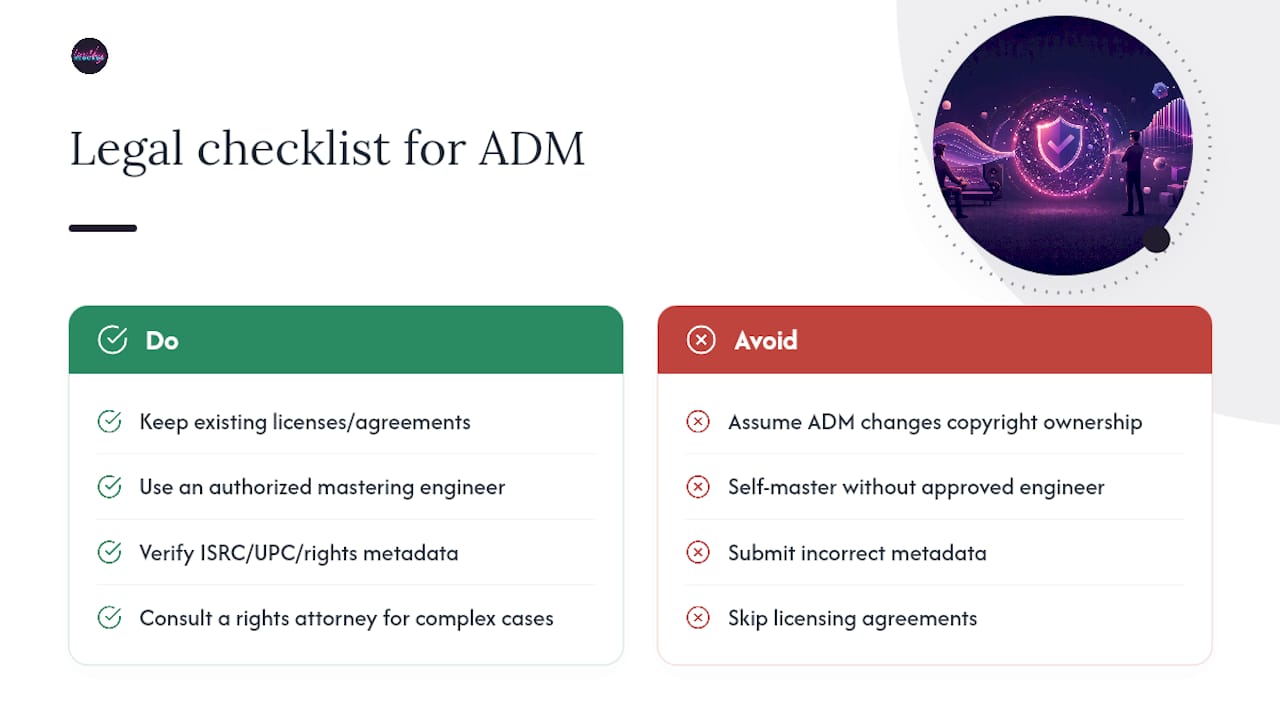
ADM certification is a quality and format standard, not a licensing mechanism, and that distinction matters for anyone assuming the badge changes their rights or obligations. Submitting a master for ADM certification doesn’t alter copyright ownership, doesn’t grant Apple any additional license to the recording, and doesn’t substitute for the standard licensing and distribution agreements you already need with your distributor.
Where legal considerations do come into play is engineer authorization. ADM certification is tied to approved mastering studios or authorized third parties, according to Apple’s Mastered program page, which means independent artists typically need to work with an engineer or facility recognized under that framework to qualify for the badge at all. Self-mastering a track to the correct technical specs doesn’t automatically grant certification if the engineer isn’t part of that approved network.
Metadata accuracy carries its own weight here. The ISRC, UPC, and rights holder information you supply to your distributor for badge application are the same fields used for royalty tracking and licensing administration downstream. Errors in that metadata can create disputes over payment attribution long after the badge itself is a non-issue.
None of this replaces a conversation with a rights attorney if you’re negotiating a mastering agreement with unusual terms, or if a remaster involves rights held by a different party than the original release. ADM is a technical certification layered on top of your existing legal arrangements, not a replacement for them.
Where to Find Apple’s Official ADM Documentation
Start with the Apple Digital Masters PDF for the complete technical spec, and the Apple Video and Audio Asset Guide for sample rate and format detail. Apple’s droplets and the afclip utility ship through Apple’s provider tools for approved engineers. For loudness context beyond ADM itself, our Apple Music loudness breakdown covers Sound Check behavior in more depth.
The Checklist Culture Beats the Spec Sheet
Most engineers treat ADM as a pass/fail spec sheet: hit 24-bit, hit an approved sample rate, ship it. That’s not wrong, but it misses what actually determines whether a submission bounces back. The spec sheet tells you the destination. It says nothing about the habits that get you there reliably, project after project.
The conventional advice stops at “master at -1 dBTP and you’re fine.” Technically true, practically risky. Apple’s own guideline is a ceiling, not a comfortable working target, and engineers who master right up against it end up in more afclip re-render cycles than the half-decibel of extra headroom would have cost them. That’s not caution for its own sake. It’s the difference between a workflow that ships once and one that ships three times.
What deserves priority isn’t more gear or a better limiter. It’s a fixed export template you don’t have to reinvent under deadline, and a short test sequence you run without skipping steps when a release date is close. The engineers who never bounce a submission aren’t the most talented ones. They’re the ones who made the checklist boring.
— Kreg
Get Your Master ADM-Certified Without the Guesswork
Twisby Records is the alternative to piecing together your own encode-and-test workflow from scattered documentation: we handle the full ADM certification path, from the 24-bit export through the afclip pass, as part of our mastering service, so you deliver one finished file instead of three failed attempts.
If you’ve read this far and you’re still not sure whether your current master clears -1.5 dBTP after AAC encoding, that uncertainty is exactly the gap our process closes. We run every master through the same droplet, afclip, and reference-system sequence outlined above, backed by over 35 years of mastering experience and existing Apple Digital Masters certification, so the file you hand your distributor is the one that gets the badge on the first submission. If your release also needs a push once it’s live, our advertising services build targeted Facebook and Instagram campaigns around the release, so the polished master actually reaches new listeners instead of sitting quietly in a catalog. If you’re an independent artist looking to sell finished masters or production work directly, Payhip’s music production marketplace is worth a look as a distribution channel alongside your mastering work.
Send us your rough master and current session specs, and we’ll tell you exactly where it stands against Apple’s requirements before you spend a single re-render cycle guessing.
Sources
- Apple Video and Audio Asset Guide (Apple Help)
- Apple Music — Apple Digital Masters
- UnitedMasters support article on Apple Digital Masters badge
FAQ
How Do You Get an Apple Digital Master Certification?
Work with an Apple-approved mastering engineer or studio, deliver a native 24-bit file at an accepted sample rate, and pass the afclip encode test before submitting the master to your distributor along with the release UPC and engineer contact information.
What Does the Apple Digital Master Badge Mean on Apple Music?
It signals the track was mastered and tested using Apple’s approved workflow, including AAC encode auditioning and afclip verification, so the version listeners hear matches the engineer’s intended sound across both streaming and download formats.
How Many Streams on Apple Music Does It Take to Earn $1,000?
Apple Music’s per-stream payout varies by subscription type and region and isn’t published as a fixed rate, so there is no single stream count that reliably guarantees a specific payout; artists should check their distributor’s royalty statements for actual per-stream figures on their catalog.
Who Qualifies for the Apple Music Student Plan?
Apple Music’s student pricing is a subscription discount for verified students at eligible institutions, unrelated to Apple Digital Masters certification, which applies to the audio file itself rather than to listener account types.
Do You Need Special Software to Meet Apple’s Audio Standards?
Yes. Apple names four approved tools for testing ADM submissions: the Apple Digital Masters Droplet, AURoundTripAAC, Sonnox Pro-Codec V2, and the afclip command-line utility, and running your master through this sequence is required before certification.









