


Spotify for Artists analytics is the free dashboard Spotify gives every artist with music on the platform. It shows streams, saves, listeners, followers, playlist placements, where your audience lives and how fans respond to a new release. The numbers only help if you know which ones matter, so this guide walks through each view and what to do with it.
TL;DR
- Spotify for Artists is free to join once your music is live. Request access to your profile, then log in with a personal Spotify account.
- Watch saves, active listeners and release engagement more closely than raw monthly listeners. They show whether people intend to come back.
- Demographic and location data covers only a short window, so check it regularly and keep your own notes.
- Use the numbers to decide what to fix: the mix, the master, the release timing or the promotion.
Table of Contents
- How to get access to your stats
- What Spotify for Artists analytics show
- Streams, listeners and followers: what each number means
- Audience segments: the number that predicts growth
- Source of streams: chosen or programmed
- Release engagement: your first 28 days
- Demographics and location
- Playlist data: the “why” behind a spike
- How far back your data goes
- A monthly check-in that takes 20 minutes
- Our perspective: analytics tell you where to work
- Turning analytics into action
- How Twisby Records can help
- Common mistakes when reading Spotify analytics
- FAQ
- Sources
How to get access to your stats
You need music on Spotify first. After that, you can claim your artist profile by submitting a request, ask your team’s Admin to invite you, or get instant access through a preferred distributor when you submit a request. You log in with your regular personal Spotify account.
If you have a band, decide who holds the Admin role. Admins invite everyone else, so it should be the person who will still be around in three years. Releasing under one profile and one login saves headaches later.
One thing to know early: your stats refresh once a day, at about 5 PM ET (9 PM UTC), and days are counted in UTC. A release-day spike will not show up instantly, and your “Tuesday” may not match your local Tuesday. Don’t panic at an empty graph at noon.
What Spotify for Artists analytics show
The analytics section covers streams and saves across your catalog, engagement and demographic insights about listeners and followers, and playlist data showing which playlists contribute to your success. Here is how those pieces break down.
| Area | What it tells you | What to do with it |
|---|---|---|
| Streams and saves | How much your music is played and kept | Compare songs to see what resonates |
| Audience | Listeners, followers, demographics, location | Decide where to focus ads, shows and content |
| Audience segments | How engaged your listeners are | Move people from light to super listeners |
| Source of streams | How people found you | Judge whether growth is chosen or programmed |
| Playlists | Which lists feature you | Study what earns placement |
| Release engagement | How your active audience reacts to a release | Time and plan future releases |
Streams, listeners and followers: what each number means
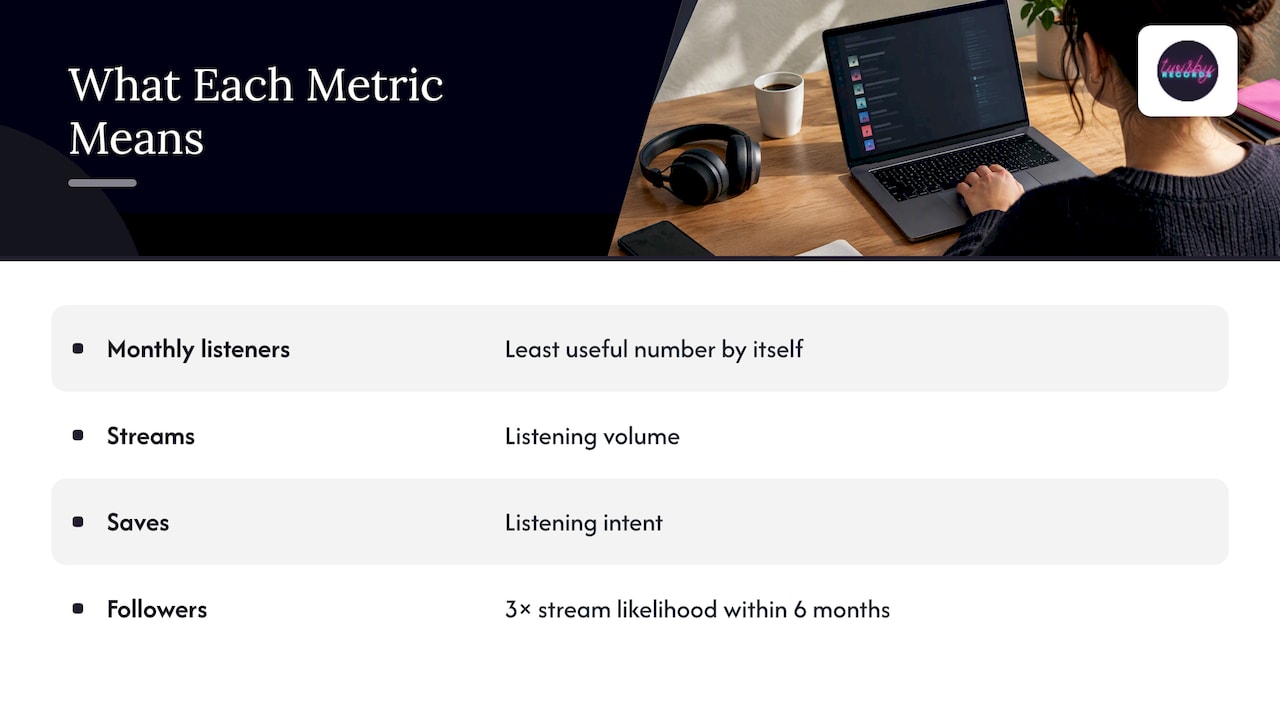
Beginners fixate on monthly listeners. It is a fine headline figure, but it is the least useful number on the page by itself. A listener who hears you once on an autoplay queue counts the same as someone who plays your album twice a week.
Streams tell you volume. Saves tell you intent: someone liked a song enough to keep it. Followers tell you commitment. According to Spotify, on average, after following an artist, listeners are 3 times more likely to stream that artist’s music in the next 6 months. So a follower is worth much more than a one-time listener.
You can see your total follower count, but not the names of individual followers. Don’t expect to build an email list from the dashboard. That is one reason we send ad traffic to a landing page where you own the contact.
Audience segments: the number that predicts growth
Spotify splits your total audience into monthly active, previously active and programmed listeners, based on where and when they streamed. Monthly active listeners are then divided into super, moderate and light listeners based on intentional streams in the last 28 days.
Why care? Spotify says monthly active listeners generate more future streams on average than other listeners, and artists should both find new fans and deepen the fandom of existing ones. To encourage active streams, Spotify points to a display campaign, Countdown Page, Artist Pick or Promo Card.
A simple routine:
- Note your active listener and super listener counts the week before a release.
- Check them again 28 days after.
- If light listeners grew but super listeners did not, your reach worked but the music or the follow-up did not convert.
- If super listeners grew, repeat what you did.
Source of streams: chosen or programmed
Spotify separates active sources, where listeners intentionally seek out your music, from programmed sources, which Spotify or another listener selects. Your profile, your own playlists, and searches are active. Algorithmic and editorial placements are programmed.
Neither is bad. Programmed streams bring discovery. But if nearly all your streams are programmed, you are renting an audience. If a growing share comes from active sources, fans are seeking you out. That is the shift worth tracking month by month.
Release engagement: your first 28 days
The release engagement metric shows what percentage of your active audience listens to a new release in its first 28 days. It is the cleanest read on whether your existing fans care about the new song.
Low release engagement is not a verdict on the music. It can mean the announcement was late, the cover art was unclear, or your fans were not reached. Compare two or three releases before drawing conclusions. A single data point is noise.
Demographics and location
Spotify for Artists provides location breakdowns and demographic information, including listeners’ age, gender and the features they use to discover and play music. Spotify’s own overview says artists use this to route tours, pitch songs to local radio, refine promotion or secure partnerships.
For an independent artist the practical use is targeting. If your top cities are Pittsburgh, Columbus and Austin, those are where a small show or a local ad budget goes furthest. You can also see other artists your fans listen to, which helps you find a tourmate or collaborator.
Playlist data: the “why” behind a spike
When a day suddenly jumps, open the playlist view. Playlist data shows who adds your music to playlists and how that helps discovery, and you are notified when Spotify adds your music to a curated playlist. Look at the size and type of list. A placement on a large algorithmic list may spike streams without producing one follower. A small list built by a genuine fan may produce saves.
How far back your data goes
History is limited, and the limits changed. Spotify replaced the ‘Since 2015’ filter with a Last 12 months filter in several views, and you can still see the past 2 years with the Custom date range. Per Spotify, audience-level data is available for the past 2 years plus the year to date, while listener demographic and location data is available for only the last 28 days. If a recording becomes unavailable, its all-time stream count is kept for 90 days.
Because of those windows, take a monthly screenshot or spreadsheet entry of the numbers you care about. Your own record of what you did and what happened is more valuable than anything the dashboard will retain for you.
A monthly check-in that takes 20 minutes
- Streams and saves per song. Which track has the best save-to-stream ratio? That is your best song for ads.
- Active vs. programmed. Is the active share rising?
- Segments. Are light listeners turning into moderate and super listeners?
- Top locations. Did a city appear that you did not expect?
- Playlists. Any new placements worth thanking or studying?
- Notes. Write down what you released, posted or promoted that month.
Keep the same order every month. Consistency matters more than depth.
Our perspective: analytics tell you where to work
We have spent over 35 years around records, and the pattern repeats: artists open the dashboard, see a flat line, and assume the fix is more promotion. Often the fix is earlier in the chain. If saves are low relative to streams, people are hearing the song and not keeping it. Sometimes that is the song. Sometimes it is a mix that feels thin next to the tracks around it on a playlist, or a master that sits quieter than everything else.
So we read the data in this order. First, does the music hold people? That is a mixing and mastering question, and it is where we start. Second, can the right people find it? That is targeting and ads. Ads aimed at the wrong audience or a song that is not ready waste money in the same way.
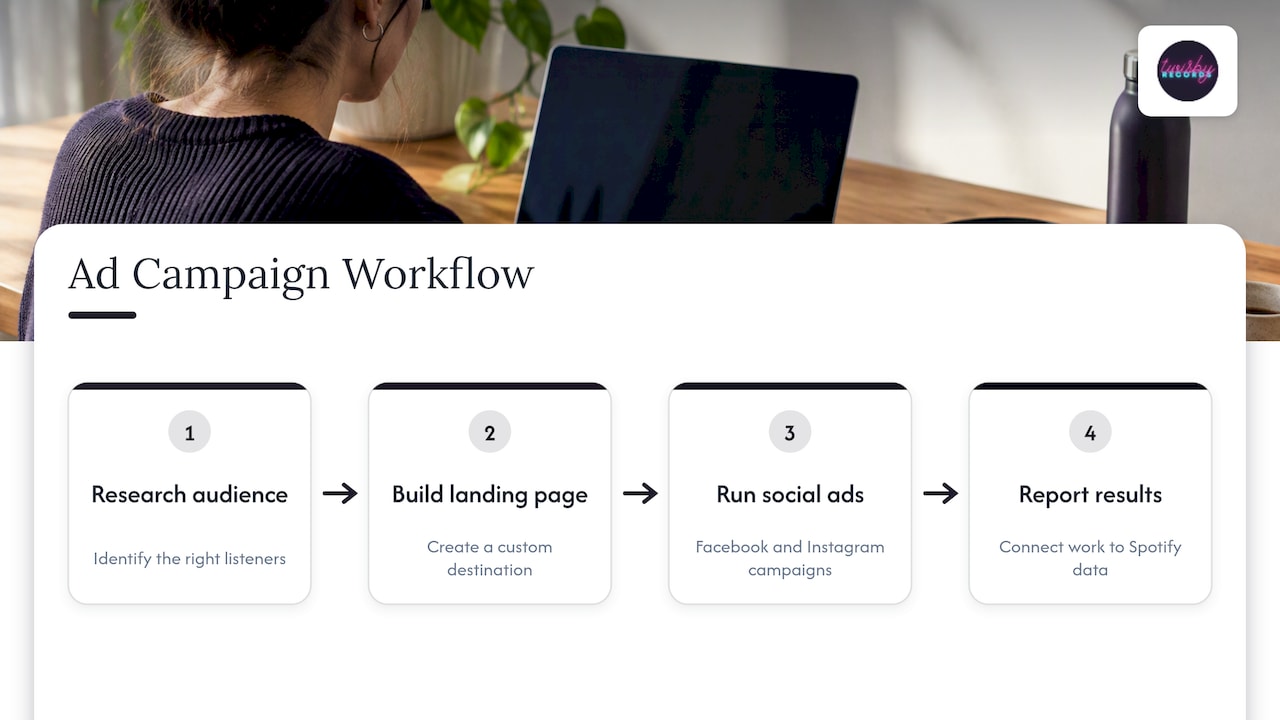
Our ad work follows this logic. We research the audience, build a custom landing page, run Facebook and Instagram campaigns, and report back so the numbers you see in Spotify for Artists connect to what we did. We also don’t treat vanity metrics as wins. Spotify itself frames its tools as a way to avoid vanity metrics and understand how marketing builds real fans over the long term. We agree.
One caution: everything here is guidance on reading your numbers, not a promise of any stream count. No tool or service can guarantee the result, and we won’t claim otherwise.
— Kreg
Turning analytics into action
If saves are weak: revisit the song itself. A fresh mix can fix balance, vocal clarity and low-end problems that make a song feel less finished than the competition. Final loudness and tone belong to mastering.
If you get streams but few followers: your profile and calls to action may be the problem. Spotify encourages artists to invite listeners into their creative world by customizing their profile and creating videos and visuals.
If your audience is concentrated in a few places: put your ad budget there first, then widen.
If release engagement is low: start the pre-save and announcement earlier, and ask your existing fans directly.
If you are ready to grow beyond your current circle: that is where paid campaigns come in.
How Twisby Records can help
We handle the two sides of the numbers. For the sound, mastering is $50 per track, delivered with the Apple Digital Masters certification we hold. Mixing and recording are quoted per project, with personalized work by experienced engineers, real analog gear and remote vocal production available.
For the audience, our advertising packages run Facebook and Instagram campaigns for your releases. The Standard package is $25 per month plus a 20% fee on your ad spend, the Premium package is also 20% per month on ad spend, and there is a one-time onboarding fee of $99. You get audience research, a custom landing page, reporting and ongoing optimization. You can also start at our home page and tell us about your next release.
Common mistakes when reading Spotify analytics
- Chasing monthly listeners. It rises with a single playlist add and falls just as fast.
- Judging a release after three days. The 28-day window exists for a reason.
- Ignoring source of streams. Ten thousand programmed streams are not the same as a thousand active ones.
- Not recording history. The dashboard will not keep everything.
- Changing five things at once. If you change the cover, the ad, the date and the mix together, you will not know what worked.
FAQ
How can I see my Spotify artist stats?
Join Spotify for Artists, which is free, and request access to your artist profile. Once approved, log in with your personal Spotify account to see your dashboard. Your distributor may also offer instant access when you submit a request.
What analytics can Spotify artists see?
You can see streams and saves, audience engagement, demographic insights for listeners and followers, playlist data and release engagement. You also get segments that show how active your listeners are. You cannot see the names of individual followers.
How often do Spotify for Artists stats update?
Stats update once a day, at approximately 5 PM ET, and days are counted using UTC. A release-day number may look low until the next refresh.
How far back does the data go?
Audience-level data covers the past 2 years plus the year to date, though some views default to the last 12 months. Demographic and location data covers only the last 28 days, so record it regularly.
Sources
- Get started – Spotify for Artists
- Getting access to Spotify for Artists
- When stats update in Spotify for Artists
- Analytics – Spotify for Artists
- Understanding your listener and follower stats
- Audience segments on Spotify
- Source of streams
- Release engagement
- An Overview of Spotify for Artists
- Changes to Spotify for Artists historical data
- How far back your stats go
- Where Your Music is Everything – Spotify for Artists









