


LUFS stands for Loudness Units relative to Full Scale. It is a number that tells you how loud a track sounds to a listener, averaged over time. It is not how high the loudest peak reaches. Streaming services use that number to turn loud songs down, so it shapes how your release sounds next to everyone else’s.
Below, we explain what LUFS measures, how it differs from RMS and peak meters, which of the three LUFS readings to watch, and what to aim for when you mix, master and even record vocals.
TL;DR
- LUFS measures perceived loudness over time. Peak meters only show the highest instant.
- Values are negative. The closer to 0, the louder. -9 is louder than -14.
- Spotify turns louder masters down to -14 LUFS, so squeezing out extra loudness mostly costs you dynamics.
- Watch integrated LUFS for the whole track, short-term for sections, and true peak for safety.
- Use LUFS as a reference, not a rule. Serve the song first.
Table of Contents
- What LUFS stands for and what it measures
- How a LUFS meter works
- LUFS vs. RMS
- Integrated, short-term and momentary LUFS
- Why streaming services care about LUFS
- What LUFS should you master to?
- Recording levels for vocals
- How to measure LUFS on your own track
- Our perspective on LUFS
- Getting a master that translates
- Common LUFS mistakes
- FAQ
- Sources
What LUFS stands for and what it measures
The Audio Engineering Society explains that LUFS means Loudness Units relative to Full Scale. It is the same unit that the broadcast standard ITU-R BS.1770 calls LKFS. You will see both names. BBC researchers note that LKFS is technically equivalent, and LUFS is the term that fits international naming conventions. In music, everybody says LUFS.
Two details matter in practice:
- Values are normally negative. A more negative number means quieter audio, according to the AES.
- LU is a relative unit. A loudness unit is the difference between two LUFS readings, and 1 LU equals a change of 1 dB, per the same AES page.
So if your master reads -12 LUFS and a streaming service plays it at -14, the service has turned you down by 2 LU, which is 2 dB.
Why peak meters are not enough
A peak meter tells you the highest instantaneous level. Two songs can both peak at the same point and sound wildly different in loudness. One might be a sparse acoustic ballad. The other might be a dense, compressed rock track. The ballad and the rock track hit the same ceiling, but the rock track feels much louder.
The European Broadcasting Union describes how peak normalization led to uniform peaks but widely varying loudness. That is why the industry moved toward loudness normalization. LUFS is the yardstick built for that job.
How a LUFS meter works
You do not need the math to mix, but the outline helps you trust the number. According to the AES, BS.1770 loudness measurement does three things:
- It applies K-weighting, a filter that mimics how our ears hear different frequencies.
- It computes RMS over small blocks of audio.
- It uses gating to discard blocks that are quiet enough, so silence does not drag the average down.
The iZotope team adds that K-weighting uses a high shelf above about 2 kHz and a high-pass filter below 100 Hz, and that a 3 dB gain increase raises the reading by 3 LU. EQ moves the reading too, depending on where and how you apply it. A bass boost can change the number less than you expect, while a brighter top end can change it more.
LUFS vs. RMS
RMS approximates the power of a signal. It is a useful, older way to see average level. LUFS goes further. The AES says LUFS meters combine RMS measurement with frequency weighting, time weighting and level gating to better represent perceived loudness.
In plain terms:
| Peak | RMS | LUFS | |
|---|---|---|---|
| What it shows | Highest instant | Average power | Perceived loudness over time |
| Accounts for how ears hear frequencies | No | No | Yes (K-weighting) |
| Ignores silence | No | No | Yes (gating) |
| Best use | Preventing clipping | Gain staging while tracking | Delivery and comparison |
RMS is still handy when you are recording. LUFS is what you check when you compare songs or prepare a release.
Integrated, short-term and momentary LUFS
Most loudness meters show three readings. Here is what each one tells you, using the definitions in the Yamaha Pro Audio guide.
- Integrated LUFS is the average loudness over the entire track. This is the number used for normalization targets.
- Short-term LUFS uses a 3-second sliding window. It shows how loud a chorus is compared with a verse.
- Momentary LUFS uses a 400 ms window and catches fast changes.
The AES describes integrated loudness as the gated overall loudness from the beginning to the end of the selected content, such as a song or album. Max short-term can reveal a passage that is very loud for a few seconds, while max momentary is closest to an instantaneous loudness level.
A practical way to use them: check integrated on the full bounce, then scrub through short-term to see whether your final chorus jumps too far above the verses. Use momentary when a single snare or vocal phrase seems to poke out.
Why streaming services care about LUFS
Streaming platforms normalize playback so listeners do not need to grab the volume knob between songs. Normalization adjusts the gain of the whole track to hit a target. Integrated loudness is the measurement it relies on, as the AES notes.
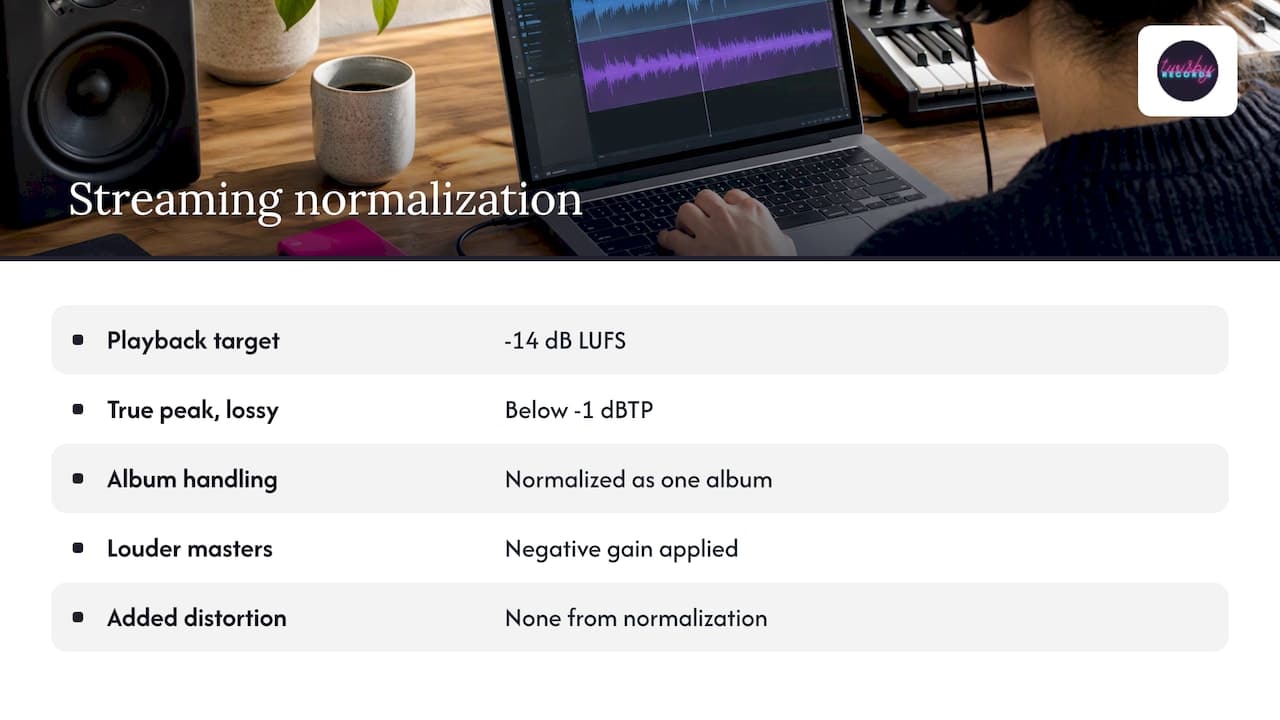
Spotify says it applies negative gain to louder masters to bring them to -14 dB LUFS, and that this adds no additional distortion. It also recommends keeping true peak below -1 dBTP for lossy formats. According to iZotope, Spotify normalizes an entire album at once, so the relative levels between your tracks stay the same.
The result is that the old arms race has lost much of its payoff. Yamaha notes that LUFS adoption has largely mitigated the loudness wars, shifting focus from hyper-compressed peaks to target-based loudness. If your master is much louder than the target, the platform turns it down, and you keep the squashed dynamics without getting the volume.
What LUFS should you master to?
There is no single correct number. Mastering engineer Bob Katz has said that popular masters have a median around -14 to -16 LUFS, with some acoustic albums falling below -16 and classical around -20 or lower, as summarized by the AES.
Here is how we think about it with artists:
- Know the reference point. Spotify’s -14 LUFS is a handy yardstick.
- Match the genre. A dense electronic or hip-hop track will naturally sit louder than a folk record.
- Leave true peak headroom. Keep peaks under -1 dBTP so lossy encoding does not cause distortion.
- Do not chase the number. Hitting -14.0 exactly is not a goal in itself.
A quieter master is not a worse master. Normalization can only turn loud audio down on some platforms, and it will not fix an imbalanced mix. That is a mixing problem. If your mix sounds thin or harsh, a loudness target will not rescue it.
Is LUFS too loud for a master?
LUFS is a measurement, not a setting, so it cannot be too loud itself. A master is too loud when you had to sacrifice punch, clarity or vocal presence to reach the number. The EBU emphasizes that loudness normalization should encourage dynamic mixing, because loudness variation is a fundamental artistic tool. Keep the contrast between your verses and choruses. Listeners feel that contrast as energy.
Recording levels for vocals
LUFS is a delivery measurement, but loudness trouble often starts at the microphone. When you record, you are working in dBFS, so aim for healthy levels with room to spare.
- Neumann advises leaving about 10 dB of headroom above the loudest peaks when recording vocals in 24-bit, setting gain for the singer’s loudest expected performance.
- Avid suggests aiming for average levels around -18 dBFS on the RMS meter for vocals.
- In a static mix, Avid says individual tracks should average -18 to -12 dBFS and the master should peak around -6 to -3 dBFS.
Those numbers are not LUFS targets. They keep your plug-ins working in their sweet spot and leave the mastering stage room to work. Recording a vocal “hot” does not make it better. It only risks clipping.
How to measure LUFS on your own track
Follow these steps:
- Bounce your mix or master as a full file, start to end. Integrated LUFS needs the whole track.
- Insert a loudness meter on the master channel, or load the bounce into a standalone loudness meter.
- Play the song from the top to the end without stopping, and read the integrated value.
- Note the max short-term reading and see where it happens. Check that your loudest section is intentional.
- Check true peak. If it is above -1 dBTP, lower the output ceiling.
- Compare with a commercial track in your genre that you love, at matched playback level, and judge by ear.
The last step matters most. Loudness numbers are an estimate of perception, not a replacement for it.
Our perspective on LUFS
We have been mixing and mastering for independent artists for over 35 years, and we have watched the loudness conversation change completely. For a long time, “louder” meant “better” to a lot of people, and artists asked us to push masters until they crumbled. Today, most of that effort is wasted, because platforms balance the volume for the listener anyway.
Here is what we tell artists:
- Fix the mix first. A good balance, a clear vocal and a well-controlled low end do more for perceived loudness than a limiter ever will.
- Treat -14 LUFS as a reference, not a rulebook. Orphiq makes the same point: serve the music over an arbitrary target, because normalization only adjusts playback level.
- Protect the dynamics. The chorus should feel like a lift, not a wall.
- Use real ears and real gear. Meters help, but our work is personalized, done by experienced engineers using real analog gear, and not an automated, one-size-fits-all process.
If you want a second opinion on where your track sits, send it to us. We will tell you honestly whether the issue is loudness, the mix, or something else entirely.
— Kreg
Getting a master that translates
If you want a master prepared with all of this in mind, our mastering service is $50 one-off. We balance loudness, true peak and tone for streaming while keeping your dynamics intact. We are also Apple Digital Masters certified, and you can read how to get Apple Digital Masters for your music.
If the mix itself is the problem, see our mixing and mastering service. Budgeting for it? Our guide to mixing costs for DIY artists breaks it down. Releasing on vinyl as well? Mastering for it has different needs, covered in mastering for vinyl.
Once the release sounds right, you need people to hear it. Our advertising packages run targeted Facebook and Instagram campaigns for music releases. The Standard package is $25 per month plus a 20% fee on ad spend, with a one-time onboarding fee of $99.
Common LUFS mistakes
- Mastering to -14 and stopping there. The number says nothing about whether the track sounds good.
- Judging a single section. A loud chorus read on its own tells you little about the integrated value.
- Ignoring true peak. A track can hit its LUFS target and still clip after encoding if peaks are too hot.
- Comparing at different volumes. Louder always sounds better at first listen. Match levels before you compare.
- Using loudness to hide a weak mix. Turning the track up makes every flaw louder too.
FAQ
What does LUFS stand for in music?
LUFS stands for Loudness Units relative to Full Scale. It measures perceived loudness, using a filter that mimics human hearing, and is normally shown as a negative number.
What is the difference between LUFS and RMS?
RMS approximates the average power of a signal. LUFS builds on RMS and adds frequency weighting, time weighting and gating, so it better matches how loud a track feels to a listener.
What LUFS should I target for streaming?
Spotify normalizes to -14 LUFS, and popular masters often land around -14 to -16 LUFS. Treat that as a reference. Keep true peak under -1 dBTP and let the genre and the song decide the rest.
Is a lower LUFS value quieter?
Yes. LUFS values are normally negative, and a more negative value means quieter audio. A track at -16 LUFS is 2 LU quieter than one at -14 LUFS.
Sources
- Loudness Basics, Audio Engineering Society
- Audio Loudness in Production, Mastering and Distribution, AES
- Loudness normalization on Spotify
- What Is Loudness? Yamaha Pro Audio
- BBC Research & Development White Paper WHP202
- EBU Tech 3343 loudness guidelines
- What are LUFS? iZotope
- How to master for streaming platforms, iZotope
- Loudness & Delivery QC Glossary
- Vocal Recording Setup, Neumann
- Guide to gain staging in audio production, Avid
- Mastering for Streaming: Loudness and Format Guide, Orphiq









