

You can’t apply for Apple Digital Masters yourself. The program works through approved mastering engineers: you hire one, they master your song to Apple’s specs, and the release goes out through your distributor. After it is live, you ask your distributor to flag it so the badge appears. This guide walks through each step, the file specs, the checks, and the mistakes that slow independent artists down.
I’ve been mastering for 35 years, and the same confusion comes up with nearly every independent artist. People think Apple Digital Masters is a filter, a file format or a paid upgrade. It’s none of those. It’s a way of mastering and delivering that Apple recognizes.
TL;DR
- Apple Digital Masters is Apple’s program for high-resolution masters, and it replaced the older Mastered for iTunes name.
- An individual artist can’t self-certify. Apple approves mastering studios, and only approved studios or parties Apple expressly authorizes may use the badge.
- The source file should be 24-bit WAV, ALAC or FLAC at the highest native sample rate, with no upsampling, and checked against an Apple AAC encode for clipping.
- Your distributor still needs to deliver the release with a UPC and ISRCs, and you tell them which approved engineer mastered it.
- Twisby Records is Apple Digital Masters certified, and mastering is $50 per track.
Table of Contents
- What Apple Digital Masters actually is
- Who can “certify” your music
- The process, step by step
- File specs that matter
- The tools that check your master
- Delivery details that hold up releases
- Will listeners hear it?
- Our perspective
- Working with Twisby Records
- Common mistakes to avoid
- FAQ
- Sources
What Apple Digital Masters actually is
Apple Digital Masters replaced the program formerly called Mastered for iTunes. Apple’s documentation explains that the new name reflects how the audio advantages reach Apple’s whole catalog, whether a listener streams or downloads.
The idea is simple. Apple converts everything you deliver into AAC for streaming and downloads. If it starts from a higher-quality source, the encoding can preserve the artist’s intended sound. Apple notes that 24-bit audio is designed to keep a wide dynamic range through that encoding.
Two points that readers often miss:
- It’s not a separate product you buy from Apple. It’s a mastering approach and a delivery path.
- It isn’t about making a song louder. A master made for AAC delivery may need different decisions than one made for vinyl, CD or another listening setup, which is how Apple frames the program.
Apple also offers lossless versions on Apple Music using ALAC. Apple’s consumer page describes the benefit as applying to both streaming and downloads.
Who can “certify” your music
This is the question behind most searches for Apple Digital Masters certification. The certification belongs to the studio, not to the song or the artist.
Apple’s studio-approval process asks an engineer to:
- Review the Apple Digital Masters documentation.
- Create a separate adaptive master for iTunes.
- Listen to the final result in iTunes Plus.
- Contact an Apple Music Label Representative to be connected with an ADM specialist.
That sequence comes straight from Apple’s provider support page. It’s why a bedroom engineer who downloads the droplet can’t simply declare their work an Apple Digital Master.
The badge has rules too. Apple permits the badge only for approved mastering houses or other third parties it expressly authorizes, and it reserves the right to withdraw permission for improper use. Don’t put the badge on your artwork or website on your own.
So your real job as an artist is to choose an approved engineer and give them the right material.
The process, step by step
Here’s the route most independent releases take.
1. Finish the mix before you think about the badge
Mastering can’t rescue a mix with a harsh vocal or a muddy low end. Before you send anything, check that the mix has headroom, that nothing is clipping, and that you aren’t running a limiter or loudness maximizer on the master bus. Leave peaks at a sensible level and let the mastering engineer make the final calls.
If you’re not sure the mix is ready, that’s what mixing is for. A stronger mix gives the mastering stage more to work with, and the Apple master is only as good as what goes in.
2. Hire an approved engineer
Ask directly: “Are you an Apple Digital Masters approved engineer, and will you deliver an ADM-ready master?” A straight answer is easy to give. If you get hedging, move on.
We’re Apple Digital Masters certified at Twisby Records, and mastering is a flat $50 one-off per track. You can see the details on our mastering page.
3. Get the right deliverables
Your engineer will send the Apple-ready high-resolution master. Ask for the files in the format your distributor accepts, plus a standard version if you also need one for other stores. Keep the originals safe. You’ll want them again for vinyl, sync licensing or a future reissue.
4. Submit through your distributor as usual
You deliver the release the way you normally do. Apple says approved distributors and encoding houses deliver music with Transporter or iTunes Producer. iTunes Producer attaches audio and metadata to a digital package, while Transporter is intended for approved distributors or encoding houses with large catalogs. As an independent artist you’ll almost always go through a distributor rather than using those tools directly.
Apple keeps a directory of preferred distribution partners that lists what each one offers. Look at it before you commit if you haven’t picked a distributor.
5. Tell your distributor after the release is live
This step trips up many artists. Distributors handle it differently, so read yours before release day. As one example, UnitedMasters says to work with an Apple-approved mastering engineer, submit the release through its regular process, then contact it once the release is live with the release title, UPC and the engineer’s email address.
The pattern to expect: you don’t tick a box in the upload form. You follow up with the details after the release is live. Ask your distributor’s support team what it needs from you, and have the engineer’s contact details ready.
File specs that matter
Apple’s Video and Audio Asset Guide is the current reference. Its version 5.3.19 is dated September 8, 2026. It says Apple Digital Masters audio should be:
- 24-bit in an approved container.
- 44.1, 48, 88.2, 96, 176.4 or 192 kHz sample rate.
- PCM WAV, ALAC or FLAC, with ALAC and FLAC accepted when generated with a qualified codec.
The same guide says to use the highest native resolution available. If you recorded at 24-bit/48 kHz, deliver 24-bit/48 kHz. Don’t upsample, and don’t pad a 16-bit file out to 24 bits. It won’t improve the sound, and it defeats the purpose of the program.
If you recorded at a higher sample rate, the mastering engineer works at that rate. Ask in advance which rate your engineer plans to deliver and why.
| Item | What to do |
|---|---|
| Bit depth | 24-bit |
| Sample rate | Highest native rate, from 44.1 up to 192 kHz |
| Format | WAV, or ALAC or FLAC from a qualified codec |
| Upsampling | Don’t |
| Bit-padding a 16-bit file | Don’t |
| Final check | Audition the AAC encode for audible clipping |
The tools that check your master
Here’s where mastering for Apple differs from ordinary mastering. The engineer listens to the AAC version, not just the WAV.
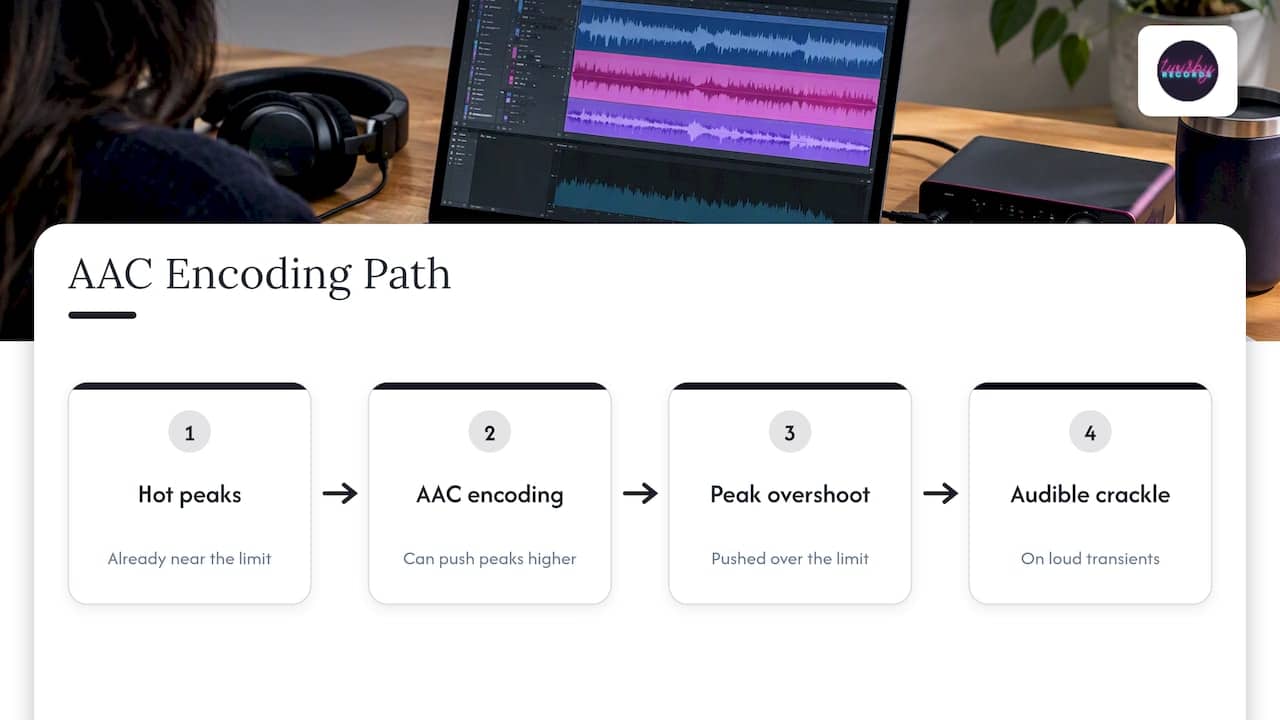
Apple recommends auditioning files with the current AAC encoder through the Apple Digital Masters Droplet, RoundTripAAC, or Sonnox Pro-Codec V2 using Apple’s iTunes+ AAC codec, then setting a level that avoids audible clipping. The reason is simple. Encoding can push already hot peaks over the limit, and you can hear it as crackle on loud transients.
Apple’s own documentation covers the rest of the toolkit. AURoundTripAAC and afclip are for comparing and checking audio, and afconvert is a command-line utility that encodes AAC using the same commands used at ingest.
You don’t need to run these yourself. But you can ask your engineer what they checked, and a good one will tell you. For a loud, dense track, the difference between a safe level and a clipped encode can be a fraction of a decibel.
Delivery details that hold up releases
A perfect master can still stall on metadata. Apple requires a UPC, EAN or JAN for each album and an ISRC for each song or music video. Most distributors generate these for you. If you bring your own ISRCs, keep a record, because you’ll need the same codes when you contact your distributor about the badge.
A short checklist before you upload:
- Final mastered files named and in the order you want.
- UPC and ISRCs confirmed.
- Artwork and metadata matching your other releases.
- The engineer’s name and email saved for the post-release step.
- Release date set far enough ahead to leave time for fixes.
Will listeners hear it?
Honestly, it depends. On good headphones or speakers, a well-handled 24-bit master that avoids encoding clipping can sound cleaner, and dynamics are kept intact. On earbuds in a noisy gym, many listeners won’t notice a difference.
That’s no reason to skip it. The work that makes a track Apple-ready is the same work that makes it sound better everywhere: careful levels, no clipping, no needless processing, and listening on the format people actually hear. The badge is a signal that someone did that work properly.
Our perspective
We’ve seen artists spend months worrying about the badge and almost no time on the mix. The badge doesn’t make a song better. It tells Apple, and listeners who look for it, that the master was prepared to a standard.
What we tell the artists we work with:
- Start with the song. A great mix mastered well beats a weak mix with a badge on it.
- Ask who is actually doing the work. We use real analog gear and experienced engineers, and every project is handled personally, not run through an automated tool.
- Don’t chase loudness. Apple’s process rewards headroom and clean peaks. Smashed masters often come out worse after AAC encoding.
- Plan the release, not just the file. The best-mastered record still needs people to hear it.
That last point is why we also run advertising for independent artists. A well-prepared release gives your campaign something worth sending listeners to.
— Kreg
Working with Twisby Records
If you want a release mastered by an Apple Digital Masters certified studio, here’s how we work:
- Mastering: $50 one-off. Start on the mastering page.
- Mixing: if your track isn’t mastering-ready yet, we can mix it first. There’s no published price, so you’d request a quote on the mixing page.
- Advertising: for the launch itself, our Facebook and Instagram campaigns start with a one-time onboarding fee of $99. Standard Packages are $25 per month plus a 20% per month fee on adspend. Premium Packages are 20% per month per adspend.
You keep control of the creative direction, and we handle the technical side. Visit Twisby Records to see what fits your release.
Common mistakes to avoid
- Upsampling a 16-bit file to 24-bit. It adds no quality and goes against Apple’s guidance.
- Sending a limited master as the source. Heavy limiting leaves no headroom for the AAC encode.
- Using the badge without permission. Only approved mastering houses or authorized third parties can use it.
- Waiting too long to contact your distributor. Have the UPC, title and engineer’s email ready as soon as the release is live.
- Assuming every distributor handles it the same way. Check their support page before you pay for the mastering.
FAQ
Can I get Apple Digital Masters without hiring a mastering engineer?
Not in the sense of getting the badge. Apple approves studios, and it reserves the badge for approved mastering houses or parties it expressly authorizes. You can follow the technical specs yourself, but the certified route is working with an approved engineer.
Does Apple Digital Masters cost extra on Apple Music?
Apple doesn’t present it as a fee you pay Apple. The cost is on the mastering side, because you pay an approved engineer. At Twisby Records, mastering is $50 one-off, and your distributor’s own fees apply separately.
What file format should I send for an Apple Digital Master?
The master should be 24-bit audio at the highest native sample rate, from 44.1 to 192 kHz. Apple accepts PCM WAV, ALAC and FLAC from a qualified codec. Don’t upsample or bit-pad.
How do I get the badge to show on my release?
Release through your distributor as usual, then contact them once the music is live. Provide the release title, UPC and your engineer’s email address, as one distributor’s guide describes. Other distributors may ask for slightly different details.
Sources
- Apple Digital Masters 2.4.1 (Oasis)
- Delivering Apple Digital Masters, Apple Music Provider Support
- Apple Music: Apple Digital Masters
- Apple Music: Mastered
- Apple Video and Audio Asset Guide
- Digital packaging for music, Apple Music Provider Support
- Music delivery tools, Apple Music Provider Support
- Apple Music preferred distribution partners
- Delivering Apple Digital Masters through UnitedMasters









