


Fans Also Like is the row of related artists on every Spotify artist profile. Spotify builds it from what your listeners actually play, and artists cannot edit it. You can’t pick your neighbors. You can influence who your audience is, and that decides who shows up next to your name.
This guide covers what the section is, how Spotify decides what goes in it, why it sometimes looks wrong or vanishes, and what independent artists can do about it. We’ve worked with DIY musicians for over 35 years, and this is one of the questions we hear most.
TL;DR
- Fans Also Like is generated from listener behavior and descriptive data about your music. There is no form to fill in and no way to edit it.
- More listening, saves and playlist adds from real fans give Spotify more data, and Spotify says more data makes the section better.
- A wrong or odd list is common for newer artists, especially with little press or a common name.
- Clean metadata, consistent artist names and a focused audience are the parts you control.
- Targeted ads and a polished master help the right listeners find you and stay.
Table of Contents
- What Fans Also Like shows, and where to find it
- How Spotify decides who appears
- Why your list might look wrong
- What you can and can’t control
- What actually helps: seven moves for independent artists
- Our perspective: the list follows the listener
- Where the sound meets the audience
- How listeners find similar artists
- Mistakes we see all the time
- FAQ
- Sources
What Fans Also Like shows, and where to find it
Open any artist profile on Spotify and scroll down. You’ll see a group of other artists under the heading Fans Also Like. According to Spotify for Artists, it recommends artists fans might be interested in based on the artist’s sound and listening habits.
For a listener, it’s a shortcut. You like one band, you tap through to the next five. For an artist, it works as a signal about who Spotify thinks your audience is. Fans who land on a big name in your genre can tap through to you if you appear there, and that’s free exposure worth caring about.
Two things to know up front:
- It’s per artist, not per song. The row describes the artist’s overall listener pattern.
- It isn’t guaranteed to appear for everyone. Spotify Community moderators said in 2024 that a missing section on mobile was a test, so what you see can differ by device or app version.
How Spotify decides who appears
Spotify has been fairly open about the basic idea. In 2019, Spotify data analyst Glenn McDonald explained that the section uses shared fans and shared descriptions from Spotify and music-related websites. Put simply, two kinds of evidence feed it.
Shared listeners
If many of the people who listen to you also listen to another artist, the two of you look similar. The same reporting says similarity grows when you have more fans in common and when those shared fans make up a bigger share of each artist’s audience.
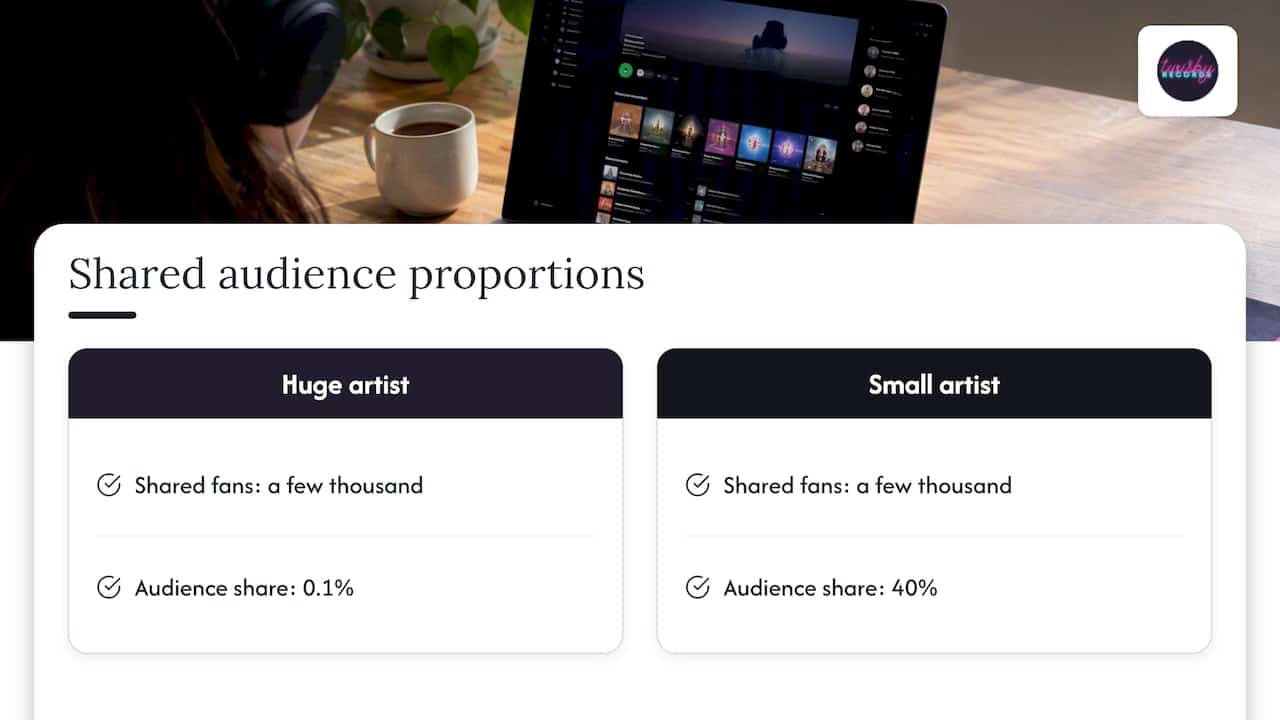
That second part matters for small artists. A huge act and a tiny act can share a few thousand fans, but if those fans are 0.1% of the huge act’s audience and 40% of yours, the link is lopsided. Proportion counts, not just raw overlap.
Descriptions around the music
Spotify also reads how music is described online: reviews, articles, playlist titles and the like. Spotify for Artists wrote in 2018 that Fans Also Like is populated from listener-data patterns, and that its analysis also looks at dimensions like tempo, mood and energy.
It’s worth separating this feature from the rest of Spotify’s recommendations. Spotify’s own explainer says personalized recommendations draw on signals such as searches, listening, skips, saves, follows, location and trends, and that the weight of each signal can shift over time. Fans Also Like sits inside that bigger picture, so treat any exact formula you read online with suspicion. Spotify has never published one.
Why your list might look wrong
Search the forums and you’ll find the same complaint again and again: a band’s related artists have nothing to do with their sound. A few causes are well documented.
- Thin data. Spotify’s own warning, as reported by Hypebot, is that description matching can misidentify newer artists, especially those with little press or a common name, and tie them to unrelated artists.
- A mixed audience. If your early listeners came from a playlist in another genre, or from friends who like very different music, the data will reflect that.
- Drift over time. Spotify says recommendations change with listener taste and that its systems are continuously improved. The list you saw last spring may not be the one you see now.
- Metadata mix-ups. Wrong artist names or credits can attach your releases to someone else’s profile, which scrambles everything downstream.
If you spot a sudden change, don’t panic. Give it a few weeks of normal activity before concluding something broke. And don’t chase a quick fix: nobody outside Spotify can edit the section, whatever a video or a service claims.
What you can and can’t control
Here is the honest split.
| You can’t | You can |
|---|---|
| Edit or add artists to Fans Also Like | Send the right listeners to your music |
| Request a specific neighbor | Get fans to save, follow and playlist your songs |
| Force the section to appear | Keep metadata and artist names consistent |
| Know the exact formula | Build playlists that describe where you fit |
Spotify also dropped the Similar Artists and Compare to Other Artists views from Spotify for Artists analytics because few people used them. That change concerns the analytics dashboard, not the public section, but it means you can’t see a private breakdown of your own similarity data either.
What actually helps: seven moves for independent artists
Spotify’s own artist support page gives the starting list. It asks you to encourage fans to listen, save and add your music to playlists, and to create artist playlists with descriptive titles. Here is how we’d put that to work.
1. Decide who your listener is
Write one sentence: “If you like X and Y, you’ll like this.” Everything else in this list gets easier when you know it. A vague audience produces a vague list.
2. Build descriptive playlists
Make a playlist that includes your songs, songs you listen to, and artists you sound like. Spotify specifically suggests descriptive playlist titles. A title like “Moody indie rock for night drives” tells the system and a human exactly where you fit. Skip titles like “My faves.”
3. Ask fans for the actions that count
A stream is good. A save and a playlist add are better evidence of real interest. Tell your audience directly, in captions and in your link-in-bio, to save the track.
4. Fix your metadata before release
Spotify says metadata is supplied by your label or distributor and must be corrected through them. It also advises consistent spelling and formatting of your artist name across releases, with roles supplied at track and release level. Check every field before you submit, not after.
5. Understand where your streams come from
Spotify separates active sources, like your profile and listeners’ libraries, from programmed ones such as Discover Weekly, Release Radio and Autoplay, in its source of streams guide. Active listening from people who chose you is the cleanest signal you can create. Programmed streams are the reward for it.
6. Use data to target, not to guess
Spotify for Artists noted in 2020 that its related-listener data could help artists target marketing or find collaborators. The same logic applies outside Spotify: pick ad audiences that look like the neighbors you want.
7. Make the music sound competitive
A listener who clicks through from a bigger artist hears your track right after a professionally finished one. If yours is quieter, muddier or harsher, they skip. Skips are a signal too. This is the part we handle every day, covered below.
Our perspective: the list follows the listener
We get asked whether Fans Also Like can be fixed, as if it were a setting. It isn’t, and any service promising to rewrite it should make you cautious. What we tell artists is simpler: the list is a mirror, and you change it by changing who listens.
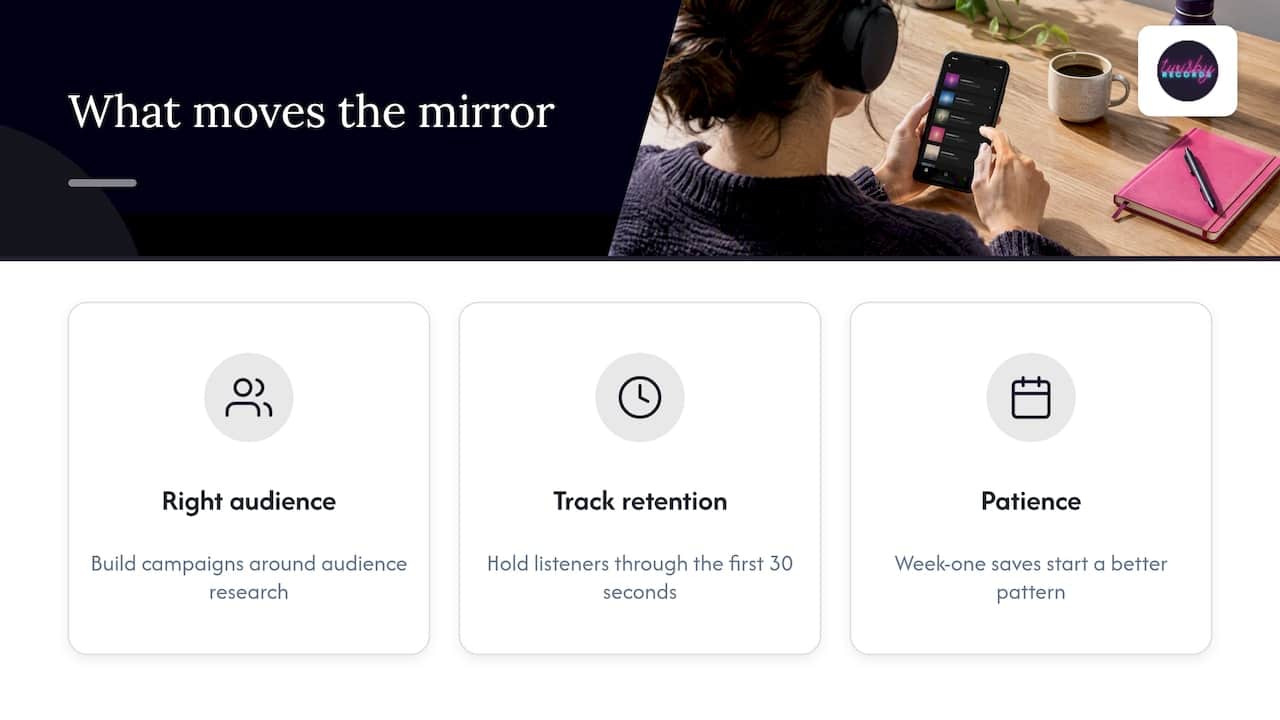
In our experience, three things move the mirror. First, the audience has to be the right one, which is why we build ad campaigns around audience research instead of broad reach. Second, the track has to hold those listeners through the first thirty seconds, which comes down to a mix and master that can sit next to the artists you want to be compared with. Third, you need patience. Data takes time to settle, and a release that gets the right people saving it in week one starts a better pattern than one that gets a flood of random plays.
We use real analog gear, personalize every project, and don’t hand your song to a one-size-fits-all or AI-driven process. That’s not nostalgia. A human engineer listens to your reference artists and asks what you want the listener to feel. If you want to understand how popularity data behaves in the days after a release, we wrote about it in our post on Spotify popularity scores that lag.
— Kreg
Where the sound meets the audience
There are two practical levers where we can help.
Sound. Mastering is $50 per track on our mastering page. If your song needs more than a final polish, our mixing service starts from your stems and your references. We’re also Apple Digital Masters certified, and if that matters to your release, here is how to get Apple Digital Masters for your music.
Audience. Our advertising packages run targeted Facebook and Instagram campaigns for music releases, with audience research, custom landing pages, reporting and optimization. The Standard package is $25 per month plus a 20% fee on ad spend, with a one-time onboarding fee of $99. The goal isn’t a vanity number. It’s getting people who truly fit your sound to listen, save and follow, which is the behavior Spotify’s system reads.
If you’re not sure which you need, start at twisbyrecords.com and tell us about the release.
How listeners find similar artists
If you landed here as a listener, the quick route is the same one we described above. Open an artist page and browse Fans Also Like. Beyond that, Spotify’s programmed sources include Discover Weekly, Release Radar, Radio, Autoplay and Daily Mix, all listed in the source of streams guide. Your own saves, skips and follows tune all of them, because Spotify says your taste profile is its most important input for personalization.
If you make music, flip that around. Every listener’s taste profile is a vote, and your job is to earn votes from the right people.
Mistakes we see all the time
- Buying plays. Fake or off-target streams pollute the pattern with people who don’t match your sound. You can’t buy your way into the right neighborhood.
- Changing your artist name spelling. Inconsistent names split your data and can merge you with someone else.
- Releasing in a genre you don’t belong to because a playlist offered quick numbers.
- Judging after three days. Related artists settle slowly.
- Ignoring how the song sounds next to the artists you want to be compared with.
FAQ
Can I choose which artists appear in my Fans Also Like?
No. Spotify states that artists can’t edit the section. What you can do is generate more listener data by encouraging fans to listen, save and add your music to playlists, and by sharing descriptive artist playlists.
Is there a minimum number of listeners to get Fans Also Like?
Spotify hasn’t published a threshold. The section depends on whether there are strong enough patterns in your listener data, and Spotify says more data makes it better. Very new profiles may see it empty or odd for a while.
Why did my Fans Also Like section change or disappear?
Spotify says recommendations shift with listener taste and that its systems keep improving. Availability can also vary by device or app experience, since Spotify has tested layouts without the section. If it’s gone on one device, check another before assuming something is wrong.
Does my music’s sound affect who I’m grouped with?
Spotify’s analysis does consider qualities like tempo, mood and energy, alongside listener patterns. Fan behavior is the bigger driver. A well-finished track simply keeps the right listeners from skipping.
Can Spotify fix a wrong related artist for me?
Spotify’s guidance is that listening habits determine the section, so there is no manual correction for it. Metadata errors, like wrong artist credits, are different: those must be corrected through your label or distributor.
Sources
- Fans Also Like – Spotify
- Making the Most of Your Artist Profile on Spotify
- Spotify Reveals How The ‘Fans Also Like’ Feature Works (Hypebot)
- Trap Queen and the Data Scientist: How a Subgenre Is Born
- Understanding recommendations – Spotify Safety and Privacy center
- Changes to Spotify for Artists historical data
- Music metadata guidelines – Spotify
- Source of streams – Spotify
- How to Read Your Spotify for Artists Data
- Spotify Community thread on the missing section









