A working remote mixing workflow needs five things: consolidated stems that all start at the same zero point, one upload location everyone treats as the master copy, timestamped feedback instead of vague notes, an agreed number of revision rounds, and async work as your default with short live calls reserved for final tweaks. Export your consolidated WAV stems tonight, upload them to a single shared folder, and send your engineer a reference mix. That single move eliminates most of the back and forth that stalls remote projects.
TL;DR:
- Sending consolidated stems aligned at the same zero point and free of master bus processing simplifies the engineer’s workflow and reduces revision rounds.
- Using timestamped, specific feedback via waveform comments or screen recordings accelerates revision processes and prevents miscommunication.
- Maintaining consistent folder structures, clear naming conventions, and version logs helps avoid confusion and keeps projects organized across multiple tracks and collaborators.
- Relying on asynchronous feedback is more efficient, reserving live calls for final tone alignment or complex automation issues that are difficult to explain in writing.
- For those seeking to avoid workflow management, professional remote mixing services offer turnkey solutions with certified standards and clearly defined revision cycles.
Table of Contents
- What Is Remote Mixing and Why Does It Work?
- Essential Technical Setup and Collaboration Tools
- File Preparation and Delivery: Getting It Right the First Time
- How Do You Give Feedback That Actually Speeds Up Revisions?
- When Should You Use a Live Call Instead of Written Notes?
- Building Session Templates and Keeping Version Control Clean
- Common Pitfalls and Your Pre-Delivery Checklist
- How Twisby Records Builds This Workflow for Real Clients
- Keeping Momentum Without Losing Creative Control
- Get a Professionally Mixed Track Without Managing the Workflow Yourself
- Sources
- FAQ
What Is Remote Mixing and Why Does It Work?
Remote mixing means sending your tracked audio to an engineer who never sets foot in your room, then getting a finished mix back through file transfer and feedback rounds instead of sitting on a couch behind the console. It works because the parts of mixing that matter most, critical listening, gain staging, tonal decisions, don’t require physical proximity. They require a good monitoring environment and a clear signal chain, both of which the engineer already has.
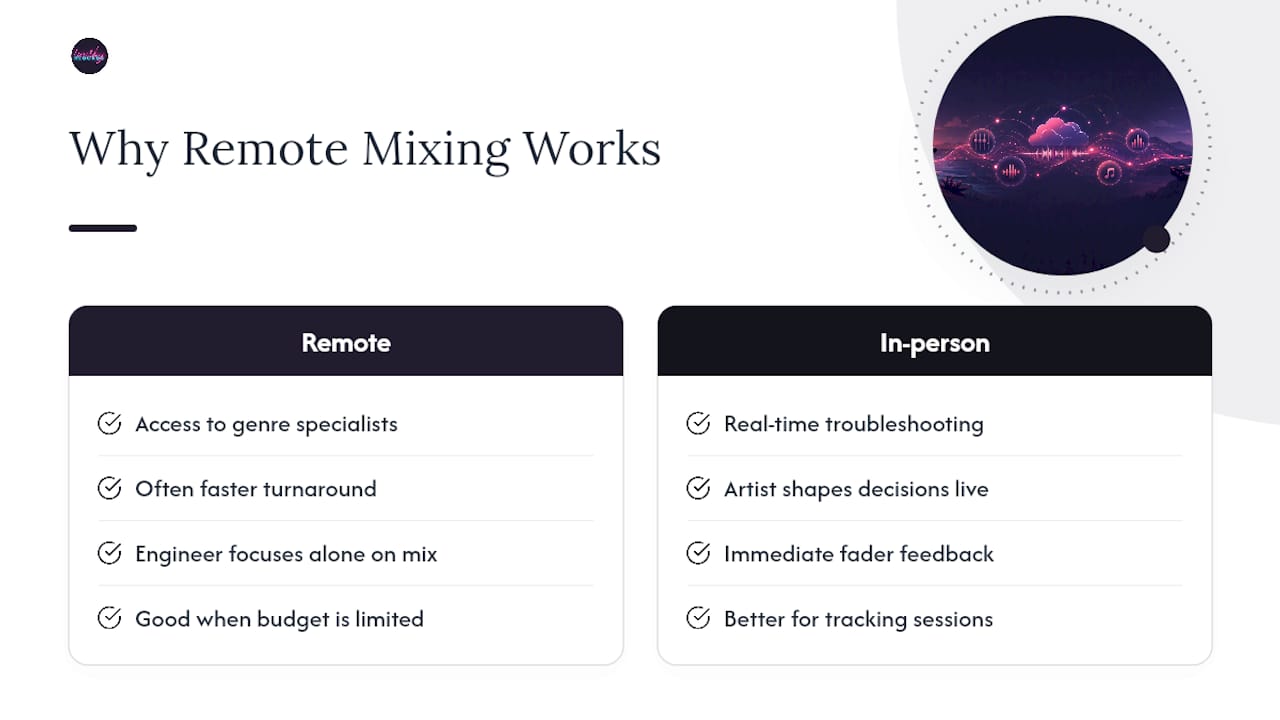
Three benefits make this worth the coordination overhead. First, you get access to specialists you’d never reach locally. A metalcore band in a small town can hire someone who’s mixed nothing but metalcore for a decade instead of settling for the one studio in a 50-mile radius. Second, turnaround is often faster because the engineer isn’t waiting on your schedule to book a session. Third, and this one gets overlooked, the engineer does better work when you’re not in the room. Musicians tend to chase moment-to-moment excitement during a live session and green-light moves that don’t hold up on replay. Working alone against a reference, the engineer focuses purely on how the mix sits over repeated listens.
Remote mixing makes the most sense when your budget won’t cover a full in-person session, when the engineer you actually want lives nowhere near you, or when your recording schedule is tight enough that you can’t wait for studio availability. In-person still wins when you need real-time troubleshooting on a complicated arrangement, or when the artist’s presence during tracking and mixing genuinely shapes creative decisions moment to moment.
The trade-offs are real and worth naming upfront. Communication takes more deliberate effort because you lose the ability to just point at a fader and say “more of that.” You’ll occasionally hit a problem that’s genuinely faster to solve on a call than through three rounds of written notes. And you’re mixing on your engineer’s monitoring setup, not yours, which means your reference checks on your own speakers and headphones matter more than ever before you sign off.
Essential Technical Setup and Collaboration Tools
You don’t need a studio to participate in a solid remote mixing workflow. You need a handful of specific things, and skipping any of them is where projects usually go sideways.
Minimum hardware and environment checklist:
- An audio interface capable of exporting clean stems at your session’s native sample rate.
- At least one pair of reference headphones and, ideally, one set of monitors or speakers for cross-checking mixes.
- A reasonably quiet room for critical listening. You don’t need acoustic treatment to evaluate a mix, but a noisy apartment will fool you into thinking things sound fine when they don’t.
- A secondary playback source, a phone speaker, a car stereo, earbuds, to sanity-check how the mix translates outside your main setup is a simple but crucial tool, as shown in public mix presentation examples.
Decide early whether you’re sending consolidated stems or full session files. Consolidated stems (individual WAV files for each element, bounced and aligned) are the standard for most remote projects because they’re DAW-agnostic. Your engineer can open them in any full-featured DAW without needing your exact plugin list installed. Session files make sense only when the engineer specifically requests them, usually because they want to inherit your editing or MIDI programming rather than just your recorded audio.
Collaboration tools fall into four functional categories, and you don’t need one of each:
- Cloud transfer services for moving large stem packages without email attachment limits.
- Waveform-comment platforms that let you drop a timestamped note directly on the audio, which beats a text message every time.
- Managed project services, where an engineer or studio handles file organization and version tracking for you so you’re not building folder structures from scratch.
- Real-time streaming tools for low-latency audio sharing during live calls, useful only when you actually need to hear changes happen in the moment.
Latency is the deciding factor for whether you need that last category at all. If you’re just reviewing a bounced mix and leaving notes, latency is irrelevant, you’re listening to a file, not a live stream. Real-time tools only earn their place when you and the engineer need to hear the same audio change together, in sync, which is a narrower use case than most people assume.
File Preparation and Delivery: Getting It Right the First Time
Bad file prep is the single most common reason remote mixes take three extra rounds to get right. None of it is complicated, but every step matters.
Export and format rules:
- Export consolidated WAV files for every track, each one starting at the exact same zero-point timestamp. This is non-negotiable. Misaligned stems cost your engineer time realigning audio instead of mixing it.
- Match your session’s original sample rate and bit depth. If you tracked at 48kHz/24bit, export at 48kHz/24bit, not 44.1kHz because that’s what you’ve seen elsewhere.
- Strip any master bus processing, no limiter, no bus compression, no final EQ, before export. Your engineer needs full headroom and an unprocessed signal to work with, a practice standard across professional mixing workflows.
- Name every file clearly: song title, instrument or part, and take number if relevant. “Verse_Guitar_L_Take2.wav” beats “Audio_14.wav” every single time.
What to include with your upload:
- A rough reference mix so the engineer knows your intent before they start.
- Tempo and BPM information, plus a click track if the song used one, since tempo data matters for anything involving virtual instruments or programmed parts.
- A short plugin list if any tracks were recorded through hardware or software processing you want preserved.
- Written notes on any comped takes or edits the engineer should know about before touching a fader.
Pro Tip: Before you upload anything, solo two or three stems and check that they line up visually on the timeline. A five-second alignment check on your end can save your engineer an hour of detective work on theirs.
Once everything’s packaged, run a quick verification pass: confirm the sample rate matches across every file, confirm nothing clips on playback, and do one full listen-through before you hit upload. Standardized upload guides that walk through exactly these checks are one of the most effective ways to prevent the delays that plague first-time remote projects. Twisbyrecords has a full breakdown of export steps for mixing if you want the process laid out in more granular detail.
How Do You Give Feedback That Actually Speeds Up Revisions?
Vague feedback is the number one killer of revision efficiency. “Make the vocal pop more” tells your engineer almost nothing actionable. Specific, timestamped feedback tells them exactly where to look and roughly how far to push it.
Use this template every time: timestamp, track name, what you’re hearing, and a requested change with a measurable target. For example: “At 1:32, vocal buried under the guitar; raise it 2 to 3 dB.” That single sentence replaces an entire back-and-forth email thread.
Best tools for delivering this kind of feedback:
- Annotated waveform platforms where your comment sits directly on the timestamp in question.
- Short screen recordings with audio playing underneath, useful when a note is hard to articulate in text alone.
- A/B bounce requests, asking your engineer for two versions of a specific section so you can compare directly rather than describing a preference from memory.
Waveform-based comment tools tied to versioned folders cut down on the miscommunication that scattered texts and emails almost guarantee. When your notes live in one place, tied to the exact moment in the song they describe, nobody’s guessing what you meant three days later.
Structure your revision rounds the same way every time: rough mix, first revision, fine-tune pass, approval. Most projects need no more than two full revision rounds if the first-round feedback is specific. Three or more usually signals that either the notes were too vague the first time, or the scope crept beyond what was originally agreed. Twisbyrecords covers batching feedback into focused groups in its guide on approving mixes faster, and it’s worth reading if you tend to send notes as they occur to you rather than all at once.
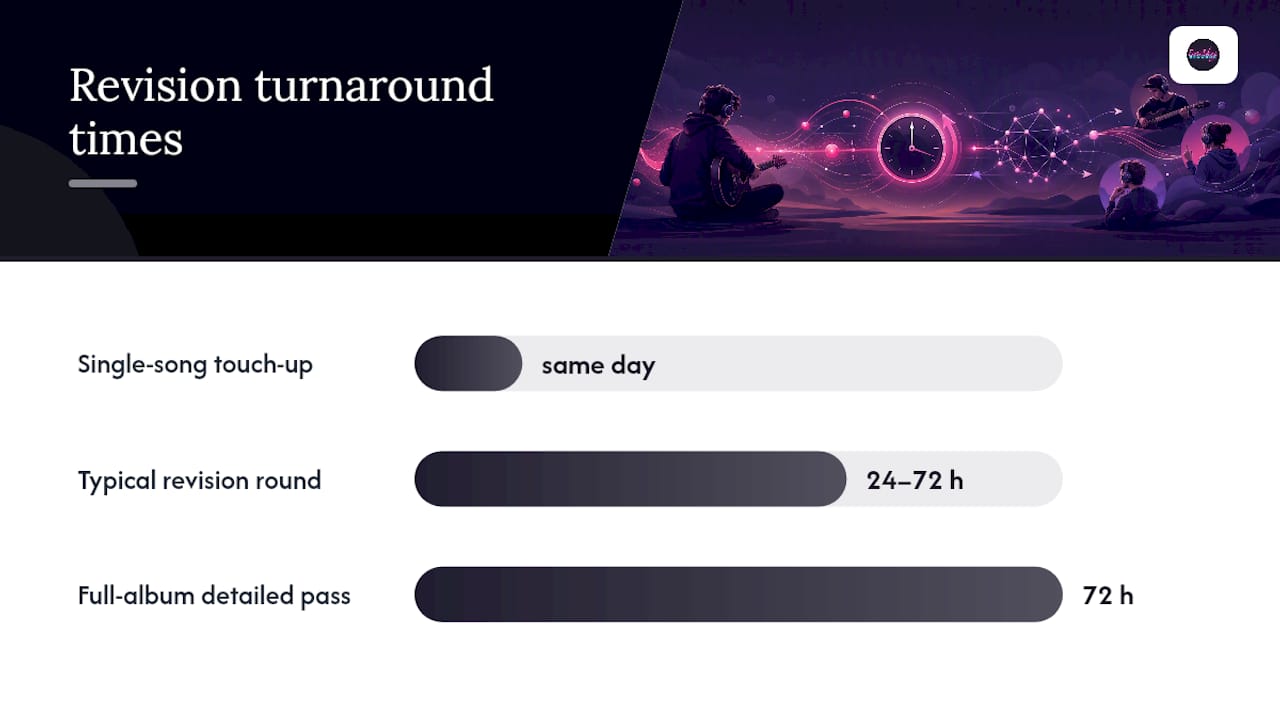
As a rule of thumb, budget 24 to 72 hours per revision round depending on how many tracks and how much change you’re asking for. A single-song touch-up might turn around same day. A full album with detailed automation notes needs the longer end of that window.
When Should You Use a Live Call Instead of Written Notes?
Default to asynchronous work. It’s more efficient for both sides, lets the engineer focus without interruption, and creates a written record of every decision. But there’s a specific window where a short real-time session beats three more rounds of emailed notes: tone alignment early in a project, complex automation that’s hard to describe in text, or a revision cycle that’s dragging because written feedback keeps missing the mark.
Keep these calls to 15 to 30 minutes. Anything longer usually means you didn’t prepare enough beforehand, or the conversation has drifted from mixing into unrelated territory.
How to prepare for a real-time session:
- Have stems already uploaded and the session already open on the engineer’s end before the call starts.
- Bring a short written agenda, three or four specific points, not a running list you’re inventing as you talk.
- Reference specific timestamps you want to discuss, the same way you would in written feedback.
- Have a shared listening reference cued up so you’re both anchored to the same sonic target.
For the host engineer, low-latency routing basics matter here: confirm the streaming tool’s sample rate matches the session, test audio quality before the artist joins, and have a backup playback method ready in case the connection drops mid-call. Nothing kills momentum faster than spending the first ten minutes of a 20-minute call troubleshooting a dropped connection instead of listening to the mix.
Building Session Templates and Keeping Version Control Clean
Chaos creeps in fast once you’re juggling more than one project, or more than one collaborator, without a system. A reusable template solves this before it becomes a problem.
Structure your project folders the same way every time: a top-level folder per song, with subfolders for Stems, Rough Mixes, References, and Deliverables. Inside Stems, name every file with song title, instrument, and take number. Inside Deliverables, use clear version tags so nobody’s ever asking which file is current.
Naming and version rules that prevent confusion:
- Use a consistent format like
SongTitle_MixV1_2026-03-14.wavso the version number and date are visible at a glance. - Never overwrite a previous mix version. Save each round as its own file so you can always A/B against an earlier pass.
- Keep a simple revision log, even a plain text file, noting what changed in each version: “V2: raised lead vocal, added slapback delay on verse 2.”
- Archive final stems and the approved mix in a separate backup location the moment a project closes, not weeks later when you’ve moved on to the next one.
A single source of truth for files, paired with consistent naming, is what keeps a five-song EP from turning into a folder full of files named “final,” “final2,” and “final_ACTUAL.” It sounds basic. It’s also the single habit that separates smooth remote projects from the ones that drag on for months.
Common Pitfalls and Your Pre-Delivery Checklist
Most remote mixing failures trace back to the same handful of mistakes, repeated across different projects and different genres.
Top pitfalls to watch for:
- Inconsistent file naming that forces the engineer to guess which take is the keeper.
- Missing takes or comps that surface mid-mix, forcing a pause to track down the right audio.
- Vague feedback that triggers a guessing-game revision instead of a targeted fix.
- Feedback scattered across texts, emails, and voice memos instead of one central location.
- Skipping your own reference check before approving, then noticing problems only after release.
Quick troubleshooting checklist:
- Confirm sample rate matches across every stem before the engineer opens the session.
- Check that any plugins referenced in your notes are actually available or substitutable on the engineer’s end.
- Re-verify stem alignment if anything sounds phasey or oddly timed on the first listen.
Pro Tip: Do your final approval listen on at least two different playback systems, headphones and a phone speaker at minimum, before signing off. A mix that sounds great on studio monitors can fall apart on the speaker most of your listeners will actually use.
Before you approve a final delivery, confirm you’ve received a full-resolution WAV bounce, an MP3 reference copy, an instrumental or acapella version if your release needs one, correct metadata, and a written approval trail showing the final round was signed off. Twisbyrecords breaks down loudness and delivery specifics further in its guide to mixing for streaming.
How Twisby Records Builds This Workflow for Real Clients
An experienced mixing service has refined exactly this process and holds Apple Digital Masters certification, a technical standard that confirms a mix meets Apple Music’s mastering specifications before release. That combination of experience and certification is why the file prep and feedback structure outlined in this guide isn’t theoretical. It’s the same structure Twisbyrecords runs with clients daily, adapted to each artist’s specific project instead of forced into a one-size template.
Some blogs expand on several pieces of this workflow in more depth, including export steps for stems, batching feedback for faster approvals, and setting up a workable home studio for artists tracking on their own before sending files off. Independent musicians working through their first remote project can lean on those templates directly rather than reinventing the folder structure from scratch.
Keeping Momentum Without Losing Creative Control
The biggest workflow killer isn’t bad gear or slow internet. It’s feedback that arrives in three separate messages over three separate days instead of one consolidated note. Keep your feedback single-threaded: one document, one platform, one submission per revision round. Batch every note you have before you send anything, don’t dribble out thoughts as they occur to you between now and Thursday.
Scope creep is the other trap. A revision round meant to fix vocal levels quietly turns into a request to also swap the snare and rebalance the whole chorus. Ask for that as a separate, explicit round, not a rider on a note that was supposed to be about one fader move. Engineers can absolutely accommodate bigger changes, but only when you’ve named them as bigger changes upfront rather than sneaking them into what was billed as a quick fix.
— Kreg
Get a Professionally Mixed Track Without Managing the Workflow Yourself
If everything in this guide sounds like more coordination than you want to take on, that’s the entire case for hiring it out instead of running the workflow solo. Some services offer an alternative to piecing together your own remote mixing process: send your stems once, get personalized engineering back, with Apple Digital Masters certification available on qualifying projects and turnaround structured around clear revision rounds instead of open-ended back and forth.

Deliverables often include a final WAV master, alternate versions for different platforms, and MP3 reference copies for quick sharing with your band or label. Some services also handle advertising for your release once the mix is locked, to help get it in front of listeners on streaming platforms. Check out the full services page to see current mixing and mastering packages, or start by sending over your stems and a reference track to get a project quote.
Sources
These resources go deeper on specific pieces of the workflow covered above, from export mechanics to feedback tools:
- Mixing in the virtual world — Recording Magazine
- Advanced Mixing Techniques — Berklee Online
- Remote music production guide — Feedtracks
- Remote mixing workflow — Trackbloom
FAQ
What Format Should I Use to Send Stems for Remote Mixing?
Export consolidated WAV files at your session’s original sample rate and bit depth, with every stem starting at the exact same zero-point timestamp and no master bus processing applied.
How Many Revision Rounds Should a Remote Mix Include?
Most projects need no more than two full rounds, rough mix through first revision to a fine-tune pass, when the initial feedback is specific and timestamped rather than vague.
How Long Should a Revision Round Take?
Plan on a few days per round depending on the number of tracks and the scope of the requested changes.
Do I Need Real-Time Video Calls for Remote Mixing?
No. Default to asynchronous feedback and reserve short 15 to 30 minute live sessions for tone alignment or complex automation that’s hard to describe in writing.
What Should I Check Before Approving a Final Mix?
Confirm you’ve received a full-resolution WAV, an MP3 reference, correct metadata, and instrumental or acapella versions if needed, and do a final listen on at least two playback systems before signing off.
Does Twisbyrecords Offer Remote Mixing Services?
Yes. Twisbyrecords provides personalized remote mixing and mastering with Apple Digital Masters certification available, structured around clear revision rounds and defined deliverables.