

For most independent music, record at 48 kHz or 44.1 kHz, with 24-bit depth, and keep that rate from the first take to the final master. Either one is a professional choice. Higher rates like 88.2 or 96 kHz have real uses, but they are not a requirement for a great record, and they cost you disk space and processing power.
The rest of this guide explains why, so you can set up your session once and stop second-guessing it. We cover what sample rate actually is, how 44.1 and 48 kHz differ, what to use for vocals, when higher rates earn their keep, and how to hand off files to a mixing engineer, a distributor, and the streaming platforms.
TL;DR
- Record at 44.1 kHz or 48 kHz, 24-bit. Both are standard for professional music, and the difference between them is small.
- Pick one rate before you record and never change it mid-project. Converting between rates is where avoidable problems start.
- Choose 48 kHz if video, film, or YouTube is part of the plan. Choose 44.1 kHz if the project is audio-only and aimed at CD-style distribution.
- Use 88.2 or 96 kHz only if you have a reason, such as heavy saturation plugins or archival goals, and your computer can handle it.
- Send your mixer the session’s native rate and bit depth. Do not upsample a 16-bit, 44.1 kHz file and call it high-res.
Table of Contents
- What sample rate actually means
- 44.1 kHz vs. 48 kHz: the real difference
- The best sample rate for recording vocals
- When higher sample rates make sense
- Keep one sample rate from start to finish
- What platforms and distributors accept
- Common myths about sample rate
- Our perspective: spend your effort where listeners will hear it
- Getting your session ready for mixing and mastering
- How we can help
- FAQ
- Sources
What sample rate actually means
Sample rate is the number of times per second your audio interface measures the incoming sound. It is written in hertz, so 44.1 kHz means 44,100 samples per second, and 48 kHz means 48,000.
Think of it as the frame rate of audio. More measurements per second means the system can represent higher frequencies. The rule behind this is the Nyquist-Shannon theorem: the sample rate has to be more than twice the highest frequency you want to capture. Half the sample rate is called the Nyquist frequency.
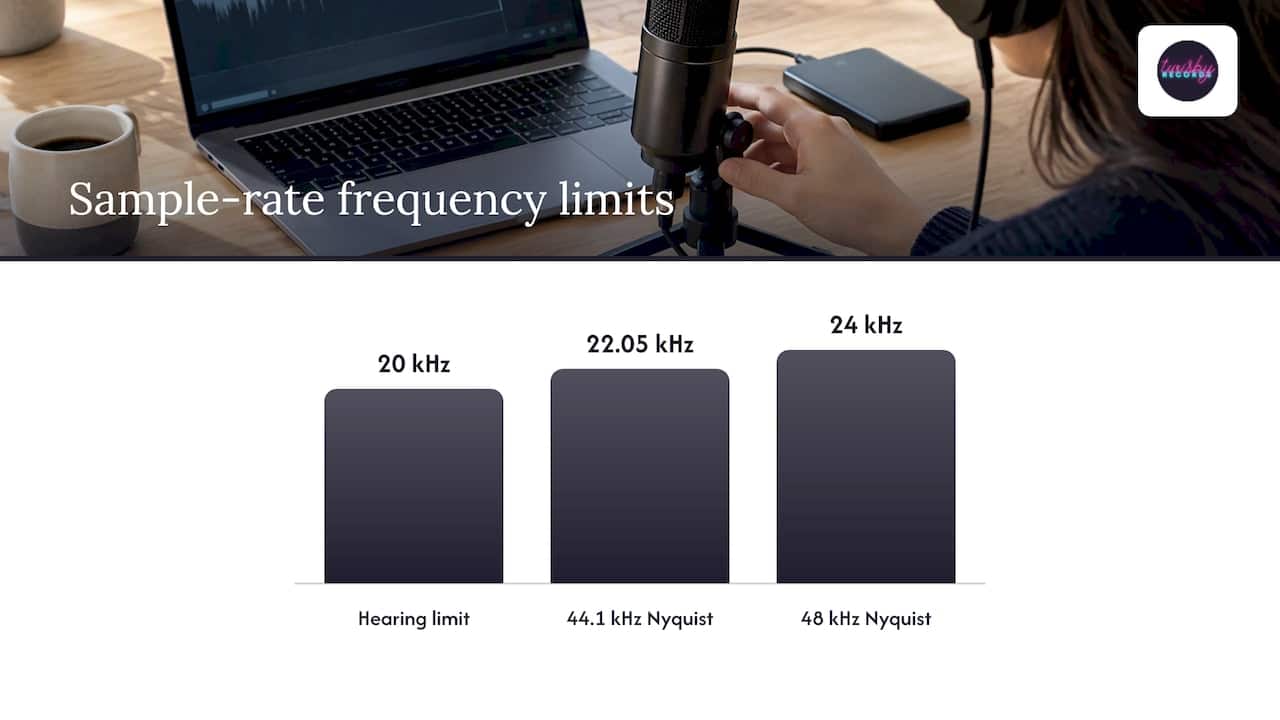
Human hearing is commonly treated as running from about 20 Hz to 20 kHz. That is the reason music is so often sampled at 44.1 or 48 kHz: both put the Nyquist frequency above the top of the hearing range, at 22.05 kHz and 24 kHz.
Sample rate vs. bit depth
People mix these up all the time, so here is the short version. Sample rate is how often the audio is measured. Bit depth is how finely each measurement is stored. Sample rate sets the spacing of samples in time. Bit depth sets amplitude resolution and dynamic range.
In practice, bit depth matters more for your day-to-day recording. Record at 24-bit. It gives you far more headroom, so you can leave healthy space on your meters instead of chasing every peak. That one habit does more for your recordings than any sample rate upgrade.
44.1 kHz vs. 48 kHz: the real difference
These two rates exist for historical reasons, not sonic ones.
- 44.1 kHz is the CD standard. It was the music-world default for decades.
- 48 kHz is the standard for video, film, and broadcast. The University of Oregon’s production guidance recommends 48 kHz for camera and audio-recorder work and identifies it as the DVD and broadcast standard.
There is even a bit of math behind the video choice. At 24 frames per second, 48 kHz gives exactly 2,000 samples per frame, while 44.1 kHz gives 1,837.5. Whole numbers make sync cleaner.
Which one should you pick?
Here is how we would decide:
| Your situation | Sample rate to record at |
|---|---|
| Audio-only release, no video planned | 44.1 kHz or 48 kHz |
| Music videos, YouTube content, sync pitches | 48 kHz |
| Recording alongside video footage | 48 kHz |
| Heavy saturation or distortion plugins, powerful computer | 88.2 or 96 kHz, optional |
| Older or modest laptop, big track counts | 44.1 or 48 kHz |
Sound On Sound technical editor Hugh Robjohns has argued that for a project destined only for 44.1 kHz CD, recording at 48 kHz adds no significant quality and introduces an unnecessary conversion step. He recommends 24-bit/44.1 kHz for CD-only releases. That is a fair point, and it is why the decision comes down to where the music is going, not which number looks bigger.
On the other side, iZotope notes that 48 kHz is becoming a de facto minimum for music. Sonarworks puts it plainly: both 44.1 and 48 kHz are common and acceptable for professional music. So you cannot go wrong. You can only go wrong by switching halfway through.
The best sample rate for recording vocals
There is no special vocal sample rate. A voice recorded at 48 kHz and a voice recorded at 44.1 kHz will not sound meaningfully different once the track is mixed and released. Vocals carry most of their energy and character well below 20 kHz, and both rates cover that range with room to spare.
What shapes a vocal recording far more:
- Bit depth. Use 24-bit so you can record with headroom and avoid clipping.
- Gain staging. Aim for peaks that sit comfortably below the top of the meter. Louder is not better at the input stage.
- The room. A reflective bedroom adds more coloration than any change from 44.1 to 96 kHz ever will.
- The microphone and preamp. This is where the character comes from.
- The performance. Always.
So for vocals, match the session. If the rest of your song is at 48 kHz, record the vocal at 48 kHz. If you are tracking a vocal at home and sending it to us for mixing or remote vocal production, tell us the rate and bit depth you used, and export every file at exactly that setting.
One caveat worth knowing: if you plan to run vocals through plugins that add harmonics, such as saturators, distortion, or some pitch tools, a higher session rate can sometimes help those plugins behave. More on that next.
When higher sample rates make sense
Sometimes 88.2 or 96 kHz is a smart choice. Here are the honest reasons.
- Plugins that generate harmonics. Higher rates like 88.2 or 96 kHz may improve performance in some digital plugins that use nonlinear processing, such as saturation or distortion. Many modern plugins already oversample internally, so the benefit varies.
- Aliasing control. Higher rates, called oversampling, are usually used to allow adequate filtering around the Nyquist frequency, which helps avoid aliasing artifacts.
- High-resolution and archival goals. If you want a master that holds up as formats evolve, a higher native rate is a sensible archive.
- Sound design or heavy time-stretching. Extra samples give processors more to work with.
And the trade-offs are real. Higher rates increase file size and tend to raise CPU load. Sonarworks adds that they may reduce the number of tracks your system can run. Double the sample rate and you roughly double the data. On a 60-track session, that adds up quickly.
Our advice: if your computer runs a 96 kHz session smoothly and you like the extra safety margin, use it. If it stutters, or you are not sure, 48 kHz is the better call. A stable session at 48 kHz beats a glitchy one at 96 kHz every time.
Keep one sample rate from start to finish
The most useful rule in this whole article is consistency. Work at your project’s native sample rate to avoid conversion issues, and keep a 24-bit master at that rate as the source for delivery.
Why it matters: sample rate conversion is a processing step, and every step is a chance for something to go wrong. Apple’s own Digital Masters guidelines warn that downsampling may create aliasing, and truncating bit depth can cause quantization distortion. Do conversions once, at the very end, with good tools, and only when a platform needs it.
A simple workflow
- Decide the rate before the first take. Set it in your DAW project settings and your interface’s control panel.
- Record at 24-bit. No exceptions.
- Never import files at a different rate without checking. If a collaborator sends 44.1 kHz stems into a 48 kHz session, some DAWs convert quietly and some play them at the wrong speed.
- Export stems at the session’s native rate and bit depth. No dithering, no conversion, no normalizing.
- Keep the high-resolution master. Apple advises artists to keep the highest native sample rate available so they can take advantage of future improvements in distribution technology.
If you track with a click, set it up in the session before you start. A guide on DAW-ready click tracks shows how to prepare one so tempo and timing are locked in before anyone presses record.
What platforms and distributors accept
You record at one rate. Your distributor and the platforms have their own delivery rules. Check them before you bounce.
- Apple Digital Masters. Apple accepts 24-bit PCM sources at 44.1, 48, 88.2, 96, 176.4, and 192 kHz. It explicitly forbids upsampling or bit-padding from 44.1 kHz/16-bit files.
- Apple Music Hi-Res Lossless. The badge requires 24-bit audio at 88.2, 96, 176.4, or 192 kHz. A 44.1 or 48 kHz master can still be a fine Apple Digital Masters release, but it will not carry the Hi-Res Lossless badge.
- Distributors. Digital distributors often accept FLAC at 16-bit or 24-bit, two-channel, with 44.1 kHz or higher sample rates. Always read your own distributor’s current spec.
- YouTube music videos. YouTube recommends 48 kHz at 24-bit in a lossless format, such as FLAC or PCM, though higher rates are accepted.
That last point is a quiet argument for 48 kHz if you release videos. You record once, and the audio drops straight into a video edit without conversion.
If Apple Digital Masters is a goal, we walk through the whole process in how to get Apple Digital Masters for your music.
Common myths about sample rate
“Higher is always better.” Not exactly. Past the point where the hearing range is covered, you are buying margin for processing, not audible detail. That margin matters in specific cases and is wasted in others.
“I can record at 44.1 kHz and upsample to 96 kHz for hi-res.” No. Upsampling adds no information. Apple’s guidelines specifically rule out upsampling from 44.1 kHz/16-bit for Digital Masters submissions.
“48 kHz is only for video people.” It started there, but it is now widely used for music as well, and plenty of engineers track everything at 48 kHz.
“Sample rate fixes a bad recording.” It does not. A noisy room, a clipped input, or a rough performance will sound the same at any rate.
Our perspective: spend your effort where listeners will hear it
We have been mixing and mastering independent music for over 35 years, and our mastering is Apple Digital Masters certified. Here is what that experience tells us about sample rate.
Most artists lose sleep over 44.1 versus 96 kHz and then send us a vocal recorded too hot, in a boomy room, with the click bleeding into the mic. We would much rather you fix those things first. Sample rate is a setup decision. You make it once, you write it down, and you move on to the part that matters: the song and the performance.
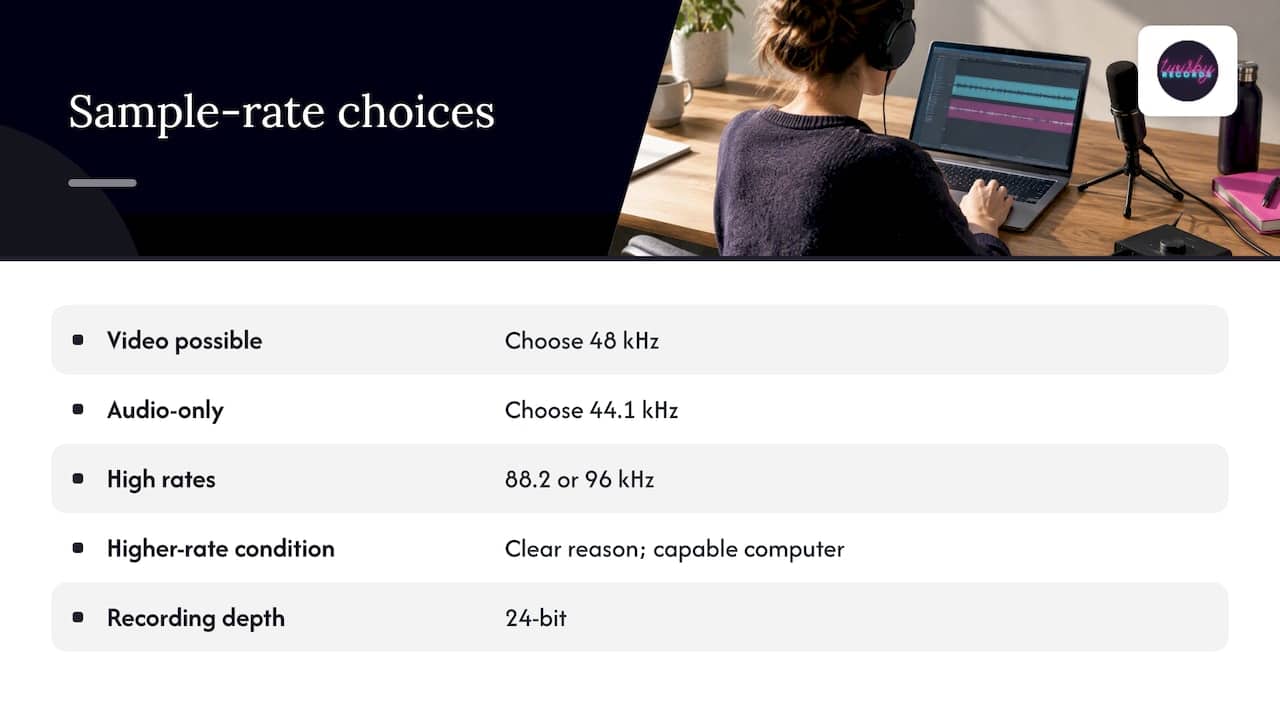
Our practical rule is simple. Record at 24-bit. Pick 48 kHz if there is any chance of video, or 44.1 kHz if the project is audio-only. Move to 88.2 or 96 kHz only when you have a clear reason and a computer that can take it. And when you send files, tell us the rate and bit depth, and do not convert anything on the way.
We do this work by hand, with experienced engineers and real analog gear, and we care about creative collaboration and fast turnaround more than checklists. If you are unsure about your session, ask us before you record. A two-minute question can save you a re-track.
— Kreg
Getting your session ready for mixing and mastering
A clean handoff makes a mix better and faster. Before you send anything:
- Export every track from the very start of the song, so they all line up when imported.
- Use the session’s native sample rate and bit depth, 24-bit if you recorded at 24-bit.
- Leave plenty of headroom on stems, with peaks well below full scale. Do not limit or normalize.
- Label files clearly: lead vocal, double, harmony, kick, and so on.
- Include a rough mix and a note on tempo, key, and any references you love.
Budget matters too. If you are weighing what mixing should cost, our breakdown of mixing costs for DIY artists shows how preparation can bring the price down. And if vinyl is on your roadmap, there are separate technical checks, covered in mastering for vinyl.
How we can help
Once your session is recorded and organized, we take over the technical side. Mastering with us is $50 one-off, delivered with the care of a full-attention engineer and prepared with Apple Digital Masters in mind. If your tracks need shaping first, our mixing service is built around personalized work for each artist, and we also offer remote vocal production if you are tracking at home. For artists recording in the Pittsburgh area, ask about our recording partnerships.
When the music is finished and you want people to hear it, we also run targeted Facebook and Instagram ad campaigns for releases. Standard Packages are $25 per month, with a 20% fee on ad spend, plus a one-time onboarding fee of $99. You can see how it works on our advertising page. To start a project, visit Twisby Records.
FAQ
What is the best sample rate for recording vocals?
Use the same rate as the rest of your session, either 44.1 kHz or 48 kHz, at 24-bit. Both capture the full range of a human voice and more. Choose 48 kHz if the song will be paired with video.
Is 44.1 kHz or 48 kHz better?
Neither is better for audio quality. 44.1 kHz is the CD standard and 48 kHz is the video and broadcast standard. Pick based on where the music will end up, and stay with it for the whole project.
Is 96 kHz worth it for a home studio?
Sometimes. It can help with saturation-type plugins and gives you a high-resolution archive, and Apple’s Hi-Res Lossless badge needs 88.2 kHz or higher. The cost is bigger files and more CPU load, so it only pays off if your computer runs it smoothly.
Can I change the sample rate after I record?
You can convert, but you should avoid it. Conversion adds a processing step, and upsampling a low-rate file does not add real detail. If you must convert, do it once, at the end, on the final master.
What sample rate should I send for mixing?
Send the stems at the exact sample rate and bit depth you recorded in. Do not convert, normalize, or dither them. Tell your engineer the settings in your note so nothing is misread on import.
Sources
- Sampling Rate | Analog Devices
- Audio Recording Standards, University of Oregon CINE
- Sample Rate and Bit Depth: What to Use at Each Stage
- Sample Rate, Bit Depth, and Buffer Size Explained, Focusrite
- 12 Sample Rate Myths Busted, Waves
- Is it worth recording at a higher sample rate? Sound On Sound
- Digital audio basics, iZotope
- Understanding Sample Rate, Sonarworks
- Digital Audio Fundamentals, Audacity Manual
- Apple Digital Masters 2.4.1
- Apple Video and Audio Asset Guide
- Glossary of Music Terms: Distribution, Spotify for Artists
- Encoding specifications for music videos, YouTube Help









