

You cannot install a Meta pixel directly on Spotify. The fix is a tracked entry point, usually a smartlink or a single-CTA landing page, running the Meta pixel and Conversions API together, paired with the Spotify Pixel on your own site. Set up your smartlink now, attach the pixel to the click-out button, and layer in Conversions API before you spend another dollar on ads.
TL;DR:
- Using a Meta pixel with Spotify requires a tracked entry point like a smartlink or landing page since direct installation on Spotify is impossible.
- The setup involves integrating the Meta pixel and Conversions API on the landing page, with matching event identifiers to ensure accurate deduplication.
- Spotify Pixel tracks user actions on your website after a listener hears your ad, but it cannot see inside the Spotify app itself, leading to attribution gaps.
- Campaigns should prioritize click-out events as conversions rather than streams, and testing mobile handoffs prevents tracking failures that could lower campaign performance.
- Validating setup through browser tools and verifying domain ownership improves data reliability, especially important for repeated, budget-heavy campaigns aiming for accurate ROAS measurement.
Table of Contents
- How Facebook Pixel Works With Spotify: Two Systems, Not One
- How Do You Install Meta Pixel on a Spotify Smartlink?
- What Does Spotify Pixel Track, and What Shows Up in Ad Analytics?
- Best Practices for Tracking Spotify Ads Without Losing Data
- Why Don’t Your Ads Manager and Spotify Numbers Match?
- The Twisby Records Pre-Launch Checklist
- Is All This Tracking Infrastructure Worth Building?
- Get Your Spotify Campaign Tracking Set Up Right
- Sources
- FAQ
How Facebook Pixel Works With Spotify: Two Systems, Not One
Marketers keep searching for a way to use Facebook pixel with Spotify directly on the platform, and the answer is that there isn’t one. Spotify does not let advertisers embed third-party tracking code on its app or its hosted pages, so Meta’s pixel has no surface to sit on inside Spotify itself. What you get instead are two separate measurement systems that need to be stitched together on your end.
- Spotify Pixel installs on a website you own. It measures what listeners do after hearing or seeing your Spotify ad: a purchase, a sign-up, a click, anything that happens on your domain.
- Meta Pixel installs on pages you control too, but its job is different: it feeds your retargeting audiences, builds lookalikes, and reports conversion events back into Ads Manager for optimization.
- Neither pixel can see what happens once a listener lands inside the Spotify app itself, which is why the smartlink or landing page in between matters so much.
Run both pixels on the same tracked page and feed server-side events with matching identifiers, and you get a far more complete picture than either tool provides alone. That’s the whole game: one shared checkpoint, two sets of eyes on it.
How Do You Install Meta Pixel on a Spotify Smartlink?
Setting this up takes about 30 minutes if you’ve done it before, longer the first time through. Here’s the order that actually works:
- Create your Meta pixel in Events Manager and note the Pixel ID. You’ll reuse this ID everywhere.
- Build a smartlink or single-CTA landing page you own, with one button: “Listen on Spotify.” This tracked entry point is the only place a pixel can legally sit before the handoff to Spotify.
- Install the pixel on that page, either as a head snippet, through Google Tag Manager, or via a smartlink platform’s built-in integration. Attach a custom event, something like
ClickOut_Spotify, to the button itself, not to the page load. - Configure Conversions API on the same page so a server-side copy of that event fires alongside the browser pixel. Give both events the identical
event_idandevent_nameso Meta deduplicates them instead of counting the conversion twice. - Verify your domain in Ads Manager and set up Aggregated Event Measurement so Meta prioritizes your click-out event correctly for conversion-optimized campaigns.
- Test everything with Meta Pixel Helper in your browser and Test Events inside Events Manager, then manually check the mobile handoff by tapping the button on your own phone to confirm Spotify actually opens.
Pro Tip: Test the mobile handoff on both iOS and Android before you launch. A smartlink that fails to open the Spotify app, or one that strips your tracking parameters mid-redirect, is one of the most common reasons conversions silently disappear.
This same setup pattern applies whether you’re running Spotify audio ads or Instagram campaigns for a release. The tracked entry point is what makes Facebook event tracking possible when the destination platform won’t cooperate.
What Does Spotify Pixel Track, and What Shows Up in Ad Analytics?
Spotify Pixel is JavaScript you install once on your own site, and from that point forward it logs actions listeners take after your ad plays: page visits, click-outs, form fills, purchases. Once it’s live, you get access to a set of reporting tools built specifically for interpreting that data, helping you sell music tracks online more effectively.
- Spotify’s dashboard includes campaign reporting, audience insight metrics, mobile measurement, and a full metrics glossary so terms aren’t left to guesswork.
- Attribution relies on device graphs, IP matching, and first-party identifiers, which works well for on-site conversions but breaks down the moment a listener leaves your site for the Spotify app.
- Spotify Ad Analytics combines Pixel data with Conversions API submissions into one real-time dashboard, and it includes lift reporting that estimates incremental impact beyond what direct clicks alone would show.
The gap to flag for anyone on your team expecting a clean number: Spotify’s system has no visibility into Meta’s ad platform, and Meta has no visibility into what happens inside Spotify’s app. Every “conversion” you see in one dashboard needs to be reconciled against the other, not treated as a final total.
Best Practices for Tracking Spotify Ads Without Losing Data
Getting Spotify ad tracking right comes down to a handful of disciplined habits, and skipping any one of them tends to be where campaigns fall apart.
- Treat the smartlink click-out as your primary conversion event. A stream is not a conversion you can verify at the pixel level, the click-out is.
- Fire the browser pixel and the server-side Conversions API event together, always sharing the same
event_idandevent_name, so Meta merges them instead of inflating your numbers. - Keep the landing page to one call to action on a verified domain. Aggregated Event Measurement only prioritizes correctly when your event setup is clean and unambiguous.
- Expect real data loss from iOS App Tracking Transparency prompts and ad blockers. This is exactly why server-side events through Conversions API matter more each year, not less.
- Build your key performance indicators around cost per tracked click-out rather than raw stream counts pulled straight from Ads Manager. Tuning optimization around the tracked click-out and treating streams as a downstream, reconciled metric gives you a signal you can actually trust week over week.
For artists running conversion-focused campaigns specifically built around Spotify, this checklist pairs well with a more detailed Spotify conversion ads setup guide if you want the full walkthrough.
Why Don’t Your Ads Manager and Spotify Numbers Match?
They rarely match exactly, and that’s expected, not a sign something’s broken. Meta Ads Manager shows conversions it can attribute through its own pixel and CAPI events. Spotify Ad Analytics shows lift and pixel-based conversions through its own attribution model. Your own server logs show whatever actually happened on your landing page, independent of either platform’s counting method.
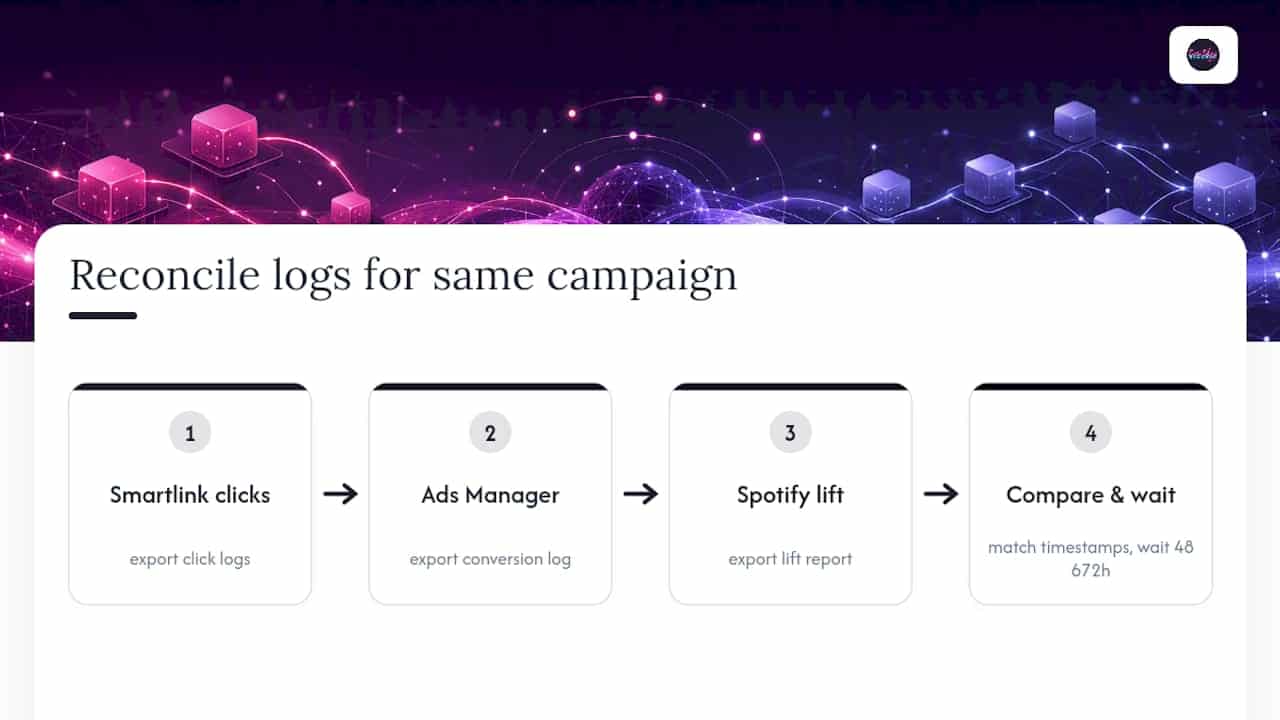
Reconcile the three using event_id values and matching timestamp windows, not gut instinct. Export your smartlink click logs, export the conversion log from Ads Manager, and compare both against Spotify’s lift report for the same campaign dates. Stream data tends to lag by about a day, so give yourself a 48 to 72 hour window before drawing conclusions.
Two numbers worth tracking side by side: cost per tracked click-out, and your conversion-to-stream ratio once Spotify’s lift data catches up.
The Twisby Records Pre-Launch Checklist
Before any Spotify campaign goes live, we run through the same short list every time, because skipping one step almost always shows up as missing data three days later.
- Confirm the smartlink has one CTA and nothing competing for the click.
- Confirm the Meta pixel fires on that page and Conversions API mirrors it with a matching event ID.
- Confirm the domain is verified in Ads Manager.
- Physically test the mobile handoff on both iOS and Android before spending a dollar.
In the first 48 to 72 hours after launch, we watch click-out rate, where listeners drop off on the smartlink page, device split, and any flags that show pixel and CAPI events aren’t reconciling. Small problems caught early save a lot of wasted spend later…
Is All This Tracking Infrastructure Worth Building?
Build the full stack, smartlink, Meta pixel, Conversions API, Spotify Pixel, when you’re spending real ad budget on a repeatable release cadence and need to know which creative or audience is actually working. Skip the heavy setup for a one-off, low-budget promo where raw stream counts matter more than source-level optimization. The trade-off is honest: more setup work now buys you a clearer signal on ROAS later.
— Kreg
Get Your Spotify Campaign Tracking Set Up Right
Setting up Meta pixel, Conversions API, and a properly tracked smartlink correctly the first time saves you from weeks of guessing where your ad budget actually went. Technical setup for pixel installation, Conversions API configuration, domain verification, and landing page setup is available to help with troubleshooting deduplication errors between takes.
Smartlinks and landing pages can be built through a links service, and the advertising team sets up measurement stacks alongside campaign strategies, matching event IDs, verifying domains, and testing mobile handoff before ads go live. If you’re tired of reconciling three dashboards that never agree, request a quote and we’ll get your tracking built correctly from the first click.
Sources
- About the Spotify Pixel – Help Center
- Ad Measurement & Performance Tools | Spotify Ads
- How to Track Spotify Streams From Meta Ads: A Complete Attribution Guide | Soundlink
- What Conversion Event Should Spotify Ads Use? | VLVTN
- How to Set Up the Meta Pixel: A 2026 Step-by-Step Install Guide
FAQ
Why Can’t You Install a Facebook Pixel Directly on Spotify?
Spotify does not allow marketers to place third-party tracking code, including the Meta pixel, on its app or hosted pages, so you need a smartlink or landing page you control to bridge the two systems.
What Conversion Event Should I Use for Spotify Ads?
Use the smartlink click-out to Spotify as your conversion event, not a raw pageview or a stream count, and fire it with matching identifiers across the browser pixel and Conversions API.
What Is a Pixel in Facebook Ads?
A Meta pixel is a snippet of code placed on a website that reports visitor actions, like page views or purchases, back to Ads Manager so campaigns can be optimized and retargeted based on real behavior.
Why Do People Say Facebook Is “Turning Off” Spotify Tracking?
Facebook itself hasn’t disabled anything specific to Spotify; the confusion comes from Meta pixel simply having no way to sit on Spotify’s platform at all, which forces marketers into the smartlink workaround described above.
How Do I Verify My Pixel and CAPI Setup Are Working?
Check the browser event with Meta Pixel Helper and confirm the matching server event in Meta’s Test Events tool, then verify both share the identical event ID before trusting your reported numbers.









