


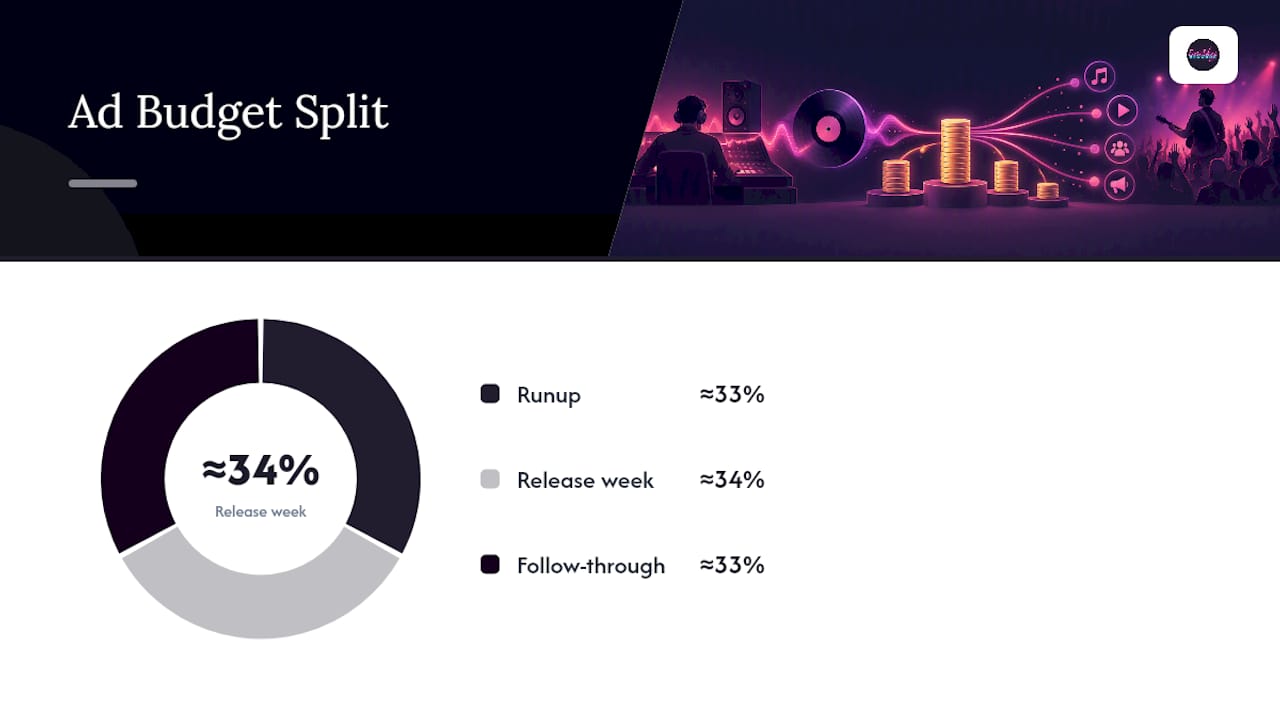
Set a 90-day countdown split into four phases: Foundation, Runup, Ignition, and Follow-through. Lock three dates now: your campaign start (about 90 days out), your distributor upload (21 to 28 days out), and your Spotify pitch (at least 7 days out, ideally 14). Split your ad budget into thirds across runup, release week, and follow-through, and don’t touch that last third until the data tells you where to spend it.
TL;DR:
- Spending your ad budget in three equal parts across runup, release week, and follow-through prevents early overspending and maintains flexibility for optimizing campaigns.
- Upload to your distributor at least 21 to 28 days before release to avoid delays, and submit your Spotify pitch at least seven days prior for better playlist chances.
- Test multiple ad creatives during the runup phase with a minimum daily budget that can generate several conversion events each day, scaling winners gradually to avoid resetting the learning phase.
- Lock your audio, artwork, and metadata early in the Foundation phase to prevent downstream delays or panic-driven decisions during release week.
- Use Ads Manager instead of Boost to gain better targeting controls, and ensure mobile landing pages and pixels are tested beforehand to optimize ad performance.
Table of Contents
- What Does a 90-Day Music Ad Timeline Look Like?
- Your Week-by-Week Ad and Content Calendar
- How to Budget and Launch Ads Without Getting Stuck in Learning Limited
- When Do You Upload to a Distributor and Pitch Spotify?
- What Should You Watch in the First 30 Days After Release?
- What Twenty Years of Studio Work Teaches You About Timing
- How Twisby Records Fits Into Your 90-Day Plan
- Where to Go for Official Platform and Legal Guidance
- Sources
- FAQ
What Does a 90-Day Music Ad Timeline Look Like?
Every phase has one job. Miss the job, and the next phase starts behind schedule.
Foundation (days 90 to 61) is where you lock the boring stuff so nothing derails you later. Finalize your story angle, finish mixing and mastering, get artwork approved, build your electronic press kit, and set up your pre-save landing page. If your audio isn’t locked here, everything downstream slips.
Runup (days 60 to 31) is where you build the audience you’ll sell the release to. This is content cadence, pre-save promotion, and small paid tests to find which creative and audience combinations actually convert.
Ignition (days 30 to 1) is execution under pressure. You upload to your distributor, submit your Spotify pitch, and take whatever ad creative won during runup and start ramping it toward release-week scale.
Follow-through (release day onward) is where most independent artists quietly fail. You read the data, double down on what’s working, and spend the budget you held back on the highest-return opportunity, not the plan you made three months ago.
- Foundation: lock audio, art, EPK, pre-save
- Runup: build audience, test small, iterate creative
- Ignition: upload, pitch, ramp ads, schedule release week
- Follow-through: read data, reallocate, protect held-back spend
Your Week-by-Week Ad and Content Calendar
Here’s the version you can paste directly into a calendar app, with rough day counts attached to each stretch.
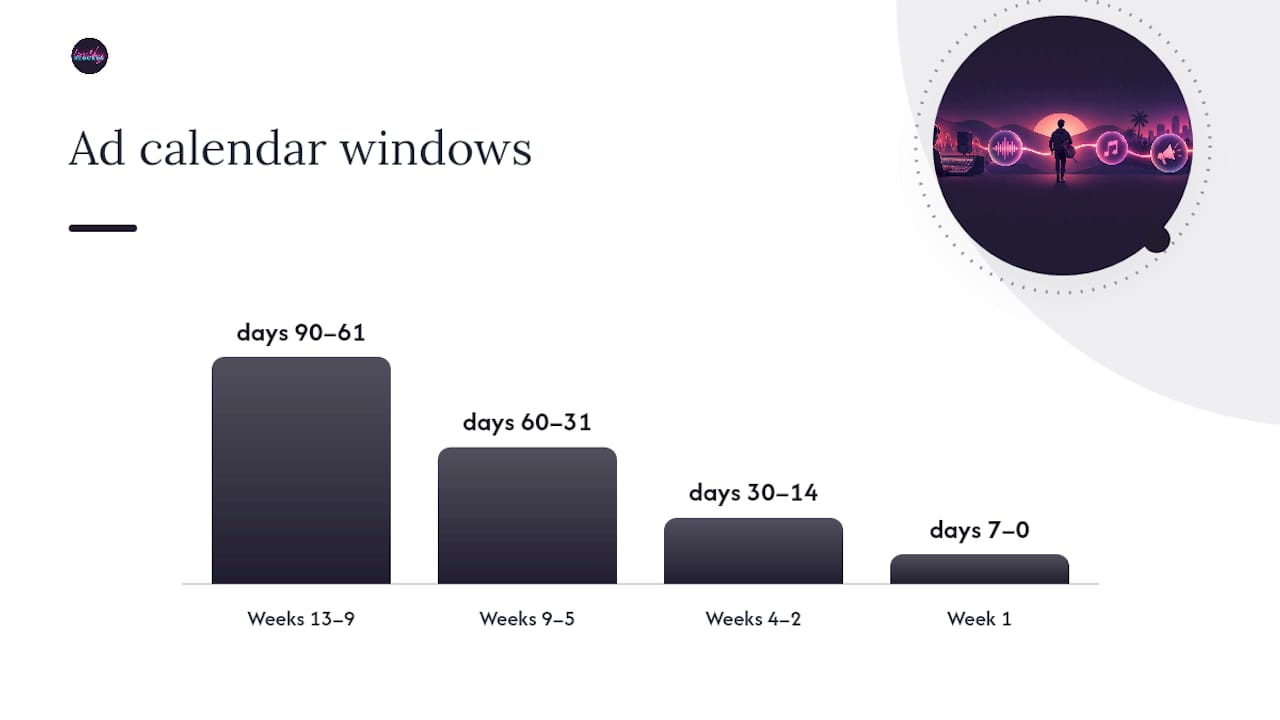
- Weeks 13 to 9 (days 90 to 61): Finish artwork, confirm collaborators and feature credits, build your pre-save landing page, and install your tracking pixel. Nothing gets promoted yet, but the infrastructure needs to exist before it does.
- Weeks 9 to 5 (days 60 to 31): Announce the release publicly. Run small ad tests in the $50 to $150 range across two or three audience segments to see which creative earns saves and clicks at the lowest cost. Finalize your EPK and start assembling distributor files.
- Weeks 4 to 2 (days 30 to 14): Upload to your distributor, aiming for 21 to 28 days before release to protect against processing delays. Submit your Spotify pitch with at least 7 days of lead time, though 14 gives editors and the algorithm more room to work. Lock your release-week post schedule and finalize two to three ad creative variants.
- Week 1 (days 7 to 0): Confirm your distributor metadata is correct, pin promo content to your profiles, schedule release-day posts across every channel, and move budget from your winning runup creatives into release-week ad sets.
Ad setup runs parallel to content, and it needs its own owner. Someone should be checking your pixel fires correctly, building Ads Manager audiences from your pre-save and website traffic, and confirming UTM parameters actually route to a working landing page before a single dollar gets spent.
Pro Tip: Test your landing page and pixel on a phone, not just a laptop. A broken mobile checkout or a slow-loading pre-save page will quietly kill your ad performance before you ever notice the problem in your reporting dashboard.
How to Budget and Launch Ads Without Getting Stuck in Learning Limited
The budget-in-thirds rule solves a problem most independent artists don’t see coming: spending everything before you know what works. Split your total ad spend into three roughly equal parts across runup, release week, and follow-through. That structure protects your flexibility, since industry-standard campaign shapes rely on exactly this allocation to keep budget available once real performance data starts coming in.
The other trap is underfunding your ad sets so badly that the algorithm never leaves its learning phase. Meta and Instagram’s systems need a steady flow of conversion events, saves, clicks, checkouts, whatever you’re optimizing toward, before they can find the right audience. Underfund an ad set and it stays stuck cycling through the same unproven audience instead of optimizing.
A workable rule of thumb: never launch an ad set with a daily budget so small it can’t generate a handful of conversion events per day. If your test creative is converting at roughly $2 to $4 per save, a $10 daily budget won’t generate enough signal. Scale up incrementally instead, doubling budget in small steps rather than jumping from $20 a day to $200.
A few practical rules that save artists from wasted spend:
- Use Ads Manager rather than the Boost button, as it offers better targeting and objective controls, especially important on tight budgets.
- Standardize your campaign objective (traffic, conversions, engagement) instead of switching mid-test.
- Run 3 to 5 creative variants during runup so you have real data before release week, not guesses.
- Scale winners gradually. A sudden budget spike resets the learning phase and can spike your cost per result.
Ad performance benchmark: Audience-consistency rates in the 90 to 98 percent range are the internal target Twisby Records uses when judging whether a music ad campaign is actually reaching the intended listener base rather than drifting toward broad, low-intent traffic.
When Do You Upload to a Distributor and Pitch Spotify?
Two deadlines here aren’t suggestions. Miss them and you lose real reach, not just a little polish.
- Distributor delivery: upload at least 21 to 28 days before release. This buffer protects you if a distributor’s review process runs long or a metadata error needs correcting.
- Spotify pitch: submit through Spotify for Artists at a minimum of 7 days before release to land on followers’ Release Radar, though Spotify’s own guidance recommends aiming closer to 14 days for stronger editorial consideration.
- Campaign Kit and display tools: Spotify’s Marquee and Showcase formats are release-week tools, not runup tools. Reserve budget and finalize the creative for these before release day, since they’re built to drive active streaming in the first week rather than build slow-burn awareness.
- Visibility check: confirm your Spotify for Artists profile is verified and your track shows pitching eligibility before you assume the submission went through cleanly.
What Should You Watch in the First 30 Days After Release?
Release day starts the real test. Spotify’s own release guidance notes that a large share of a song’s first-year streaming activity happens after that first month, which is exactly why your follow-through budget matters more than your release-day budget.
- Week 1: Track real-time streams, saves, and how many new listeners convert to followers. Push owned channels hard and ask any collaborators to share immediately, since early momentum feeds the algorithm.
- Week 2: Watch for playlist adds and where geographically your streams are concentrating. If one city or region is outperforming, shift ad spend toward that slice rather than spreading thin.
- Weeks 3 to 4: Decide whether to fund a second push or archive the release and move on. Base that call on concrete signals, save rate relative to streams, playlist add velocity, and cost per result on your ads, not gut feeling.
Pro Tip: If your save rate is climbing but playlist adds have stalled, that’s usually a signal to push more paid reach rather than more organic content. The song is resonating; it just needs a bigger audience to find it.
What Twenty Years of Studio Work Teaches You About Timing
Most artists treat the ad timeline and the audio timeline as separate problems. They aren’t. A rushed master delivered three days before your distributor deadline forces every downstream decision, artwork, pitch copy, ad creative, into panic mode. Twisby Records builds mastering turnaround and Apple Digital Masters certification into the Foundation phase specifically so the audio is never the bottleneck. Ad accounts and reporting get set up in parallel, not after the fact, which is the difference between a campaign that scales cleanly in week two and one that’s still fixing pixel errors during release week.
— Kreg
How Twisby Records Fits Into Your 90-Day Plan
Running a music ad timeline solo means juggling mastering deadlines, distributor uploads, and ad account management at the same time, usually while also trying to write your next song. Twisby Records exists so you don’t have to be your own audio engineer, media buyer, and project manager simultaneously. Mastering locks your audio early for $50 one-off, so Foundation-phase delays never push into your Runup testing window. For the ad side, the Standard Packages run $25 per month plus a 20% adspend fee, or step up to Premium Packages at 20% of adspend with no flat monthly charge. Both cover Ads Manager setup, audience research, landing pages, and the reporting you need to make your week-3 hold-or-scale decision with real data instead of guesswork.
If you’re three months from release and staring at a blank calendar, start with a mastering slot to lock your audio, then request a quote on advertising to get your Ads Manager account, tracking, and creative testing built out before your Runup phase begins.
Where to Go for Official Platform and Legal Guidance
For platform rules, see Spotify’s pitching guidance and release-day guide. For sponsored content rules, see the FTC’s disclosure guidance.
Sources
- Pitching music and videos to Spotify playlist editors – Spotify
- Preparing for Release Day and Beyond – Spotify for Artists
- FTC: Disclosures 101 for social media influencers
- Music marketing strategy — PopHatch
FAQ
When Should I Upload My Song to a Distributor?
Upload at least 21 to 28 days before your release date. That buffer protects you against distributor processing delays or metadata corrections that could otherwise push your release date.
How Much Should I Spend on Early Ad Tests?
Runup ad tests typically involve moderate spending per audience segment, sufficient to generate meaningful data on which creative and targeting combinations convert best. Scale the winners into release week rather than starting your full budget on day one.
Should I Use the Boost Button or Ads Manager?
Use Ads Manager. It gives you full control over campaign objectives, audience targeting, and budget pacing that the Boost button simply doesn’t offer, which matters when you’re trying to avoid getting stuck in a prolonged learning phase.
Do I Need to Disclose Paid Promotions or Sponsored Posts?
Yes. The FTC requires clear, conspicuous disclosure of any material connection, including paid ads or sponsored shares, placed where your audience will actually notice it.
What Does Twisby Records Charge for Ad Management?
Twisby Records offers Standard Packages at $25 per month plus a 20% adspend fee, or Premium Packages at 20% of adspend with a one time $99 onboarding fee. Both include audience research, ad management, and reporting built around the 90-day release timeline.









