
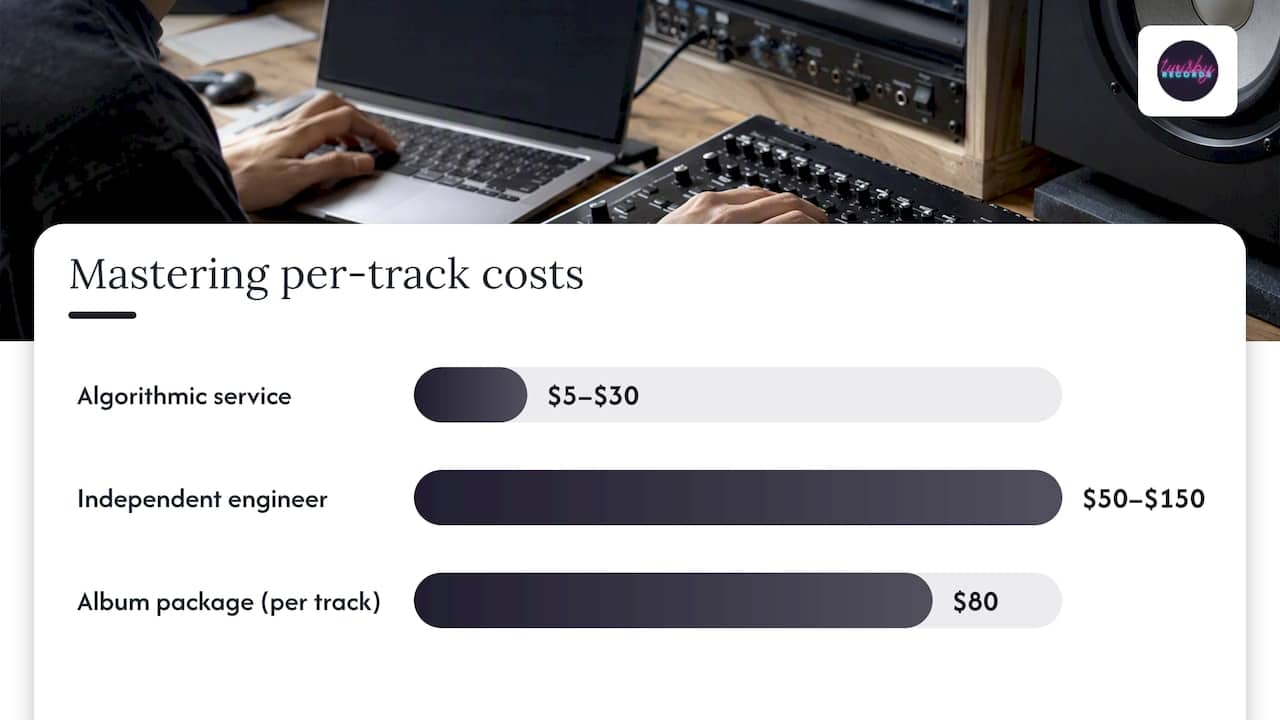
Most independent musicians pay between $50 and $150 per track for professional mastering, and that mid-range is where we’d point almost every indie artist working on a release they plan to promote. Algorithmic services run as low as $5 per track, while established studios charge $250 or more. For anything you’re putting your name on, the $50 to $150 band gets you a real engineer and a master that holds up across platforms. Keep reading for the full pricing breakdown and a budgeting checklist you can use today.
TL;DR:
- An engineer charging $100 per track may quote $800 for a 10 track album instead of $1,000, so request package pricing before budgeting.
- Algorithmic mastering costs $5 to $30 per track and suits demos or internal drafts; automated processing cannot diagnose clipping or tailor vocal treatment.
- For a single or EP you plan to promote, hire an engineer who checks translation across phones, cars, and headphones instead of trusting one system.
- Standard delivery takes 2 to 7 business days; rush service often takes 24 to 48 hours for an extra fee, so confirm deadlines before booking.
- Apple Digital Masters requires 24 bit PCM files at supported sample rates from 44.1 kHz to 192 kHz; confirm certification and encode checks are included.
Table of Contents
- Mastering Prices Per Track, Per Project, and the Algorithmic Shortcut
- What Actually Drives Your Mastering Quote Up or Down
- DIY Mastering Versus Hiring a Professional
- Turnaround Times and What a Finished Master Should Include
- Apple Digital Masters and Streaming Loudness, Explained Simply
- A Budgeting Checklist for Your Next Mastering Quote
- Why 35 Years in the Studio Changes What You Get
- Where Your Budget Should Actually Go
- Mastering Services Built for Independent Artists
- FAQ
- Sources
Mastering Prices Per Track, Per Project, and the Algorithmic Shortcut
Mastering pricing splits into three rough tiers, and knowing which one you’re shopping in saves you from comparing apples to oranges.
The low tier covers algorithmic mastering platforms, usually costing just a few dollars per track. These services run your file through an automated process in minutes, which makes them genuinely useful for demos, rough mixes you’re sharing with a band, or early drafts you want to hear “finished” before committing money. The tradeoff is consistency: an algorithm can’t tell the difference between a vocal that needs gentle lift and one that’s clipping, so it treats both the same way.
The mid tier is where independent engineers live, typically $50 to $150 per song. This is the range we’d recommend for most singles, EPs, and albums headed to Spotify, Apple Music, or physical release. You’re paying for a trained ear that listens to your specific mix and makes decisions a script can’t.
The high tier is established studios and mastering houses, often charging premium rates per track. You’re paying for a name, a legacy client list, and sometimes analog gear that costs more than a used car.
Here’s how those tiers play out across common release formats:
- Single (1 track): $50 to $150 with an independent engineer, or $5 to $30 through an algorithmic service for a quick draft.
- 4-track EP: a moderate total fee at mid-tier rates, sometimes with a small per-track discount for bundling.
- 10-track album: a moderate total fee at mid-tier pricing, though many engineers offer package rates that reduce the per-track cost compared to booking songs individually.
Bulk pricing matters here. An engineer charging $100 per track individually might offer a 10-track album for $800 instead of $1,000, since mastering a full project in one sitting lets them keep tonal consistency across the tracklist without re-learning your sound each session. If you’re budgeting for an EP or album, ask about package rates before you assume you’re paying the per-single price times your track count. For a deeper look at how packages get structured, our pricing mechanics breakdown covers the variables that shift a quote up or down.
What Actually Drives Your Mastering Quote Up or Down
Two mixes can look identical on paper and still get wildly different quotes. The difference almost always comes down to a handful of factors.
- Corrective work versus polishing: a mix with harsh frequencies, uneven levels, or phase issues takes longer to fix, and engineers charge for that time.
- Stems versus a stereo bounce: sending individual stems instead of a finished stereo mix gives an engineer more control, but it also means more setup time, which usually raises the price.
- Analog gear and engineer reputation: outboard compressors and EQs, along with an engineer’s track record, tend to sit at the premium end of pricing.
- Rush fees and revision policies: a 24-hour turnaround request often carries a surcharge, and unlimited revisions cost more to offer than a one-or-two-round policy.
A mix that arrives clean, properly leveled, and free of major problems lets an engineer spend their time on creative polish instead of repair work, which is usually reflected in a lower, faster quote.
Pro Tip: Send a rough mix for a quick listen before you commit to stems. Many engineers will tell you upfront whether a stereo master will work fine or whether stems are worth the extra cost.
DIY Mastering Versus Hiring a Professional
Plugin-based mastering tools have improved enough that a careful DIY pass can sound decent on a single playback system. The problem is translation: a track that sounds great on your studio monitors can fall apart on a phone speaker, a car stereo, or wired earbuds, and catching that gap takes trained ears and reference experience most bedroom producers haven’t built yet. Professional mastering, by contrast, focuses on exactly that kind of consistency across devices and contexts rather than simply pushing a track louder, as engineers in the field describe the process.
Here’s a simple way to decide which route fits a given project:
- Demos and internal drafts: DIY mastering with a solid plugin chain is fine. Nobody outside your circle needs to hear a polished version yet.
- Singles or EPs you plan to promote: hire a professional. You’re about to spend money on ads, playlist pitching, or release promotion, and a thin or inconsistent master undercuts that spend.
- Full-length albums for commercial release: professional mastering almost always pays for itself here, since consistency across a 10 or 12-track sequence is hard to achieve with ears that have been staring at the same mix for weeks.
The rule of thumb we’d give any independent artist: save your money on anything that stays in your hard drive, and spend it on anything that’s about to meet an audience.
Turnaround Times and What a Finished Master Should Include
Standard mastering turnaround runs anywhere from 2 to 7 business days, depending on the engineer’s queue and how many tracks you’ve sent. Rush turnaround, often 24 to 48 hours, typically carries an added fee since it means bumping your project ahead of someone else’s.
When a master comes back, you should expect a specific set of deliverables, not just a single file:
- 24-bit WAV master, the standard format for distribution and archiving.
- Alternate masters for streaming platforms, adjusted for how each service handles loudness normalization.
- Stems, if you requested them or might need them later for sync licensing or remixes.
- Sample-rate guidance matching your distributor’s requirements, so you’re not reformatting files yourself after delivery.
Asking for distribution-ready masters upfront, rather than a single generic file, saves you a round of back-and-forth once your distributor flags a format issue. Our guide to realistic mastering timelines breaks down how to plan a release date around these windows.
Apple Digital Masters and Streaming Loudness, Explained Simply
Apple Digital Masters requires source files to be 24-bit PCM at a supported sample rate, ranging from 44.1 kHz up to 192 kHz, and Apple provides specific tools engineers use to verify the encode, including afclip and AURoundTripAAC for checking clipping and comparing the original against the encoded version. Not every mastering engineer builds this check into their process by default, so it’s worth confirming.
Apple’s own documentation specifies these tools and the minimum 24-bit standard as part of preparing masters for Apple Music, which is why asking about Apple Digital Masters support upfront matters more than it might seem.
Loudness normalization adds another layer. Spotify and other platforms adjust playback loudness automatically, which means chasing one specific LUFS number stops mattering as much as it did in the pre-streaming era. Normalization behavior varies by platform and can even be toggled by the listener, so the smarter target is musical balance, not a single loudness figure.
A few practical steps to raise with your engineer:
- Confirm whether Apple Digital Masters certification is included or billed separately.
- Ask which reference LUFS range they aim for and why.
- Request alternate masters if you’re distributing to multiple platforms with different normalization behavior.
Our breakdown of Apple Digital Masters requirements walks through the full technical checklist if you want to go deeper before your next session.
A Budgeting Checklist for Your Next Mastering Quote
Budgeting for mastering gets easier once you’ve got a formula and a short list of questions ready to send.
Quick formula: take your track count, multiply by your chosen engineer’s per-track rate, then subtract any bundle discount they offer for EPs or albums.
Before you commit to an engineer, send these questions:
- What deliverables are included: how many file formats, and are streaming-specific masters part of the package?
- How many revision rounds are included, and what does an extra round cost?
- Is Apple Digital Masters certification included or an add-on?
- What’s your standard turnaround, and what does a rush request cost?
- Do you charge differently for stems versus a stereo bounce?
Pro Tip: Bounce your mix with at least -6 dB headroom, disable any limiter on your master bus, and include one or two reference tracks. Mixes that arrive this way usually move through mastering faster, since the engineer spends less time undoing a limiter you already applied.
For mixing-specific prep before you even get to mastering, our notes on mixing for streaming cover headroom and level targets in more detail.
Why 35 Years in the Studio Changes What You Get
Mastering quotes vary partly because experience varies. We’ve spent more than 35 years working with independent and DIY artists, and that time shows up in how quickly we can hear what a track actually needs instead of running it through a generic preset.
Being Apple Digital Masters certified means every master we deliver has already gone through the encode checks Apple’s own tools are built for, so you’re not finding out about a clipping issue after your release is live.
A few things that come from working this way:
- Personalized workflows instead of a one-size-fits-all chain applied to every file that comes in.
- Clear deliverables up front, so you know exactly what file formats and alternate masters you’re getting before you pay.
- Fewer surprises at distribution, since Apple-ready masters and streaming-specific versions are built into the process rather than requested as an afterthought.
That combination is what keeps artists from paying twice: once for a master, and again for the fixes a distributor flags later.
Where Your Budget Should Actually Go
A mix that needs a lot of corrective work eats into the mastering portion fast, since more of that budget goes to fixing problems instead of polishing a finished product.
Here’s the part artists underestimate: mastering spend matters most on the release you’re about to promote, not the one sitting in a folder. Spend less on anything that isn’t going public yet, and put real money behind the track that’s about to carry an ad budget or a playlist pitch. A great master on a song nobody hears is wasted money, and a mediocre master on a song you’re paying to promote undercuts everything else in the campaign. If you’re planning promotion alongside a release, it’s also worth understanding music licensing basics for any short-form video content tied to your rollout, since usage rights questions tend to surface right around the same time as mastering decisions.
— Kreg
Mastering Services Built for Independent Artists
We handle mastering the way we’d want it handled for our own releases: one flat rate, real engineers, and Apple Digital Masters certification built into every project rather than sold as an upsell. Our mastering service starts at $50 per track and includes the turnaround windows, deliverables, and revision structure covered above, so you know what you’re getting before you send a file.

If you’re also planning release promotion, our advertising packages are built to pair with a finished master once it’s ready. Get a mastering quote and we’ll tell you exactly what your project needs.
FAQ
Can ChatGPT mix and master a song?
ChatGPT itself doesn’t process audio, so it can’t mix or master a track directly. Some algorithmic mastering platforms use automated processing similar in spirit to AI tools, and these can work for quick drafts, but they lack the ear-to-ear judgment a trained engineer brings to a finished release.
Is mastering a song worth it?
For any track you plan to release or promote, yes: mastering ensures your song translates consistently across phone speakers, car stereos, and headphones rather than sounding great on only one system. Professional mastering is a creative and technical process built around that consistency across playback systems, which is why it tends to matter most on commercial releases.
How long should mastering take?
Standard turnaround typically runs a few business days, with rush options available for an added fee when you need a faster delivery. The exact window depends on the engineer’s current workload and how many tracks are in your project.
Which is harder, mixing or mastering?
They require different skill sets rather than one being strictly harder than the other. Mixing involves balancing dozens of individual elements within a song, while mastering requires a trained ear for how a finished track will translate across different playback systems and platforms.
Sources
- Apple Video and Audio Asset Guide
- Apple Music – Apple Digital Masters
- Spotify support: Loudness normalization
- GRAMMY: Behind the board — mastering explained