
Metadata is the embedded information that travels inside your audio file wherever it goes, from your hard drive to Spotify’s servers. It carries your title, artist name, ISRC, and dozens of other fields that determine whether a listener finds your song, whether a platform pays you correctly, and whether your name even shows up right. Before you upload anything, do three things: inspect your existing tags with a viewer like MetadataView, correct your artist, title, and ISRC fields so they match your official release info, and embed cover art directly into the file rather than leaving it as a separate attachment.
Here’s the fast version of what to check first:
- Open the file in a tag inspector or an editor like Mp3tag to see what’s already there.
- Fix spelling and formatting on artist, title, and album so they match across every track.
- Confirm the ISRC is present and correct. Check the Id3 standard if you’re unsure which frame it belongs in.
- Embed artwork at the file level instead of relying on a folder image.
Key Takeaways
Clean, consistent metadata directly determines whether your music gets discovered correctly and whether you get paid accurately for it.
| Point | Details |
|---|---|
| Metadata has three types | Descriptive, ownership, and recommendation metadata each serve different functions and only the first two are yours to control directly. |
| Match container to format | MP3 uses ID3, FLAC/Ogg uses Vorbis Comments, M4A uses MP4 atoms, and WAV uses RIFF/BWF. |
| Favor ID3v2.3 for delivery | Older players and some distributor pipelines handle ID3v2.3 more reliably than ID3v2.4. |
| Consistency prevents split listings | Use one canonical spelling for artist names and one format for “feat.” across every release. |
| ISRCs protect royalties | A missing or malformed ISRC can delay or misdirect payment tracking across platforms. |
Table of Contents
- What Music Metadata Actually Does (And the Three Types That Matter)
- File Formats and the Metadata Standards Behind Them
- How to Check What’s Already in Your Files
- Editing Your Metadata: Single Files vs. Batch Workflows
- Metadata Mistakes That Actually Cost You Streams and Royalties
- Your Pre-Release Metadata Checklist
- How Twisby Records Handles Metadata (And When to Bring in Help)
- Keeping Your Metadata Consistent Across Platforms and Devices
- Ready to Release With Confidence? Let Twisby Records Handle the Details
- Standards and Tools Worth Bookmarking
- What Independent Artists Get Wrong About Metadata
- Sources
- FAQ
What Music Metadata Actually Does (And the Three Types That Matter)
Music metadata splits into three functional categories, and mixing them up is where most independent artists get into trouble.
Descriptive metadata is the information you enter yourself: title, artist, album, track number, genre, release date, songwriter, and composer credits. This is the layer that identifies your work and, when it’s wrong, causes duplicate or misattributed listings across streaming platforms. Distinguishing descriptive metadata from what platforms generate later matters because accurate descriptive tags give services the correct raw material to work from, according to Soundcharts’ metadata guide.
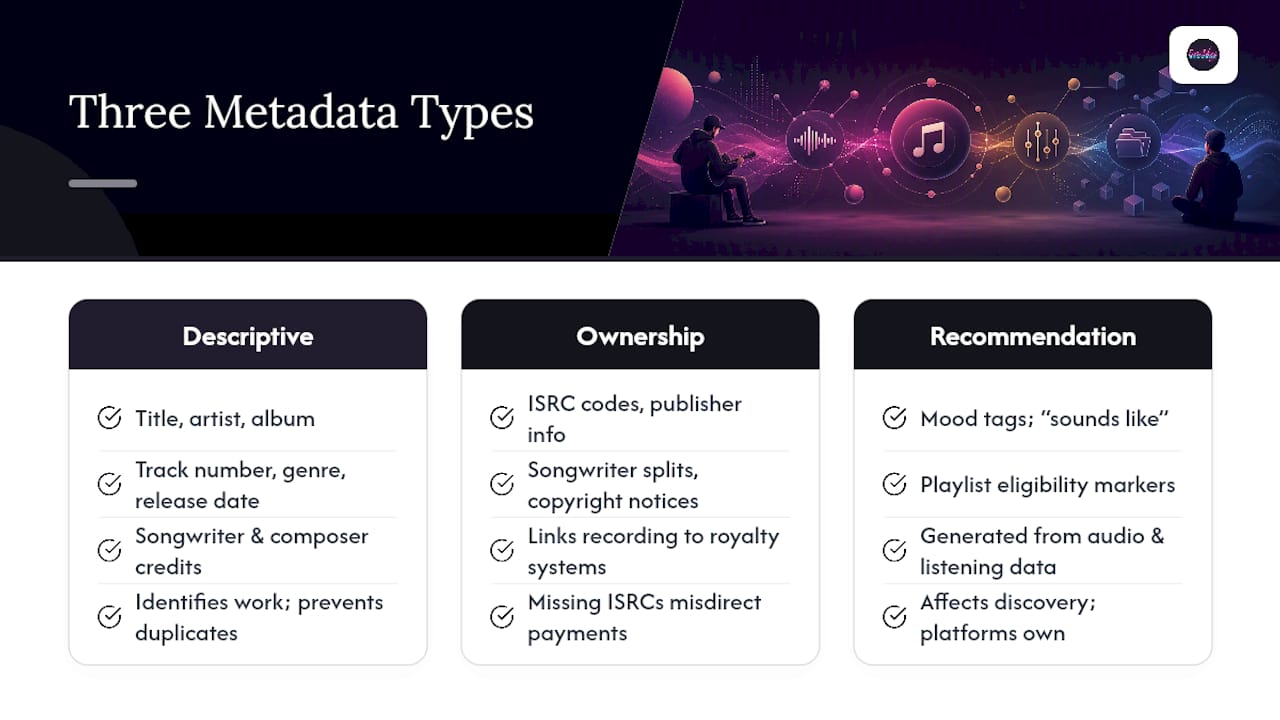
Ownership and rights metadata covers ISRC codes, publisher information, songwriter splits, and copyright notices. This layer connects your recording to royalty systems. A missing or malformed ISRC doesn’t just look sloppy. It can delay or misdirect payments because performance rights organizations and distributors use that code as the primary identifier for tracking plays. If you haven’t set up ISRCs for a release yet, our guide on getting ISRC codes right walks through the process, and understanding how royalties actually flow helps too, which we cover in music’s legal secrets.
Recommendation metadata is the layer you don’t control directly. Streaming services generate mood tags, “sounds like” associations, and playlist eligibility markers based on listening behavior and audio analysis, not on anything you type into a tag editor. You influence it indirectly, by making sure your descriptive metadata is clean enough for the platform’s systems to categorize the track correctly in the first place.

The practical takeaway: creators and distributors own descriptive and ownership metadata. Platforms own recommendation metadata. Spend your effort on the first two, because that’s where errors actually cost you streams and money.
File Formats and the Metadata Standards Behind Them
Every audio format wraps metadata differently, and knowing which standard applies to your file keeps you from losing fields when you convert or upload.
MP3 files use ID3 tags, currently either version 2.3 or 2.4, embedded directly in the file header, according to the Library of Congress’s format documentation. FLAC and Ogg files use Vorbis Comments, a simpler key-value system. M4A and AAC files (the Apple ecosystem format) rely on MP4 atoms, a different structural approach entirely. WAV files use the RIFF container, and broadcast-oriented workflows sometimes add BWF (Broadcast Wave Format) chunks for extended metadata support.
Here’s where it gets tricky for independent releases:
- MP3 → ID3v2.3 or ID3v2.4 (frame-based structure, defined in the ID3v2.4.0 specification)
- FLAC/Ogg → Vorbis Comments (plain text key-value pairs)
- M4A/AAC → MP4 atoms (proprietary-style tagging, iTunes-derived)
- WAV/BWF → RIFF chunks, less standardized across software
ID3v2.3 vs. ID3v2.4 is the compatibility question that trips up the most artists. ID3v2.4 supports more flexible frame types and better Unicode handling, but many legacy players and some distributor ingestion systems still parse it inconsistently. Mastering and distribution workflows commonly default to ID3v2.3 for exactly this reason: broader compatibility wins over newer features when you don’t know exactly which system will read the file next.
Fields also get lost or reshuffled when you convert between formats. A composer credit sitting in an ID3v2.4 frame doesn’t map perfectly to a Vorbis Comment field, and some conversion tools silently drop anything they don’t recognize. If you’re weighing WAV against MP3 for delivery, our breakdown of what artists get wrong about file formats covers the practical side of that decision. The rule of thumb: tag your master file last, after any format conversion, not before.
How to Check What’s Already in Your Files
You can’t fix metadata you haven’t looked at, and the good news is that inspecting it doesn’t require touching your audio data at all.
Trustworthy inspection tools fall into two camps. For a quick visual check, MetadataView reads tags and technical fields, including artwork, ISRC, bitrate, and sample rate, straight from your browser without altering the audio frames. Mp3tag does similar work as a desktop GUI, and it’s the tool most independent musicians end up using daily because it also edits. For developers or anyone comfortable with a bit of code, libraries like music-metadata and TagLib parse tags programmatically, which matters when you’re checking dozens of files at once.
A basic inspection workflow looks like this:
- Open the file in an inspector (web-based or desktop).
- Note which tag version is present. ID3v2.3, ID3v2.4, Vorbis Comments, or MP4 atoms.
- Check the core fields: title, artist, album, track number.
- Verify the ISRC field is populated and correctly formatted.
- Confirm artwork is embedded, not just linked externally.
- Check technical fields like bitrate and sample rate against your intended master specs.
Use a GUI tool like Mp3tag or MetadataView when you’re spot-checking a single release. Switch to a developer library like music-metadata when you’re verifying a back catalog of fifty or a hundred tracks before a bulk distribution push. Trying to eyeball a hundred files one by one in a viewer is where mistakes slip through.
Pro Tip: Run your inspection before AND after any file conversion or export. Fields that looked fine in your DAW’s export sometimes vanish once the file passes through a distributor’s encoding pipeline.
Editing Your Metadata: Single Files vs. Batch Workflows
Before you touch an editor, gather everything you need in one place: your tracklist with exact spellings, ISRCs for each track, songwriter and publisher splits, and your final cover art file. Editing metadata with incomplete information just means you’ll be back in the same tool next week fixing it again.
For a single file, open it in Mp3tag or a comparable editor like Kid3:
- Load the file and review the existing fields.
- Correct the core tags: title, artist, album, track number, genre.
- Embed the artwork directly (drag the image file into the artwork panel rather than linking it).
- Set the ID3 version explicitly. Choose v2.3 if the file is heading to external partners or older playback systems.
- Save and reopen the file to confirm the changes stuck.
For a batch of tracks, the workflow shifts to templates and lookups. Mp3tag supports filename-to-tag parsing, so if your files are named consistently (01 - Artist - Title.mp3), you can convert that pattern into structured tags across dozens of files in one pass. Both Mp3tag and MusicBrainz Picard can pull metadata from the MusicBrainz database, which is especially useful for compilation albums where manually retyping forty tracks’ worth of credits invites typos.
A few things to get right when writing ownership data into tags:
- ISRCs and composer or publisher credits have specific native frame names that differ by container. ID3 uses frames like TSRC for ISRC, while Vorbis Comments and MP4 atoms use their own field names. A common metadata mapping table shows how these map across formats.
- Double check that your ISRC didn’t get truncated or reformatted during a batch import. It happens more often than you’d expect.
- Keep a master spreadsheet of your official credits so every edit pulls from the same source, not memory.
Pro Tip: After any batch edit, run a spot check with music-metadata or reopen a handful of files in your inspector. A parser will catch a malformed tag type that a visual glance in a GUI editor might miss.
Once you’ve made your edits, validate them. Reopen the files in an inspector and confirm the fields read back correctly, and if you edited in bulk, run a quick programmatic parse to catch anything that silently failed.
Metadata Mistakes That Actually Cost You Streams and Royalties
Small inconsistencies in your tags create real problems once a track leaves your hands. Broken or inconsistent metadata damages discovery and royalty allocation, which is exactly why Soundcharts flags accuracy and consistency as non-negotiable before release.
Consistency is the rule that saves you the most trouble. If your artist name shows up as “The Band” on one track and “the band” or “Band, The” on another, streaming platforms and PROs may treat those as different entities. The same goes for “feat.” versus “ft.” versus “featuring.” Pick one format and use it on every release, forever.
Common mistakes worth naming directly:
- Typos in the artist or title field that only surface after the release is live and hard to change.
- Treating the ISRC as optional or reusing one across different versions of the same song (a remix needs its own code).
- Copying distributor-only metadata (like internal catalog numbers) into embedded tags where they don’t belong and confuse other systems.
- Skipping songwriter and publisher fields entirely, which delays royalty processing even when the recording itself is properly tagged.
On compatibility: default to ID3v2.3 for MP3 files unless a specific partner asks for v2.4. Embed cover art at a size appropriate for streaming platforms, so it doesn’t get rejected or awkwardly cropped downstream. And treat your canonical spelling of your own artist name as fixed. Write it once, correctly, and copy it everywhere to maintain consistency rather than retyping it.
The fields that most directly affect royalties are ISRC, songwriter and publisher credits, and copyright ownership lines. Get those right first. Genre and mood tags matter for discovery, but they won’t delay a payment the way a missing ISRC will.
Your Pre-Release Metadata Checklist
Run through this before you send anything to a distributor, label, or collaborator. It takes five to ten minutes.
- Confirm title, artist, and album fields are spelled exactly as you want them credited, everywhere.
- Check track and disc numbers if this is part of an album or multi-disc release.
- Verify the ISRC is present and correctly formatted for every track.
- Confirm composer, publisher, and copyright fields are filled in.
- Set your release date field to match your actual release date.
- Flag explicit content accurately if applicable.
- Check the file format, sample rate, and bit depth against your delivery specs.
- Confirm artwork is embedded (not just attached separately) and sized correctly.
- Open the file in MetadataView or a similar inspector for a final visual check.
- For multiple releases at once, run a programmatic parse to catch outliers before upload.
How Twisby Records Handles Metadata (And When to Bring in Help)
Twisby Records has spent decades mixing and mastering independent releases, and metadata vetting is a standard part of that mastering process, not an afterthought tacked on at the end. Every master that carries Apple Digital Masters certification goes through a check that includes embedding persistent identifiers correctly and confirming credits line up with what the songwriter and publisher actually agreed to.
Metadata problems rarely show up as a big obvious error. They show up three months later as a royalty statement that doesn’t match what you expected, or a track that split into two separate listings because one platform read the artist name differently than another.
That’s the pattern worth watching for. Small formatting inconsistencies compound quietly until they cost you money or visibility.
Pro Tip: If your release involves multiple songwriters, sample clearances, or a multi-disc compilation, get a second set of eyes on the credits before you lock the metadata. Complexity is where errors hide.
DIY tagging works fine for a solo single with straightforward credits. Hiring a managed service makes more sense once you’re dealing with split credits across several collaborators, a release scaled across an EP or album, a tight deadline, or simply wanting someone else to guarantee the details are right before it goes out publicly.
Keeping Your Metadata Consistent Across Platforms and Devices
Your metadata doesn’t stay put once you upload it. Spotify, Apple Music, YouTube Music, and your local device library each parse and sometimes re-render your tags independently, and that’s where consistency problems resurface even after you thought you’d fixed everything.
A distributor typically ingests your file once and pushes it to multiple platforms, but each platform’s backend may reformat certain fields for its own display purposes. Genre tags might get remapped to a platform-specific taxonomy. Artist names might get normalized against an existing profile if one already exists in that platform’s system, which is exactly why a single canonical spelling matters more than it seems like it should.
Devices add another layer. A phone’s local music library, a car’s Bluetooth display, and a smart speaker’s voice assistant may each read a different subset of your embedded tags, and older hardware sometimes only recognizes ID3v2.3 fields, ignoring anything written exclusively in v2.4 syntax. This is the practical reason compatibility-first tagging beats chasing the newest standard.
The most reliable way to keep everything aligned is to treat your tagged master file as the single source of truth. Don’t manually edit metadata separately on each platform’s artist dashboard if you can avoid it. Fix it once at the file level, before distribution, and let that file propagate outward. When you do need to make a correction after release, update the master file’s tags first, then push the correction through your distributor rather than patching each platform’s listing individually.
Ready to Release With Confidence? Let Twisby Records Handle the Details
Getting metadata right is one piece of a much bigger picture, and once your tags are clean, the next challenge is making sure the right listeners actually hear the track. Twisby Records pairs mastering that includes metadata vetting with targeted advertising campaigns built specifically for music releases, covering audience research, Facebook and Instagram ad management, and custom landing pages designed to convert listeners into fans. If you’d rather spend your time writing songs than debugging ID3 frames, that’s exactly the gap Twisby Records exists to fill.
Standards and Tools Worth Bookmarking
For deeper reference, the ID3v2.4.0 specification documents the full frame structure behind MP3 tagging. Mp3tag remains the most practical GUI editor for batch work, while MusicBrainz offers persistent identifiers and metadata lookups for compilations. Developers should look at TagLib and music-metadata for programmatic parsing, and MetadataView works well for quick, no-install inspection.
What Independent Artists Get Wrong About Metadata
Most advice on this topic treats metadata like a form to fill out once and forget. That’s backward. The fields that matter most, ISRC and composer credits, are the ones most likely to be left half-finished because they feel administrative rather than creative, and they’re exactly the fields tied to whether you get paid on time.
The conventional wisdom also overrates chasing the newest tag version. ID3v2.4 has better Unicode support and more flexible frames on paper, but in practice, if you’re delivering to distributors, labels, or older playback systems, ID3v2.3’s broader compatibility matters more than any feature ID3v2.4 offers. Studio workflows that handle a high volume of releases lean toward v2.3 for exactly this reason, and independent artists tagging their own work should follow the same logic rather than assuming newer automatically means better.
If you do only one thing before your next release, verify your ISRC and your songwriter credits are correct and embedded. Everything else, genre tags, mood descriptors, cover art sizing, matters, but none of it delays a royalty check the way a broken ISRC does.
Sources
- Mp3tag — metadata editor
- Audio Metadata Viewer — MetadataView
- The Ultimate Guide to Music Metadata — Soundcharts
FAQ
How Do I Find the Metadata for a Music File?
Open the file in a tag inspector such as MetadataView or a desktop editor like Mp3tag, both of which display embedded fields like title, artist, ISRC, and technical details without altering the audio itself.
How Can I See the Metadata of an Audio File Without Editing It?
Use a read-only viewer like MetadataView, which reads tags and technical fields from MP3, FLAC, M4A, and WAV files without touching the audio frames, making it safe for a quick check before you commit to any edits.
Do MP3 Files Have Metadata?
Yes. MP3 files store metadata using ID3 tags, currently in version 2.3 or 2.4, embedded directly in the file header alongside the audio data.
Can You Give an Example of Music Metadata?
A typical example includes the track title, artist name, album, track number, genre, release date, ISRC code, and songwriter or publisher credits, all embedded directly in the audio file so they travel with it across platforms and devices.