

Use an Engagement campaign, set conversion location to Website, and optimize for your smart link click. That single setup drives more real streams than any other objective in Meta’s toolkit for most independent artists. The one exception: if your pixel already has meaningful history on Sales, keep that objective. Switching resets what Meta has learned about your audience, and that permanence is baked into how Meta’s ODAX framework works.
TL;DR:
- Using an Engagement campaign optimized for website conversions and set to smart link clicks typically yields the best streaming results for independent artists.
- Switching objectives mid-campaign resets Meta’s learning process, so it is crucial to choose the correct goal before launching and avoid changes until testing concludes.
- Running a series of retargeting stages from awareness to engaged visitors helps build a warmer audience and improves conversion efficiency without overextending budget.
- Creative should focus on the first three seconds with direct calls to action and autoplay landing pages, while audiences should be built based on prior engagement and interest levels.
- A modest daily budget of around $10-25 can produce useful initial data, but at least a week of consistent running is necessary to exit the learning phase and gather reliable results.
Table of Contents
- What are Meta’s ODAX objectives and how do they fit music campaigns?
- Why engagement to website conversions beats sales and traffic for streaming
- How to set up an engagement campaign for smart link streams
- How to sequence objectives across cold, warm, and hot audiences
- What to measure and how to troubleshoot weak results
- Kreg and Twisby Records on running these campaigns
- Get your streaming campaign built by people who run this daily
- Sources
- FAQ
What are Meta’s ODAX objectives and how do they fit music campaigns?
Meta simplified its ad objectives into six choices under the Outcome-Driven Ad Experiences framework, and each one trains a different optimization model behind your campaign. Pick the wrong one and you’re not just wasting a setting, you’re asking Meta’s algorithm to find the wrong kind of person.
Here’s what each objective actually optimizes for, and where it fits (or doesn’t) in music marketing:
- Awareness: optimizes for reach and ad recall; good for seeding a new cold audience with your artist name and sound, but it won’t push anyone toward a stream.
- Traffic: optimizes for link clicks or landing page views; useful once you have a warm audience, but weak as a first touch because clicks don’t equal listens.
- Engagement: optimizes for interactions, video views, or a website conversion event when you set conversion location to Website; this is the workhorse for smart link campaigns because it can chase a specific on-site action.
- Leads: optimizes for form completions; almost never relevant to streaming promotion since you’re not collecting contact information to get someone to press play.
- App Promotion: optimizes for app installs or in-app events; only relevant if you’re driving people to install Spotify or another app directly, which most smart link funnels don’t require.
- Sales: optimizes for purchase or checkout events; built for e-commerce volume, not for a listener clicking through to a free stream.
The objective you choose determines the optimization model Meta builds around your ad set, and that choice is locked in at campaign creation. According to Meta’s own ODAX documentation, changing objectives mid-campaign isn’t an option: you have to rebuild the campaign from scratch, which means restarting the learning phase and losing whatever signal you’d already built.
That’s the part musicians overlook. You’re not just picking a label for your campaign, you’re picking the lens Meta uses to decide who sees your ad.
Why engagement to website conversions beats sales and traffic for streaming
Streaming is a low-commitment action. A listener taps a link, lands on a smart link page, and presses play, often without thinking twice. That behavior looks nothing like a purchase decision, which is why objectives built around Sales or Leads tend to underperform for music. Those objectives optimize for people who show buying intent: adding to cart, entering payment details, submitting a form. A person who streams your single on impulse rarely fits that profile, and Meta’s algorithm knows it.
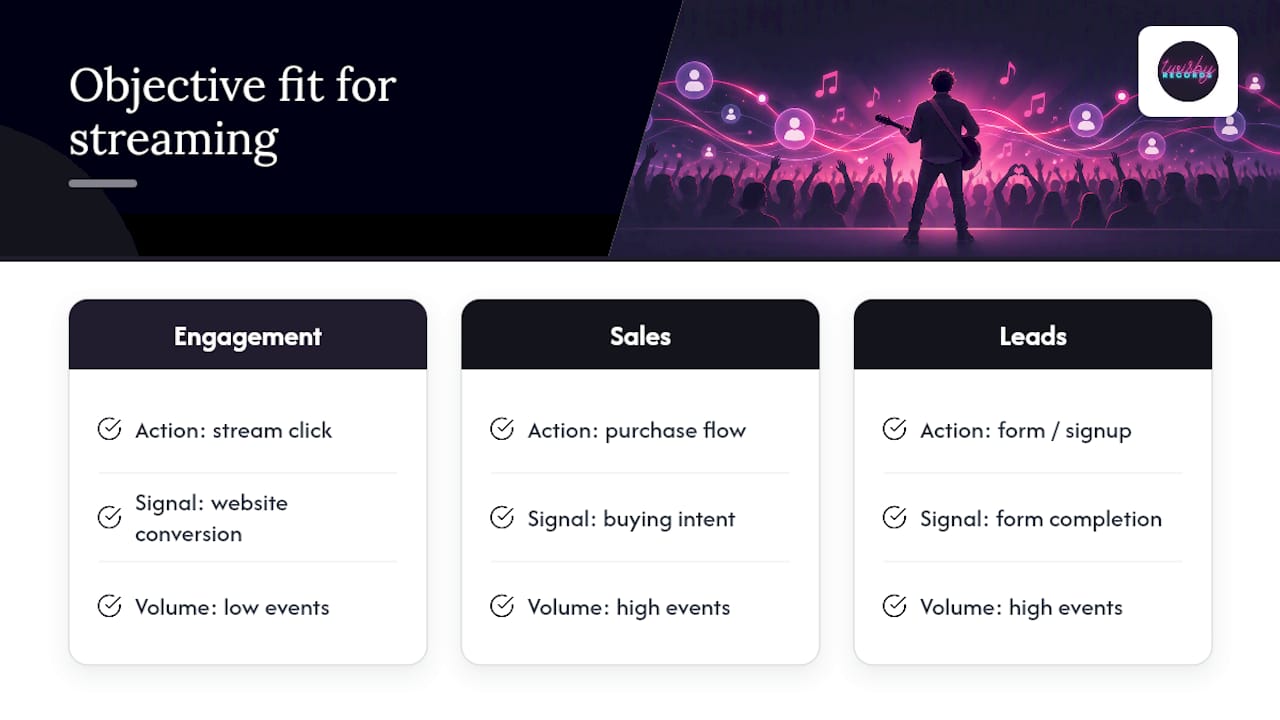
HubSpot’s breakdown of Facebook campaign objectives notes that Sales-optimized campaigns typically need a real volume of weekly conversion events to optimize efficiently, since Meta needs enough data points to recognize a pattern. Most emerging artists don’t generate that volume from a single release, so the algorithm never gets enough signal to learn who actually converts.
Statistic Callout: The permanence problem. Meta’s ODAX framework consolidated ad objectives into six fixed categories specifically so each one maps to one optimization model, and switching objectives requires rebuilding the campaign entirely. That single design choice is why picking the right objective on day one matters more than tweaking it later.
Engagement solves this by targeting a website conversion event instead of a hard sale. You can still point it at your smart link click, which means Meta optimizes toward people who take that exact low-friction action rather than people who look like typical shoppers. Practitioner guides focused specifically on music marketing, including one Music Marketing Monday breakdown, recommend this exact configuration for Spotify and other streaming smart link campaigns because it’s the closest match between what the objective optimizes and what a listener actually does.
Pro Tip: Never switch objectives mid-test just because early results look slow. Give the ad set its full learning window first, or you’ll reset the exact signal you’re trying to build.
How to set up an engagement campaign for smart link streams
Here’s the exact build, step by step, so you’re not guessing inside Ads Manager.
- Choose Engagement at the campaign level and set the conversion location to Website. This tells Meta you want optimization based on an on-site action, not an app event or a lead form.
- Pick your optimization event at the ad set level. Use the specific smart link action, usually a button click or a landing page view event, rather than a generic engagement metric.
- Set audience temperature deliberately. Cold audiences should be broad interest or lookalike based; warm audiences should be built from prior video viewers or page visitors.
- Choose automatic placements unless you have a specific reason to restrict them, since limiting placements early can starve the algorithm of volume during learning.
- Install the Meta Pixel and Conversions API together, not just the pixel alone. CAPI backs up browser-based tracking when a listener’s browser blocks cookies, which is common with third-party DSP redirects.
- Register your smart link click as a custom conversion event in Events Manager, and confirm it’s firing correctly with the pixel helper tool before you spend a dollar on the campaign.
- Build creative around a hook in the first three seconds. Vertical video that leads with sound, not a logo screen, holds attention long enough for Meta to register a genuine view.
- Write a direct call to action like “Stream it now” rather than something vague, and make sure your landing page has one obvious button, ideally with autoplay enabled so the transition from ad to listen feels instant.
- Start with a modest daily budget and let the ad set run at least a week before judging results, since Meta needs time and event volume to exit the learning phase.
Pro Tip: Keep creative constant while you test audiences, or keep audiences constant while you test creative. Changing both at once makes it impossible to know what actually moved the needle.
Twisby Records covers the pixel and CAPI mapping in more detail in a step-by-step setup guide built specifically for musicians running Spotify campaigns.
How to sequence objectives across cold, warm, and hot audiences
A single objective rarely carries an entire campaign. The stronger approach chains objectives together so each stage does one job.
- Top of funnel: run an Awareness or video-focused Engagement campaign against a broad cold audience to introduce your sound without asking for anything yet.
- Middle of funnel: retarget people who watched a meaningful portion of that video (guides commonly use 50% or 75% view thresholds) with an Engagement campaign optimized for the smart link click.
- Bottom of funnel: once you have a pool of people who clicked or visited the landing page, decide whether to keep Engagement running or shift to Traffic for a final push, depending on which produced cleaner data during the test window.
- Retargeting windows: a 14 to 30 day window usually captures people while your release is still fresh without stretching the audience too thin.
- Lookalike audiences: build these once you have a real base of engaged visitors rather than guessing from day one, since a lookalike built on thin data tends to underperform.
Music-specific playbooks, including guidance from DIY Musician, consistently recommend warming an audience with video or engagement before ever pushing toward a conversion ask. Jumping straight to a hard conversion objective with a brand-new cold audience is one of the most common ways independent artists waste budget. A sample funnel structure built specifically for modest release budgets is laid out in Twisby’s $50 test to verified presave funnel.
What to measure and how to troubleshoot weak results
These give you a clear picture of where people drop off between seeing your ad and actually streaming.
Statistic Callout: Genre, creative quality, and audience size all shift what a normal result looks like, so treat any published benchmark as a range, not a target. A detailed breakdown of expected creative retention and cost math for music ads walks through how those ranges shift by genre and format.
When results come in weak, work through this order before you touch the objective:
- Confirm the ad set has actually exited the learning phase, since early results are almost always noisy.
- Check for objective mismatch, meaning you optimized for an event that doesn’t match what you actually want (a page view instead of a button click, for example).
- Rule out creative fatigue by checking frequency; a climbing frequency with falling engagement usually means it’s time for a new hook.
- Look for audience overlap between ad sets, which can quietly split your budget against yourself.
Twisby covers the tracking side of this in more depth in a guide on tracking DSP clickouts with pixel and CAPI, which is worth a look if your event numbers look inconsistent between Ads Manager and your smart link provider’s own reporting.
Kreg and Twisby Records on running these campaigns
I’ve spent years watching independent artists burn budget on the wrong objective before ever reaching a listener. An experienced team has been mixing, mastering, and now advertising for DIY musicians for over 35 years, and that experience, with industry-recognized production standards shapes how we approach ad accounts too. Getting the mix right and getting the ad right are the same problem: precision beats guesswork.
On the advertising side, we handle pixel and CAPI installation, landing page builds, and full campaign management so an artist isn’t left configuring Ads Manager alone at midnight before a release. We build funnels the same way outlined above: warm audiences first, then convert, then measure honestly. If you want to see the technical side yourself, our pixel setup walkthrough and conversion tracking guide cover the exact steps we use internally.
— Kreg
Get your streaming campaign built by people who run this daily
Setting up an Engagement campaign correctly takes an afternoon the first time and a lot of trial and error before it clicks. Twisby Records runs this setup for artists every week, so you skip the learning curve entirely and start with a campaign built to convert clicks into real streams.
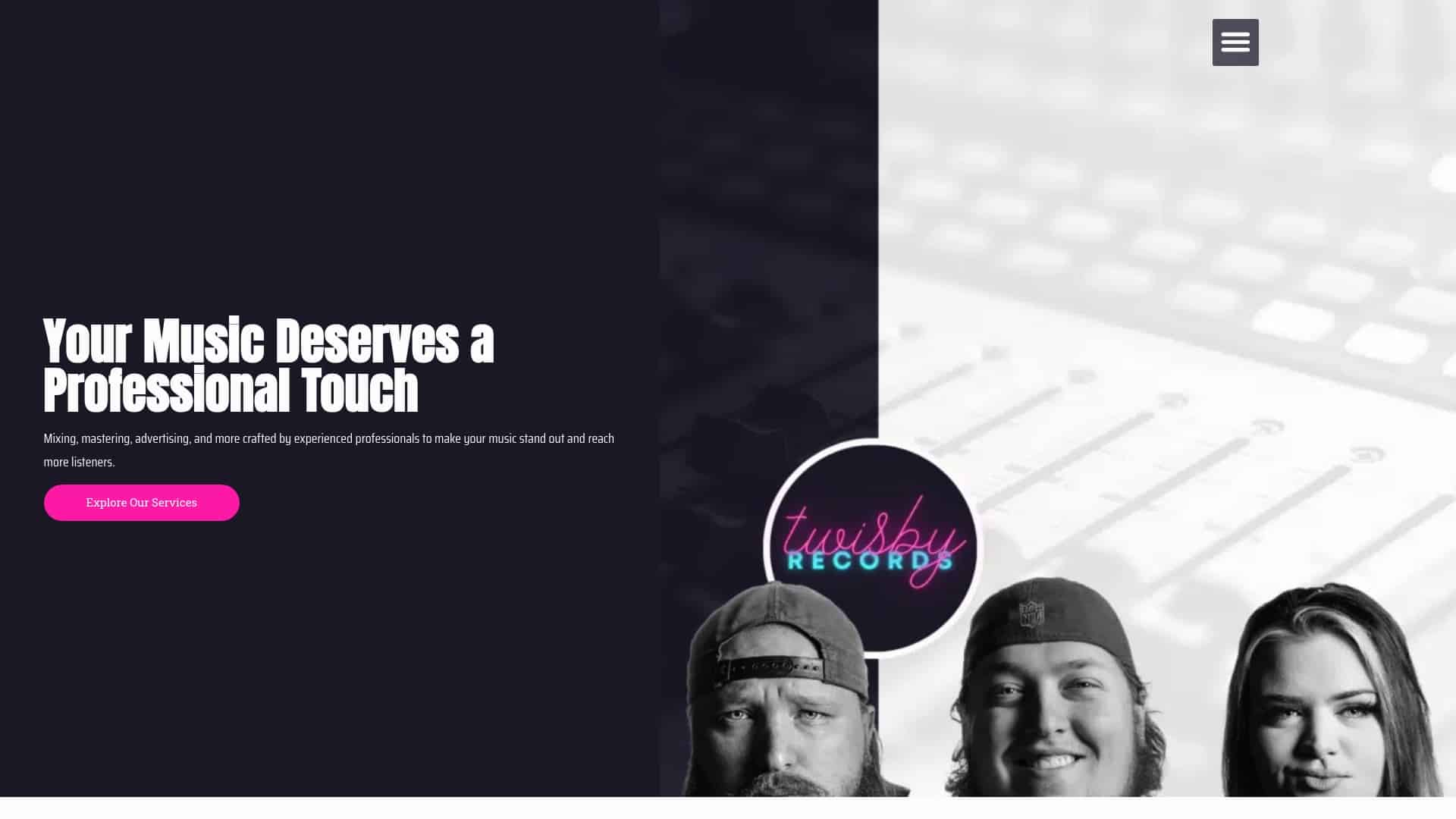
Our advertising services include Standard and Premium Packages, both covering pixel and CAPI installation, custom smart link landing pages, and ongoing reporting so you always know what’s working. The Standard Package runs $25 per month plus a 20% adspend fee, and Premium runs on a 20% adspend fee structure, with a one-time $99 onboarding fee to get your account, pixel, and landing page built correctly from the start.
This fits best if you’d rather hand off the setup and management to someone who does it daily instead of piecing it together yourself. If you’re also releasing new material, our mastering service at $50 one-off pairs naturally with a campaign launch, since a polished master gives your ad creative something worth clicking for.
Ready to get started: request a quote or explore the full advertising breakdown to see what’s included.
Sources
This article draws on Meta’s ODAX documentation, HubSpot’s guide to Facebook campaign objectives, and practitioner guidance from Music Marketing Monday and DIY Musician. Readers who want a structured course on this topic can also check Trinity Brotha Israel’s Facebook ads course for musicians.
- HubSpot: Facebook campaign objectives
- Which Campaign Objective To Use In Meta Ads For Music Marketing? – Music Marketing Monday
- Meta Ads 101: Promoting your music online — DIY Musician (CD Baby)
FAQ
Which Facebook ad objective should I choose for streaming?
For most independent artists driving traffic to a smart link, Engagement set to Website conversions and optimized for the smart link click is the strongest starting point. Keep that objective through your test window since Meta’s ODAX framework requires a full campaign rebuild to change it.
How can I promote my music on Facebook effectively?
Start by warming a cold audience with video or Engagement content before asking anyone to click through to a stream. Once you have a pool of engaged viewers, retarget them with a smart link click campaign, then measure landing page views and video retention to see where people drop off.
What is the best social media platform to promote music?
Facebook and Instagram, run through the same Meta Ads account, remain the most practical starting point for independent artists because of their targeting depth and smart link support. Some artists also compare results against YouTube, which our YouTube versus Facebook breakdown covers in more detail.
Is $10 a day enough for Facebook ads?
A modest daily budget can sustain a small Engagement test, though results depend heavily on your target audience size and creative quality. It’s usually enough to gather early learning-phase data, but expect to run it for a full week or two before drawing conclusions.









