
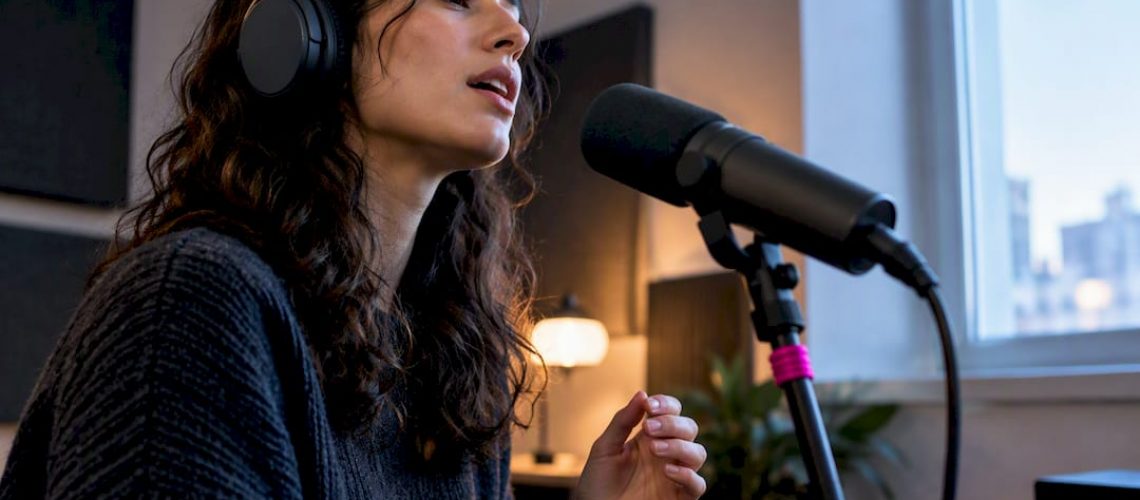

You need four things to record vocals remotely that a producer can actually use: a decent microphone matched to phantom power if it’s a condenser, a 24-bit audio interface with direct monitoring, closed-back headphones, and either a low-latency streaming connection or an agreed file-delivery spec. Once those are in place, record a 10 to 20 second test take at 48 kHz, 24-bit, and send the WAV before you commit to a full session. If you get stuck, experienced audio engineers can help you troubleshoot the setup before it costs you a session.
TL;DR:
- Using a 24-bit, 48 kHz WAV file with a clear naming convention is essential for efficient remote vocal project delivery.
- A dynamic microphone is preferable for untreated rooms, while condensers require a quiet, treated space for best results.
- Real-time tracking benefits from Sessionwire or Source-Connect, but file transfer is more reliable with poor or unstable internet connections.
- Local direct monitoring with zero-latency monitoring prevents pitch and timing issues caused by internet delay.
- Clear, timestamped communication with specific notes improves collaboration when visual cues are unavailable due to lag.
Table of Contents
- Essential gear and specs for a home singer setup
- Which remote tool fits real-time tracking, monitoring or file transfer?
- Room setup, monitoring, and handling latency without losing the take
- File specs, naming, and a quick QA check before you hit send
- A practical workflow for the actual recording session
- Fixing dropouts, sync problems, and other remote session headaches
- Keeping remote sessions synced to the producer’s DAW in real time
- Communicating clearly when you can’t see the same screen
- What we’ve learned producing vocals remotely
- How Twisby Records handles your remote vocal production
- Sources
- FAQ
Essential gear and specs for a home singer setup
The gear question has a simple answer once you know your room. A dynamic microphone, something in the Shure SM7B family or similar, rejects room noise and works well if you’re recording in an untreated bedroom or apartment. A condenser mic picks up more detail and air in the voice, but it also picks up your HVAC system, street noise, and every footstep upstairs, so it only makes sense in a quiet, at least partially treated space.
Your interface matters more than most beginners realize. At minimum, require 24-bit converters, selectable sample rates, 48V phantom power if you’re running a condenser, and direct monitoring with low enough latency that you don’t hear a slap-back delay in your headphones. The M-Audio AIR 192|4 and the PreSonus Studio 24c both hit these marks at an entry-level price, with 24-bit conversion and selectable rates up to 192 kHz. The M-Audio AIR 192|4 Vocal Studio Pro bundle goes a step further, packaging a condenser mic, headphones, and a shock mount so you’re not shopping piece by piece.
Round out the chain with closed-back headphones to prevent bleed into the mic, and treat the room where you can. Pillows, moving blankets, or a duvet hung behind you knock down the harsh reflections that make a vocal sound like it was recorded in a hallway. Our gear recommendations for home recording break down more options by budget.
- A dynamic mic suits untreated rooms; a condenser suits quiet, treated ones.
- Your interface needs 24-bit conversion, phantom power, and low-latency direct monitoring at minimum.
- Closed-back headphones stop mic bleed during tracking.
Pro Tip: Set your gain once during a warm-up take, mark the mic stand position with tape, and don’t touch either again mid-session.
Which remote tool fits real-time tracking, monitoring or file transfer?
Picking the right tool comes down to what job you’re actually doing, not which one has the flashiest feature list. Three categories cover almost every remote vocal scenario.
For live, collaborative tracking where a producer wants to direct the take in real time, Sessionwire and Source-Connect are the standard choices. Sessionwire supports studio-quality 48 kHz stereo streaming with talkback, video, screen sharing, and DAW plugin integration, and it lets guests join straight from a browser with no download required. Source-Connect handles real-time audio streaming and synchronization at a professional level, but its own documentation flags that both sides typically need compatible versions and Network Access to connect reliably.
For a producer who just needs to hear what’s happening in someone else’s DAW, without full two-way tracking, Audiomovers’ Listento is built for exactly that. It streams high-resolution audio directly from a DAW or desktop for remote review, and it’s the tool most studios reach for during mixing or mastering check-ins rather than live tracking.
For everyone else, especially on shaky home internet, plain file transfer beats any streaming tool. Record locally, bounce the take, and send the file.
- Use Sessionwire or Source-Connect for real-time, producer-directed tracking sessions.
- Use Audiomovers/Listento when a producer needs to monitor or review a DAW session remotely.
- Use file transfer when your connection can’t reliably support streaming.
Check plugin compatibility before you commit. Sessionwire’s plugin suite supports AAX, VST3, and AU formats, so it should slot into most modern DAWs. Vendor pricing and trial availability change, so confirm current plans on each product page before you sign up for anything.
Room setup, monitoring, and handling latency without losing the take
Internet delay is the enemy of a confident vocal performance, and the fix isn’t a faster connection. It’s local direct monitoring. The singer should always hear themselves through the interface’s zero-latency monitor path, never through the streamed signal, because even a few dozen milliseconds of round-trip delay is enough to throw off pitch and timing. The producer, meanwhile, listens to the streamed feed to give direction and hear takes, but they’re not the one who needs tight monitoring.
Room treatment doesn’t need to be expensive to be effective. Focus on the reflection points nearest the mic: a blanket or duvet behind the singer, a rug if you’re on a hard floor, and something soft flanking the sides of a closet-sized space if you have one. You’re not building a studio, you’re just killing the slap-back that makes a vocal sound distant and boxy.
- Set your interface’s direct monitor to zero latency and confirm the singer hears only that path.
- Route the streamed or recorded signal to the producer’s side only.
- Treat the two or three reflection points closest to the mic before worrying about the rest of the room.
- Run a buffer size low enough to avoid audible delay, raising it only if you hear clicks or dropouts.
- If the connection can’t support smooth streaming, switch to record-locally-and-send rather than pushing through a bad take.
Mic technique still matters as much as any of this. Keep a consistent distance, use a pop filter, and stay off-axis slightly if the singer tends to spit consonants.
Pro Tip: When in doubt, record locally and send the file. A clean take a few minutes late beats a glitchy take that arrives on time.
File specs, naming, and a quick QA check before you hit send
Producers expect WAV files at 24-bit, 48 kHz unless a project specifically calls for higher fidelity. Stick to that unless told otherwise, since mismatched sample rates create extra work on the receiving end.
Name files so anyone can sort them without opening a DAW: ArtistName_SongTitle_Verse1_Take03.wav tells the producer everything at a glance. Keep takes in a folder structured by song and session date.
- Deliver WAV files at 24-bit, 48 kHz unless the project specifies otherwise.
- Use a consistent naming convention that includes take numbers and section labels.
- Zip multi-file deliveries and note any revisions in the filename or an accompanying text file.
Before sending, check that levels aren’t clipping, that the file plays cleanly start to finish, and that you’ve included both dry and any processed versions the producer asked for. Our guide to preparing pro-ready stems covers the full delivery spec Twisby uses with remote clients.
A practical workflow for the actual recording session
A remote session runs smoother when everyone knows the shape of it in advance. Use this as your template.
- Pre-session check: confirm gear, run a short latency test, and agree on the file spec before the singer warms up.
- Recording pass: track in short sections rather than full songs, so a flubbed line doesn’t cost you a whole take.
- In-session notes: call out timestamps and use short descriptors like “flat on the bridge” or “keep take 4” instead of vague feedback.
- Comping: the producer or singer marks preferred takes immediately after the pass, while the performance is still fresh.
- Delivery: package files per the naming convention, run the QA check, and send.
Keep versioning simple: increment the take number, never overwrite a file, and note revisions in plain language rather than cryptic shorthand only one person understands. Our remote mixing workflow rules go deeper on cutting revision rounds for indie projects.
Fixing dropouts, sync problems, and other remote session headaches
Most remote vocal problems trace back to one of three causes: bandwidth, buffer settings, or version mismatches between the two sides of the connection.
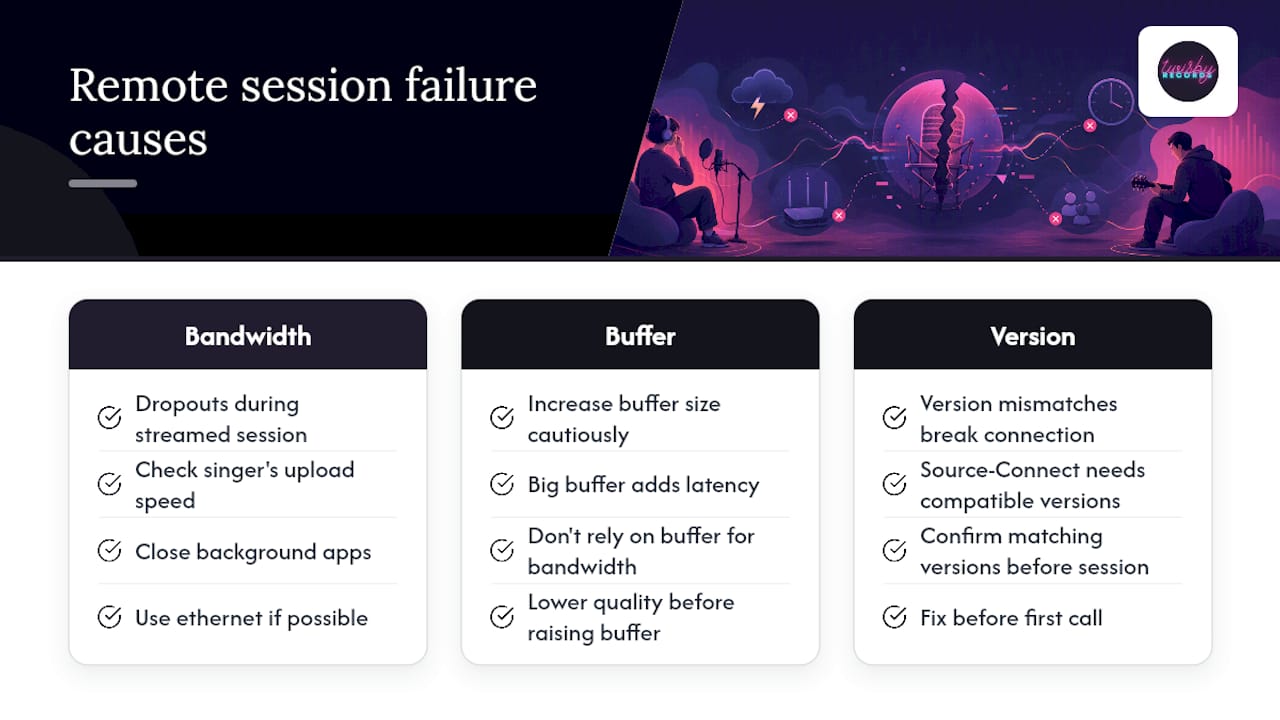
Dropouts during a streamed session usually mean the upload speed on the singer’s end can’t keep pace, especially if someone else in the house is on a video call at the same time. Close background apps, wire in an ethernet connection if possible, and lower the stream quality before raising the buffer size, since a bigger buffer adds latency without fixing a bandwidth shortfall.
Sync problems, where the recorded file drifts from what the producer heard live, almost always come from clock mismatches between the interface and the DAW, or from starting a recording mid-stream instead of from a shared count-in. Running a quick click-and-count test at the start of a session, recording it locally while streaming it live, then comparing the waveforms on arrival will catch drift before it wastes a full take.
Version mismatches are a real risk with tools like Source-Connect, where its own support documentation notes that both sides typically need compatible software versions to connect reliably. Confirm both parties are on matching versions before the session, not after the first dropped call.
When none of that resolves it, fall back to the simplest fix in remote production: record locally, bounce the file, and send it. It costs a few extra minutes and eliminates the entire connection as a variable.
Keeping remote sessions synced to the producer’s DAW in real time
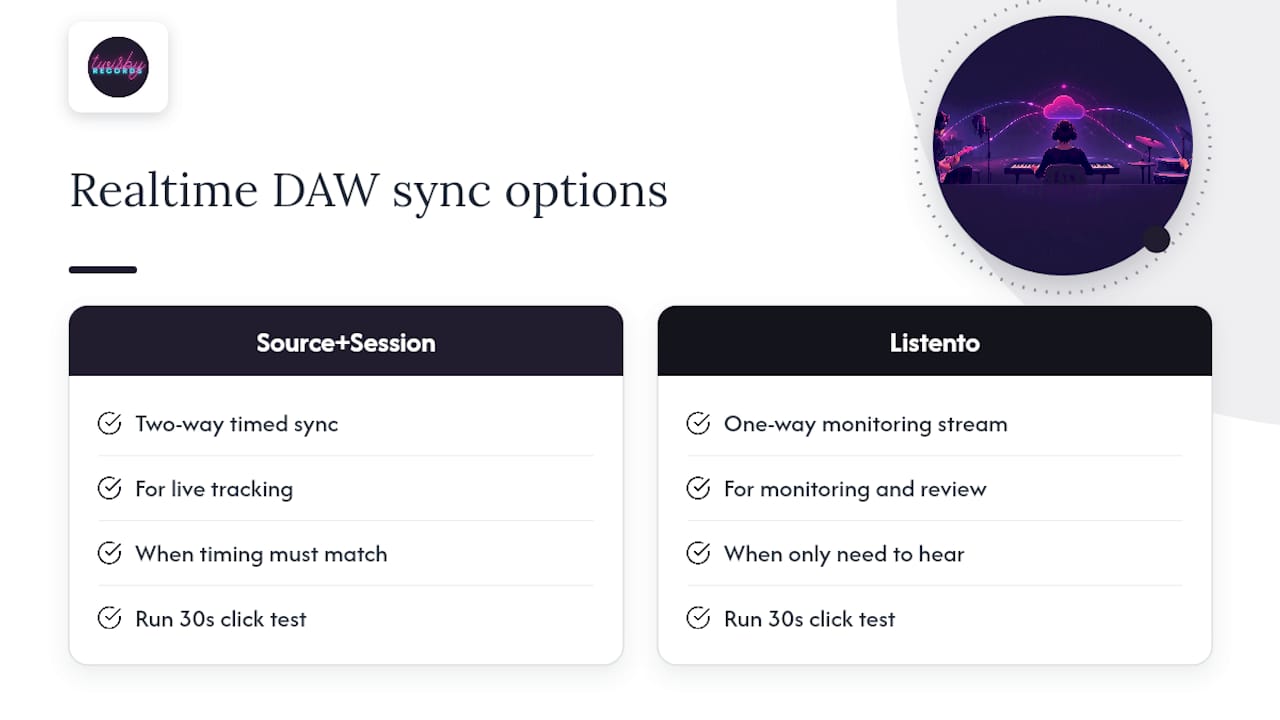
Real-time syncing works when the streaming tool and the DAW agree on timing, and that agreement depends on which tool is doing the job. Source-Connect and Sessionwire are both designed for two-way, timed sync during live tracking, which is why they’re the right pick when a producer wants to hear and direct a take as it happens rather than review it afterward.
Audiomovers’ Listento takes a different approach. It’s built to stream audio out of a DAW for remote monitoring and review, not to sync a remote performer’s input back into that DAW in real time. That distinction matters when you’re choosing tools: use Listento when a producer just needs to hear a mix or a take, and reserve Source-Connect or Sessionwire for sessions where timing has to line up on both ends.
Whichever tool you use, run the same click-and-count test described earlier before a real session starts. It’s the fastest way to confirm that what the producer hears live actually matches what lands in the recorded file, and it takes thirty seconds against the cost of redoing a whole session after the fact.
Communicating clearly when you can’t see the same screen
Feedback that works in a room falls apart over a laggy connection unless both sides adjust how they talk to each other. Vague notes like “try it again with more energy” waste a take. Specific notes like “pull back the vibrato on the word ‘again’ at 0:42” get fixed in one pass.
Agree on a shorthand before the session starts. Something as simple as “keep,” “comp,” or “pitch” attached to a timestamp lets both sides track notes without a long back and forth in chat. If you’re using a tool with talkback, like Sessionwire, use it for quick direction between takes rather than typing everything out, since typed notes tend to arrive after the singer has already moved on.
Set expectations for revisions before you start recording, not after. Decide how many passes at a section are reasonable and what “done” looks like for the session, so nobody’s guessing whether take six is really the last one.
What we’ve learned producing vocals remotely
Some experienced mixing and mastering engineers with Apple Digital Masters certification produce finished files that meet Apple’s own technical standard for audio quality. Remote sessions taught us that workflow discipline beats obsessing over specs. Consistent naming, honest level checks, and clear comp notes cut more revision rounds than chasing a higher sample rate ever does.
Our preferred test file spec for a new remote client is simple: a 15-second WAV at 48 kHz, 24-bit, dry and unprocessed. It tells us everything we need to know about the room, the mic, and the singer’s mic technique before a real session begins.
— Kreg
How Twisby Records handles your remote vocal production
You’ve got the gear, the workflow, and the tools. What you might not have is the time to mix and master what comes out the other end, or the patience to second-guess whether your low end is translating on someone else’s speakers. That’s where we come in.

If your remote vocal takes are clean and you’re ready for a finished track, our Mixing service takes those stems and builds them into a release-ready mix, and Mastering at $50 one-off puts the final polish on it with the same Apple Digital Masters standard we hold every project to. If you’d rather have us handle capture too, our Recording service covers remote sessions directly, with occasional in-person partnership options as well. Getting your vocal right is only half the job, since high-quality remote vocals play a key role in how artists get discovered locally. A well-produced track also needs to reach listeners, and clean remote production is part of what makes an artist’s work discoverable in the first place. Once the mix is ready, request a mix quote and we’ll walk you through turnaround and next steps.
FAQ
What software does Ariana Grande use?
Specific software used by named artists isn’t publicly listed, so we can’t confirm a definitive answer. For remote vocal production generally, tools like Sessionwire, Source-Connect, and Audiomovers’ Listento cover real-time tracking, studio-to-studio streaming, and remote monitoring respectively.
Who can hit all 10 octaves?
No human voice can span 10 octaves. The full range of human hearing spans roughly 10 octaves, but even trained vocalists typically cover a few octaves at most, and vocal range varies widely by individual and training.
What is the prettiest voice type?
There’s no objective ranking of voice types by beauty, since that’s a matter of personal taste and musical style rather than a measurable standard. What matters more for remote production is capturing whatever voice type you’re recording clearly and consistently, regardless of range or classification.
What is the best software for vocal production?
The right tool depends on the job: Source-Connect and Sessionwire are built for real-time, synced tracking between remote parties, while Audiomovers’ Listento is built for streaming a DAW session out for remote monitoring or review. There’s no single best option, since each tool serves a different stage of a remote vocal workflow.









