


TL;DR:
- Instagram ads with music can drive streams and sales when paired with a short funnel and targeted creative strategies. Proper setup includes owning rights, installing the Meta Pixel, and testing small budgets before scaling, with Reel ads being highly effective for music discovery. Managing audience targeting and integrating organic content build campaign efficiency and long-term growth.
Yes, you can run Instagram ads that include music and drive real, measurable outcomes — streams, follows, saves, and ticket sales — when you pair a short funnel, the right creative, and Meta Ads Manager’s delivery controls. Typical campaigns for music promotion run at a range of CPCs and CPMs that make Instagram one of the more accessible paid channels for an indie artist on a tight budget.
Here’s the five-step quick plan:
- Pick your goal. Streams, follows, saves, or ticket sales — choose one primary outcome per campaign.
- Prepare your assets and rights. Master-quality audio, vertical video, artwork, and confirmed ownership or licensing for every track you use in ads.
- Set up your Meta Ads Manager campaign. Connect your Instagram profile, install the Meta Pixel on your landing page, choose your objective, build your ad sets, and add music through the Creative Editor.
- Test creative and audiences. Run at least two creative variants against two audience segments before spending big.
- Measure and scale. Check CPM, video play-through rates, CTR, and cost per stream weekly. Cut what’s losing and put more behind what’s winning.
Before you spend a dollar, make sure your track is release-ready — master quality, artwork, and a set of supporting posts. Ads amplify what’s already there; they don’t fix a weak foundation. Twisbyrecords handles both sides of that equation, from Apple Digital Masters-certified audio to fully managed Meta campaigns.
Table of Contents
- How do you set up Instagram ads for music in Meta Ads Manager?
- Which ad formats work best for music promotion on Instagram?
- What audience targeting strategies actually work for musicians?
- How should you structure your budget and campaign for a music release?
- Which KPIs should you track, and how do you optimize weekly?
- What do you need to know about music rights before running ads?
- Why do ads work better inside an editorial ecosystem?
- Key Takeaways
- What most musicians get wrong about Instagram advertising
- Twisbyrecords offers managed Instagram ad campaigns for independent artists
- Useful sources
- FAQ
How do you set up Instagram ads for music in Meta Ads Manager?
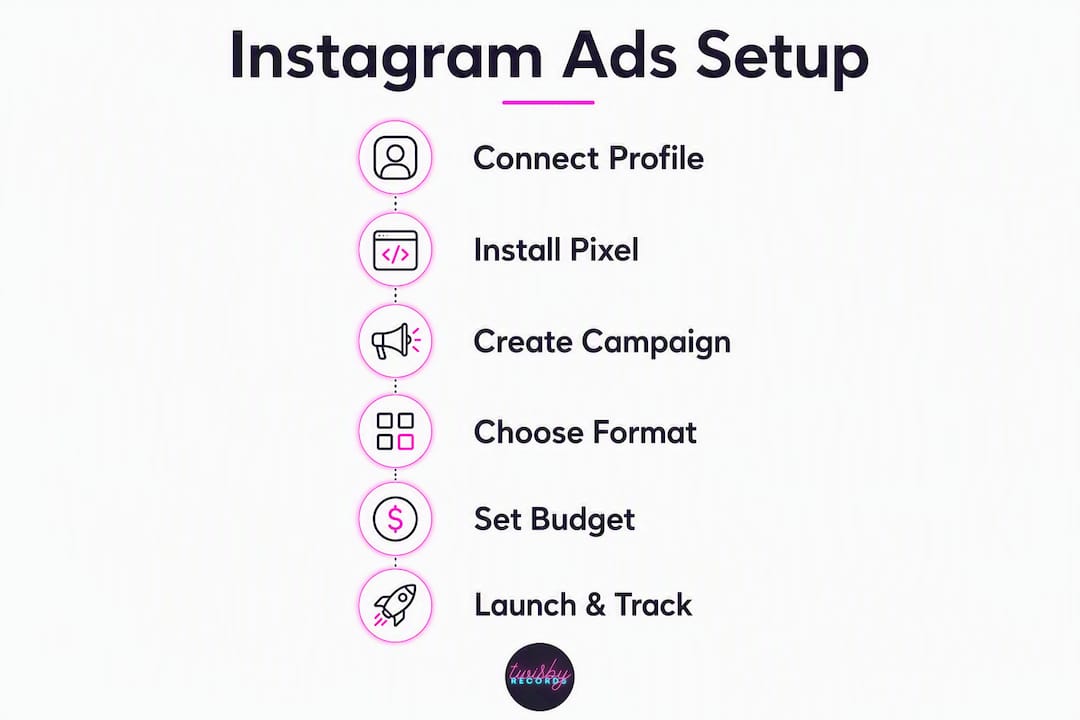
Getting your first campaign live takes about 30 minutes if your assets are ready. Here’s the exact workflow, field by field.
Account prerequisites
Before you touch a campaign, confirm these are in place:
- Meta Business Suite account linked to your artist page
- Instagram profile connected to that Business Suite account
- Meta Pixel installed on your landing page or smart link destination (required for conversion tracking and retargeting)
- Ad account billing set up with a valid payment method
- Admin permissions on both the Facebook Page and Instagram account
The Meta Pixel on your landing page is the piece most artists skip. Without it, you can’t optimize for conversions or build retargeting audiences from page visitors.
Step-by-step campaign setup
- Open Meta Ads Manager at ads.manager.facebook.com and click Create.
- Choose your campaign objective. For a new release, Awareness (reach/impressions) works for cold audiences. Traffic drives clicks to a streaming link or pre-save page. Engagement grows profile followers and post interactions. Conversions requires Pixel events and is best once you have enough data (Meta recommends 50 conversion events per week to exit the learning phase).
- Name your campaign clearly: “Artist Name — Single Title — Awareness — July 2026.”
- At the Ad Set level, set your audience. Use the Detailed Targeting field to add music-genre interests, artist names similar to yours, and demographic filters (age range, location). Keep audience size between 500K–2M for most test campaigns.
- Set placements. Choose Manual Placements and enable Instagram Feed, Stories, and Reels. Deselect Audience Network for music campaigns — it rarely delivers quality engagement.
- Set budget and schedule. Start with $5–$10/day for tests. Set a start and end date so you don’t overspend while the campaign is in the learning phase.
- At the Ad level, upload your creative. Use the Creative Editor to add your video or image. To add music, click Add Music inside the Creative Editor or use the Advantage+ Creative workflow, which lets Meta test dynamic audio and visual combinations automatically.
- Write your primary text. Keep it under 125 characters for mobile. Lead with the hook, not the artist name.
- Set your CTA button. Use Listen Now for streaming links, Learn More for pre-save pages, or Get Tickets for shows.
- Set your destination URL. Link to a smart link (a page that routes listeners to their preferred streaming platform) or a dedicated landing page. Add UTM parameters to the URL so you can track traffic in Google Analytics or your smart-link dashboard.
Pro Tip: Meta Ads Manager’s Advantage+ Creative automatically tests multiple creative combinations — different audio clips, thumbnails, and text variants — and shifts budget toward the best performer. Turn it on for any campaign where you have more than one creative asset.
Which ad formats work best for music promotion on Instagram?
Format choice is where most musicians leave performance on the table. Not all placements are equal, and the wrong format for your goal wastes spend fast.
Priority formats
Reel ads (9:16 vertical video) are the highest-performing format for music discovery. Front-loading the strongest 1–3 seconds of your track dramatically outperforms static ads — the hook has to hit before a thumb swipes. Aim for 15–30 seconds total. Reels appear in the Reels feed and the Explore tab, giving you reach beyond your existing followers.

Story ads work well for time-sensitive pushes: release day, ticket sales, limited merch drops. They disappear after 24 hours in organic form, but as paid placements they run as long as your campaign does. Keep them under 15 seconds and put your CTA on screen within the first 3 seconds.
In-feed video and carousel ads are better suited to retargeting than cold audiences. A carousel showing multiple tracks, tour dates, or press quotes gives warm audiences something to explore. Static image ads still have a place for simple “out now” announcements with a strong visual.
Six creative templates you can copy
These six formats consistently perform across music campaigns:
- Hook-first Reel: Open on the most emotionally charged 2 seconds of the song. No intro, no artist name first. Visual: performance or lyric overlay. CTA: “Listen now — link in bio” or a Listen Now button.
- Tour/ticket promo: Show a live clip or venue visual. Text overlay: “Playing [City] — [Date].” CTA: Get Tickets.
- Fan reaction/social proof: Clip of fans singing along, a comment screenshot, or a press quote. Text: “People are feeling this.” CTA: Stream it.
- Performance clip: Raw or polished live performance of the song’s best moment. No heavy editing needed — authenticity converts here.
- Conversion CTA (retargeting): Simple visual of the cover art + “Still haven’t heard it?” CTA: Listen Now. Run this only to warm audiences who already engaged.
- Storytelling snippet: 20–30 seconds of behind-the-scenes footage with a voiceover or caption explaining the song’s meaning. Builds connection before the ask.
Pro Tip: Put your artist name or logo in the first frame — even a small watermark. Viewers who watch 50%+ of your Reel but don’t click still build brand recognition, and that recognition lowers your CPC on retargeting campaigns later. Always add on-screen captions; a large share of Instagram users watch with sound off.
What audience targeting strategies actually work for musicians?
Targeting is where you either find real fans or burn budget on people who will never care. Here’s how to build audiences that convert.
Cold audience patterns
Start with interest clusters, not single interests. Instead of targeting “music fans,” stack related interests:
- Genre-specific interests (e.g., “indie rock,” “lo-fi hip hop,” “electronic music”)
- Similar artists your listeners already follow
- Behaviors like “engaged shoppers” combined with music interests for merch campaigns
- Location + demographic filters: if you’re touring the Southeast, target 18–34-year-olds in those metro areas
Keep cold audience sizes between 500K and 2M. Smaller gets expensive fast; larger dilutes relevance.
Lookalike audiences
Your best seed sources for lookalikes are people who already showed real intent: your Instagram engagers (90-day window), landing page visitors tracked by the Meta Pixel, and email subscribers uploaded as a Custom Audience. A 1% lookalike of your top engagers in the US typically outperforms broad interest targeting within a few days of data collection.
Retargeting and warm audiences
This is where the funnel pays off. Build these segments in Meta Ads Manager under Custom Audiences:
- People who watched 50% or more of any of your Reels (last 30–60 days)
- Profile visitors and post engagers (last 30 days)
- Landing page visitors tracked by the Pixel (last 14–30 days)
- Email list uploaded as a Custom Audience
Sequence them: show awareness Reels to cold audiences first, then hit warm audiences with storytelling or social proof ads, then close with a direct conversion CTA. This three-stage funnel — awareness, consideration, conversion — is the backbone of every efficient music campaign.
Common pitfalls
- Audience overlap: if multiple ad sets target similar people, they compete against each other in the auction and inflate your CPM. Use Meta’s Audience Overlap tool to check before launching.
- Too-broad “music lovers” targets: Meta’s “music” interest category is enormous and unfocused. Always layer it with genre, behavior, or demographic filters.
- Ad frequency fatigue: when your frequency (average impressions per person) climbs above 3–4 in a short window, engagement drops and CPM rises. Rotate creative or expand the audience.
How should you structure your budget and campaign for a music release?
The three-stage funnel isn’t just a creative strategy — it’s also your budget map.
Funnel-stage budget allocation
- Awareness (Reach/CPM objective): 40–50% of total budget. Cold audiences, hook-first Reels, CPM optimization. Goal: get your music in front of as many relevant people as possible at the lowest cost per impression.
- Consideration (Video Views or Engagement objective): 30–35% of budget. Warm audiences from the awareness stage. Goal: deepen connection and build the retargeting pool.
- Conversion (Traffic or Conversions objective): 20–25% of budget. Retargeting only. Goal: drive clicks to your streaming link, pre-save page, or ticket purchase.
Test budgets for indie musicians
Start at $5–$10 per day per ad set and run each test for at least 7 days. Meta’s algorithm needs time to exit the learning phase — making major changes before day 7 resets the learning and wastes your data. For a single release, a realistic test budget is $150–$300 total before you know which creative and audience combination is worth scaling.
For an album cycle, budget in phases: pre-release awareness (2–3 weeks), release week push (heaviest spend), and post-release retargeting (1–2 weeks). Total managed spend for an indie album campaign often runs $500–$1,500 depending on goals and market size.
Bidding approach
Use Lowest Cost (Meta’s default) for most campaigns — it lets the algorithm find the cheapest delivery for your objective. Switch to Bid Cap only when you have enough historical data to know your acceptable cost per result and want to prevent overspending on expensive auctions. Manual bids require volume to work well; they’re not a beginner move.
Scaling rules
When a creative and audience combination is consistently hitting your target CPM or CPC, increase the daily budget by no more than 20–30% every 3–4 days. Doubling a budget overnight forces Meta back into the learning phase. Vertical scaling (duplicating a winning ad set at a higher budget) is often more stable than editing the original.
Which KPIs should you track, and how do you optimize weekly?
Knowing which numbers to watch — and when to act on them — separates musicians who get results from those who just spend money.
Core KPIs for music campaigns
- CPM (cost per 1,000 impressions): your baseline efficiency metric. A CPM in the $2–$6 range is healthy for music promotion; higher CPMs suggest your audience is too narrow or your creative score is low.
- Video play-through rates: track 25%, 50%, 75%, and 100% completion. If you’re losing most viewers before 50%, your hook isn’t working.
- CTR (click-through rate): for traffic campaigns, aim for 1%+ on cold audiences. Below 0.5% usually means the creative or CTA needs work.
- Cost per stream/save: calculate this by dividing total ad spend by the number of streams or saves attributed via your smart link or Pixel. This is your true efficiency number.
- Follower lift: track new followers during and after the campaign window. Ads that drive follows have compounding value beyond the campaign itself.
- ROAS (return on ad spend): relevant for ticket and merch campaigns. If you’re spending $200 and generating $600 in ticket sales, your ROAS is 3x.
Stat to watch: According to HubSpot research, advertisers who test more than one creative see up to 30% better results — a strong argument for always running at least two creative variants per ad set.
Weekly optimization checklist
- Pull your ad-level report and sort by cost per result.
- Pause any creative with a CTR below 0.5% after 1,000+ impressions.
- Reallocate budget from underperformers to the top 1–2 creatives.
- Check frequency. If it’s above 3.5 for any ad set, rotate in a new creative or expand the audience.
- Review video play-through rates. If 50% completion is below 30%, test a new hook.
- Check your smart link dashboard for downstream streaming data. UTM parameters will show you which ad set drove the most actual plays.
- Adjust placements if one is significantly underperforming (e.g., Stories driving zero clicks — pause it and reallocate to Reels).
Measuring downstream impact means connecting your ad data to your streaming platform data. Use a smart link service (like a Linktree or Toneden-style page) with UTM parameters on every destination URL. The Pixel tracks landing page visits; your smart link tracks which platform each visitor chose. Together, they give you a complete picture of the path from ad impression to stream.
What do you need to know about music rights before running ads?
This is the section most guides skip, and it’s the one that can get your ads muted or taken down mid-campaign.
The core rule
You must own or hold a valid license for every piece of recorded music used in a paid ad. Using a third-party track without a master-use license — even a song you love and think is “promotional” — risks having Meta mute your ad’s audio or remove the ad entirely. This applies even to tracks you’ve streamed legally on Spotify or Apple Music.
How to secure your rights
- Own the master: if you wrote and recorded the song yourself and own the master recording, you’re clear to use it in your own ads. Keep documentation.
- Get a sync or master-use license: if you’re using another artist’s track (for a remix, cover, or collaboration), you need written permission from the master rights holder. A verbal agreement isn’t enough.
- Use cleared production libraries: services like Artlist, Musicbed, or Epidemic Sound offer licenses that explicitly cover paid social advertising. Confirm the license tier covers Meta ads before purchasing.
- Use your own stems or instrumentals: if you produced the track, using an instrumental version eliminates any third-party rights issues entirely.
Meta’s policy and where to find it
Meta’s official guidance on adding music to ads is documented in the Meta Ads Manager music policy. The US Copyright Office (copyright.gov) is the authoritative source for understanding master rights, sync licensing, and fair use limitations in the United States. Neither platform nor copyright law makes an exception for “promotional” use — paid ads are commercial use, full stop.
Rights checklist before you launch
- Confirm you own the master recording or have written master-use permission
- Confirm you own or have licensed the underlying composition (publishing rights)
- Store all license agreements in a folder you can access quickly if Meta requests documentation
- If using a production library track, screenshot or save the license certificate showing it covers paid social
- Check that your ad creative doesn’t include any unlicensed samples in the background
Why do ads work better inside an editorial ecosystem?
Paid ads don’t exist in a vacuum. The musicians who get the best results from Instagram advertising treat it as one layer of a larger content strategy, not a standalone switch to flip.
The core insight from practitioners who’ve run campaigns at scale: paid ads compound when paired with steady organic content — interviews, behind-the-scenes clips, collaborations, and fan interactions. That organic activity builds credibility, increases your profile’s engagement rate, and makes your paid ads cheaper to deliver because Meta’s algorithm rewards accounts with strong organic signals.
Here’s a practical 4-week roadmap for an indie single release:
- Week 1 — Build the foundation. Post 3–4 organic pieces: a behind-the-scenes clip of the recording session, a lyric teaser, and a collaboration post with a featured artist or producer. Set up your Meta Pixel and landing page. Install UTM parameters on all links. No paid spend yet.
- Week 2 — Launch awareness ads. Promote your best-performing organic Reel from Week 1 as a paid ad (boosting a top-performing organic Reel is often the most cost-efficient starting point). Run cold-audience awareness campaigns at $5–$10/day. Continue posting organic content 3x per week.
- Week 3 — Release week. Increase paid spend. Add a storytelling or social proof ad set targeting warm audiences (Reel viewers, profile engagers). Post release-day content organically. Run a collaboration post with an influencer or fellow artist to extend reach without additional ad spend.
- Week 4 — Convert and retain. Shift budget toward retargeting. Run conversion-focused ads to landing page visitors and email subscribers. Post a “thank you” or fan-reaction clip organically. Pull your smart link data and calculate cost per stream.
A few practical notes on keeping this cycle running:
- Repurpose every paid creative as organic content and vice versa — the same 30-second Reel can serve both.
- Use a consistent content creation strategy to keep the organic pipeline full between release cycles.
- Collaboration posts and influencer tags function as earned media — they expand reach without touching your ad budget.
- Document what worked in Week 4 before you start the next cycle. Your winning creative and audience combinations from this release are your starting point for the next one.
Key Takeaways
Running Instagram ads for music works when you treat it as a system, not a one-time push. The most effective approach combines release-ready audio, a three-stage funnel, disciplined testing, and a steady organic content layer that makes every paid dollar go further.
| Point | Details |
|---|---|
| Start with infrastructure | Install the Meta Pixel, connect your Instagram profile to Meta Business Suite, and set up UTM parameters before spending anything. |
| Use a three-stage funnel | Run awareness Reels to cold audiences, storytelling ads to warm audiences, and conversion CTAs to retargeting segments. |
| Test on small budgets first | Start at $5–$10/day per ad set and run for at least 7 days before scaling or making major changes. |
| Track cost per stream, not just clicks | CTR tells you about creative; cost per stream or save tells you whether the campaign is actually working for your music goals. |
| Twisbyrecords for managed campaigns | Twisbyrecords handles Meta Ads Manager setup, creative production, rights clearance, audience research, and reporting for independent artists who want a managed, measurable approach. |
What most musicians get wrong about Instagram advertising
There’s a version of this advice that sounds right but consistently underperforms: spend $50, boost a post, and wait for streams to roll in. The problem isn’t the platform. It’s the expectation that a single ad, disconnected from everything else, will do the work of a full release strategy.
The musicians who see real, compounding results from paid Instagram promotion share one habit: they treat every ad as part of an accumulation. Each piece of content, each collaboration, each organic post builds a pool of warm audiences that makes the next paid campaign cheaper and more effective. The ad isn’t the strategy. It’s the accelerant on a fire that’s already burning.
There’s also a tendency to over-target. I see artists build hyper-specific audiences of 50,000 people and wonder why their CPM is $18. The algorithm needs room to find your fans. A well-constructed interest cluster of 800K–1.5M people, paired with a strong creative hook, will almost always outperform a tiny, over-filtered audience. Give Meta’s delivery system something to work with.
The other thing worth saying plainly: audio quality matters in ads. A track that sounds compressed or muddy in a Reel ad signals amateur to a listener in the first two seconds, and they’re gone. Apple Digital Masters certification isn’t just a badge — it’s a standard that ensures your audio translates cleanly across every playback environment, including a phone speaker at 70% volume. That matters more than most musicians realize when they’re deciding where to invest before a campaign.
Twisbyrecords offers managed Instagram ad campaigns for independent artists
Running a Meta campaign well takes time, testing, and a clear read on what the data is telling you. For independent musicians focused on making music, that’s a real cost. Twisbyrecords offers a fully managed advertising service built specifically for indie and DIY artists releasing singles, EPs, or full projects.
The service covers campaign setup in Meta Ads Manager, creative asset preparation, rights clearance assistance, audience research, landing page setup, and weekly reporting with optimization. You get the same test-driven, funnel-structured approach described in this guide, executed by a team with over 35 years of audio and advertising experience and Apple Digital Masters certification. No guessing at field names, no wasted test budget, no wondering why your CPM is climbing.
It fits best for artists who want measurable results without managing the platform themselves. To get started, visit the advertising services page and request a consultation. Onboarding typically covers your release timeline, existing assets, and target audience so the first campaign can launch with a clear goal and a realistic budget.
Useful sources
- Meta Ads Manager — How to add music to ads: Official Meta/Instagram documentation on adding music inside the Creative Editor and Advantage+ workflows.
- Gethookd — Instagram Ads for Musicians: Examples, Cost & Strategy: Practitioner guide covering ad formats, cost benchmarks, and the three-stage funnel for music campaigns.
- Landr — Meta Campaigns for Musicians: Creative specs, Reel-first strategy, and Advantage+ creative guidance for music promotion.
- That Eric Alper — How To Run Effective Instagram And Facebook Ads For Your Music: Account setup prerequisites, Pixel installation, and campaign structure for musicians.
- Tools4Music — Instagram Music Marketing Strategy for Musicians: Test budget guidance, boosting organic Reels, and learning-phase timing advice.
- Magnetic Magazine — How To Promote Music On Instagram: Accumulation strategy, editorial ecosystem, and asset readiness as prerequisites for paid promotion.
- LeadEnforce — Instagram Ads for Artists: Turning Visual Content Into Conversions: Creative testing data, targeting strategies, and conversion path guidance for artists.
- US Copyright Office: Authoritative source for master rights, sync licensing, and fair use rules under US copyright law.
- Twisbyrecords — Advertising Services: Managed Meta Ads campaigns, creative production, and reporting for independent musicians.
FAQ
Can you run Instagram ads with music in them?
Yes. Meta Ads Manager’s Creative Editor includes an “Add Music” feature, and the Advantage+ Creative workflow lets you test audio variants automatically. You must own or hold a valid license for any track you use in a paid ad.
Is Instagram promotion worth it for music?
It can be, when you use a structured funnel and test creative before scaling. Typical CPMs in the $2–$6 range make Instagram one of the more cost-accessible paid channels for indie artists, but results depend heavily on creative quality, targeting, and whether you have a clear conversion goal.
How do you advertise your music on Instagram?
Set up Meta Business Suite, connect your Instagram profile, install the Meta Pixel on your landing page, then create a campaign in Meta Ads Manager. Choose an objective (Awareness, Traffic, or Conversions), build your audience, upload a vertical video with your hook in the first 1–3 seconds, and add music through the Creative Editor. Start at $5–$10/day and test for at least 7 days before scaling.
What’s the most cost-efficient way to start paid music promotion on Instagram?
Boosting a top-performing organic Reel is typically the lowest-friction starting point. It skips the full campaign build, uses creative that already proved it can hold attention, and lets you test paid delivery before committing to a larger campaign structure.
Does Twisbyrecords run Instagram ad campaigns for artists?
Yes. Twisbyrecords offers fully managed Meta Ads campaigns for independent musicians, covering setup, creative preparation, audience research, landing page setup, and weekly optimization reporting. Details are on the advertising services page.









