


Start by testing artist-stacking plus mood and context buckets. Run small $30 to $50 A/B tests on Meta, and reserve Spotify for intentful, stream-focused buys. Build a 6 to 12 artist-stack audience alongside a mood bucket like high-energy or chill, then split that budget across one creative and two audiences to see which signal actually drives streams, saves, and new fans.
TL;DR:
- Interest signals on Meta are based on behavioral clicks and engagement, while Spotify targets actual listening habits, making their signals fundamentally different.
- Use Spotify for capturing intentful streaming sessions with mood buckets and artist stacks, then scale successful audiences on Meta with lookalikes for broader reach.
- Layer multiple signals such as artist affinity, playlist themes, and session type carefully, keeping audiences above a minimum size to avoid diluting the targeting.
- Run small, controlled A/B tests with equal budgets over 3 to 7 days, measuring platform-specific metrics to identify the most responsive audience before scaling.
- Build and refine audiences from real streaming behavior and first-party data, avoiding over-narrowing genre tags and treating demographic filters as adjustments rather than core criteria.
Table of Contents
- What “interest” targeting actually means on Meta and Spotify
- Platform strengths and when to use Meta vs Spotify for specific campaign goals
- Tactical targeting recipes: artist-stacking, mood buckets, and contextual keywords
- How to test and measure interest-based audiences
- Creative-to-audience matching: fitting the listener’s moment
- How Twisby Records applies interest targeting
- Retargeting listeners who already showed interest
- Common pitfalls and limits of interest-based targeting
- Using first-party data and CRM to sharpen targeting
- Segmenting by age, location, and gender alongside interests
- Lookalike audiences and where they fit for music interest targeting
- Author perspective: three rules for building interest audiences
- Twisby Records: a managed option when you’d rather not run this alone
- FAQ
- Sources
What “interest” targeting actually means on Meta and Spotify
Here’s the thing nobody tells you before you spend your first dollar: “interest” doesn’t mean the same thing on Meta that it means on Spotify. They’re built on different data, and that difference should shape every audience you build.
Meta’s interest targeting runs on behavioral and engagement proxies. It watches what people click, like, and linger on, then builds interest categories from that activity. When you target “fans of indie folk” on Meta, you’re really targeting people who have interacted with pages, posts, or ads Meta associates with that label. It’s a guess, a smart one, but still a guess, optimized toward actions like clicks and landing page conversions.
Spotify works from a different foundation. Its targeting comes from first-party listening data: what people actually play, skip, save, and loop. Spotify can show you who streams a specific artist, who favors a genre inside real listening sessions, and who tends to stream during a workout versus a commute. According to Spotify Ads, the platform combines these behavioral and contextual signals with first-party demographic data to reach listeners in moments that actually fit the message.
That distinction matters when you’re deciding how narrow to go. Genre-only targeting on either platform is blunt. Thousands of artists get lumped into “indie rock” or “alternative,” and the people inside that bucket may have nothing in common beyond a Spotify tag. Listening behavior, session context, and adjacent-artist affinity give you sharper signal because they describe what someone actually does, not just what category they’ve been filed under.
A few fields worth knowing before you open either ad manager:
- Artist affinity: Meta and Spotify both let you build audiences around people who engage with or stream specific artists you consider adjacent to your sound.
- Playlist keywords: Spotify allows targeting by playlist names and themes, useful for reaching people already in a listening mode that fits your release.
- Session type: Spotify’s contextual signals include workout, commute, and chill sessions, each tied to different energy expectations.
- Device and screen state: Spotify can factor in whether someone is actively looking at their phone or listening passively, which changes what kind of ad lands.
None of these fields work in isolation. The strongest audiences layer two or three signals together, which is exactly what the next few sections walk through.
Platform strengths and when to use Meta vs Spotify for specific campaign goals
Match the platform to the outcome you actually need, not the one that feels easiest to set up. For detailed tactics, see the Spotify Marketing Strategy for Independent Artists. Spotify tends to be the stronger choice when your goal is streams, saves, or follower growth, because it reaches people mid-listen, inside a context where streaming is the natural next action. Meta tends to be the stronger choice for broad discovery, creative testing, and lookalike scaling, because its audience pool is larger and its testing tools are faster to iterate.
The combination usually outperforms either platform alone:
- Use Spotify first to capture intentful sessions. Run a display or audio campaign against a mood bucket or artist-stack audience and measure streams per exposed listener.
- Pull your top engagers into a seed audience. Export or tag the people who streamed, saved, or clicked through, then use that group as your base.
- Scale the winning combination on Meta with a lookalike. Meta’s broader reach and lookalike modeling are suited to multiplying an audience that has already proven itself.
- Route Meta clicks through a landing page or playlist link that completes the action. A click is not a stream. The gap between the two closes only when the landing experience makes streaming the obvious next step.
- Compare cost per outcome, not cost per click. A cheap click that never turns into a stream is a more expensive mistake than an expensive click that does.
A rough way to think about budget splits: if you’re testing with $100, put $50 into Spotify against your artist-stack and mood audiences, and $50 into Meta testing creative variants against a broader interest audience. Once you see which audience produces real engagement, shift new spend toward scaling that winner rather than splitting evenly again.
Reach and intent pull in different directions, and that’s fine. Early in a release cycle, when you’re still figuring out who responds to the song, lean toward intent on Spotify. Once you’ve found a combination that works, lean toward reach on Meta to multiply it.
Tactical targeting recipes: artist-stacking, mood buckets, and contextual keywords
This is where theory turns into something you can actually build this afternoon.
Artist-stacking means assembling an audience from fans of several artists who sound adjacent to you, rather than relying on one broad genre tag. Pick 6 to 12 artists whose fans would plausibly like your music: not your heroes, your peers. If you stack too few artists, your audience shrinks past the point of usefulness. If you stack too many loosely related names, you dilute the signal and end up back at genre-level targeting. A good test is to ask whether a fan of every artist on your list would recognize your song within ten seconds.
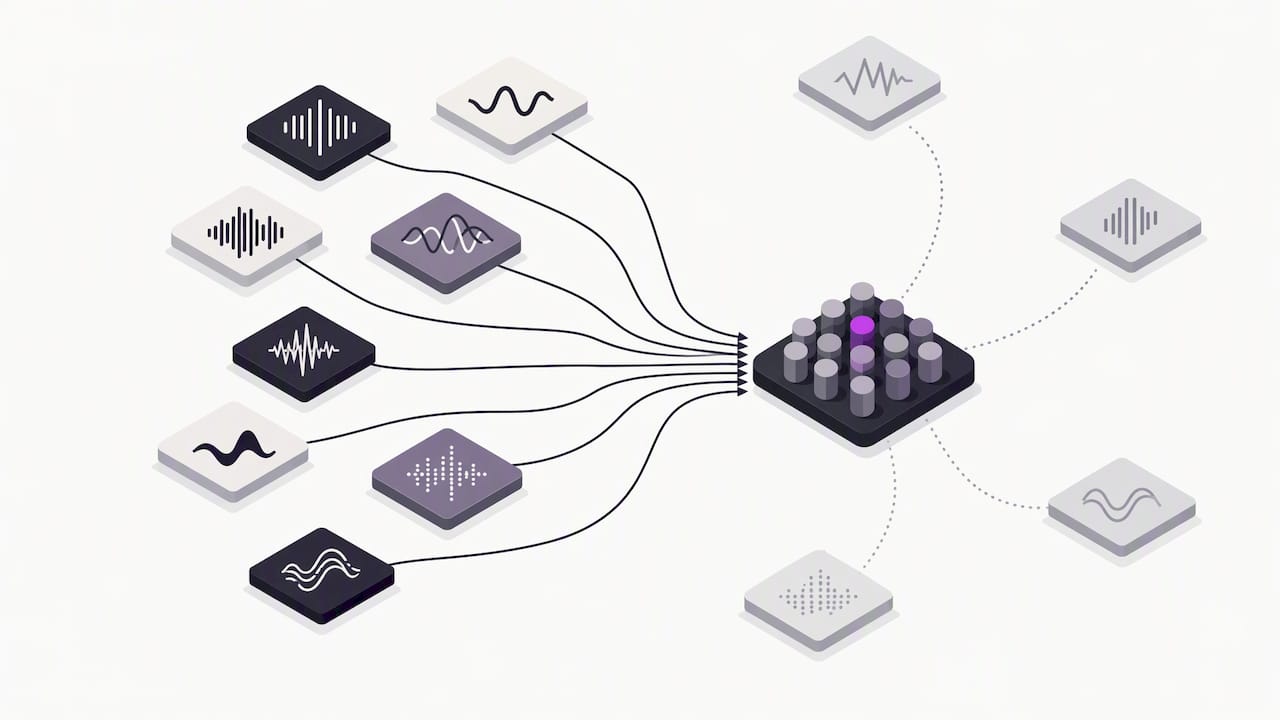
Mood and feature buckets come out of research on how people actually relate to music. Large-scale listening research described in a study on musical preference dimensions found that listener preferences are better explained by three dimensions, arousal, valence, and depth, than by genre labels alone. In practice, that means building creative and interest buckets around energy and emotional tone instead of stopping at “pop” or “hip-hop.” Try three variants of the same track: a high-energy cut for workout or hype contexts, a warm emotionally positive cut for commute or feel-good contexts, and an introspective cut for late-night or focus contexts.
Contextual targeting on Spotify lets you match those buckets to real listening moments. Spotify’s contextual advertising tools use session type, playlist and genre keywords, time of day, and screen-on or screen-off signals to place ads where they fit the listener’s current activity. A commute-themed playlist keyword paired with your mellow mix is a sharper combination than a genre tag alone.
Layering works best with a light hand:
- Combine one artist-stack audience with one mood bucket, never three or four signals at once.
- Use exclusions to remove people who have already converted, so budget doesn’t repeat on the same listeners.
- Watch your audience size as you layer: if Ads Manager or Spotify’s estimate drops below a usable threshold, remove the newest filter first.
- Re-test combinations every few weeks, since listening habits and platform algorithms both shift.
Pro Tip: Build your mood buckets around the track’s actual tempo and lyrical tone, not the genre you’d use to describe it at a show.
How to test and measure interest-based audiences
You don’t need a big budget to get a real answer. You need a clean test.
- Pick two audiences and one creative. Isolate the variable you’re testing. If you change both audience and creative at once, you won’t know which one moved the needle.
- Set equal budgets per ad set, around $25 to $30 each, for a combined $50 to $60 test. A practical $50 workflow duplicates the same creative across an artist-stack audience and a mood-bucket audience, then compares results after a short run.
- Run the test for 3 to 7 days. Shorter than that, and the algorithm hasn’t had time to find its footing; longer, and you’re burning budget on a result you likely already know.
- Track platform-native metrics, not just clicks. On Meta, that’s click-through rate, cost per click, and landing page conversion rate. On Spotify, that’s streams per exposed listener, saves, playlist adds, and listener retention.
- Apply a simple decision rule. If one audience clearly outperforms the other on the metric that matters for this release, scale it. If the gap is small, let the test run a bit longer before deciding.
- Log every test. Keep a simple spreadsheet of audience, creative, spend, and outcome so your next campaign starts from evidence instead of guesswork.
One pattern worth knowing before you spend anything: Spotify’s own Marquee case study on Mt. Joy found that 18% of casual and lapsed listeners who received a Marquee campaign went on to stream from the album, averaging 10 active streams per listener, and 14% of lapsed listeners saved or playlisted at least one track. That’s a useful benchmark for what a well-targeted Spotify audience can produce, not a guarantee for every release.
Small samples can mislead you. If your test audience is only a few hundred people, treat the result as directional, not final, and confirm it with a second round before committing a bigger budget.
Creative-to-audience matching: fitting the listener’s moment
An ad that ignores the listening context wastes the targeting work you just did. A workout-session listener responds to something fast and direct in the first three seconds. A commute listener has more patience for a short story or a visual hook. A chill or late-night listener responds better to something warmer and slower to build.
Keep production realistic for an indie budget:
- Cut the same session into 15 to 30 second edits rather than producing separate shoots for each context.
- Reuse the same performance footage or album art across variants, changing pacing and captions instead of reshooting.
- Lead with captions, since most viewers watch with sound off until something catches their attention.
A useful testing matrix is two tracks, two creative styles, and three audiences, run in parallel so you can see which combinations cross audiences well and which only work in one context. If a creative performs in the workout bucket but falls flat everywhere else, that’s a signal about the song’s energy, not just the ad.
Before anything goes live, check your mix for ad conditions specifically: loud, flat sections play worse on mobile speakers than a mix with clear low-end separation and vocal presence up front.
Pro Tip: Mix a short, ad-specific version of your track with the vocal and hook pushed slightly louder than your streaming master. Phone speakers need the help.
How Twisby Records applies interest targeting
We have extensive experience mixing and mastering for independent artists, and that same ear for detail carries into how we build ad audiences for clients. Every campaign starts with a $50-style A/B test, pairing an artist-stack audience against a mood bucket, before we commit real budget to either one.
Because we also handle mastering and creative production in-house, the audio in a client’s ad is built to a high standard, with levels and clarity checked against the benchmarks tracked across campaigns. That combination, audio quality plus audience discipline, is what lets us map a client’s metrics back to the right platform choice instead of guessing. Artists who want that paired with mastering can request a campaign quote directly.
Retargeting listeners who already showed interest
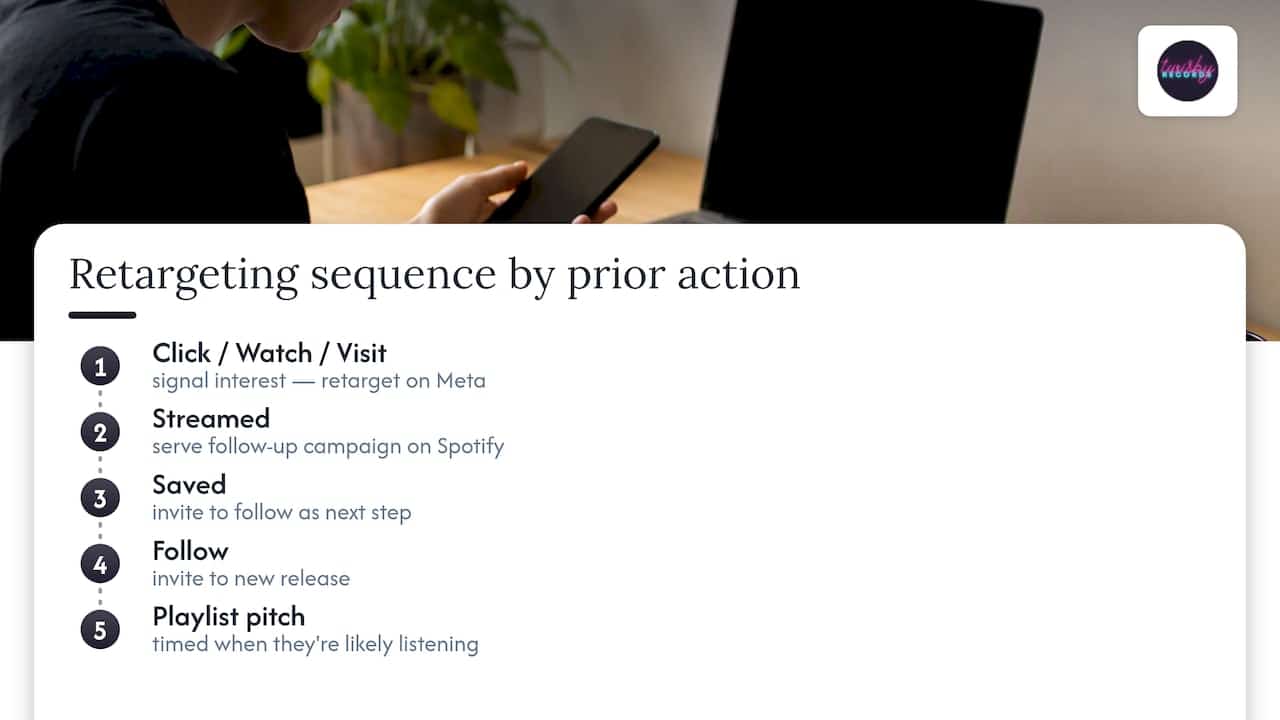
The people who clicked, streamed, or saved once are your cheapest next conversion. Retargeting on Meta can focus on anyone who watched a video past a certain point, visited your landing page, or engaged with a previous post, since that behavior signals real interest rather than a cold guess.
On Spotify, retargeting works a bit differently: you’re building on listeners who already streamed or saved a track, then serving them a follow-up campaign, maybe a new single or a playlist pitch, timed to when they’re likely to be listening again. A guide to tracking music ad conversions walks through setting up that kind of follow-up flow.
The key is sequencing. Don’t show a retargeted listener the same ad they already responded to. Give them the next step: a saved track gets an invite to follow, a follow gets an invite to a new release. Treat each prior action as a signal of where that listener is in the relationship with your music, and build accordingly.
Common pitfalls and limits of interest-based targeting
Interest targeting is powerful, but it has real limits worth knowing before you spend.
Genre tags are the most common trap. They’re broad, often stale, and lump wildly different listeners into one bucket. Over-narrowing is the opposite problem: stack too many filters and your audience shrinks past the point where either platform can optimize delivery.
Platform data also has blind spots. Meta’s interest categories are inferred from behavior, not confirmed by the listener, so some portion of any interest audience simply isn’t a good fit. Spotify’s signals are stronger because they’re first-party listening data, but they still describe past behavior, not guaranteed future response.
Budget size limits what a test can tell you. A $30 test on an audience of a few thousand people gives you a direction, not a verdict. Treat early results as hypotheses, and confirm anything surprising before building a bigger budget around it.
Finally, don’t confuse platform metrics with outcomes. A high click-through rate on Meta means people liked the ad, not that they streamed the song. Track the metric that matches your actual goal, and be honest when the numbers don’t connect the way you hoped.
Using first-party data and CRM to sharpen targeting
Your own fan data is more valuable than almost any interest category either platform can build for you. Email signups, merchandise buyers, and past ticket purchasers are people who’ve already proven they care, and that list can be uploaded to Meta as a custom audience or used as a seed for a lookalike.
If you’re collecting data across a landing page, an email list, and streaming links, a basic CRM setup lets you tag listeners by how they found you and what they did next. That tagging turns into better audience segments over time: someone who bought merch behaves differently than someone who only streamed once, and your ad strategy should reflect that.
A Meta Pixel setup guide for Spotify ad campaigns covers the tracking side of this, connecting what happens on your landing page back to the ad that drove it. Without that connection, first-party data stays siloed and your targeting never improves past the first campaign.
Segmenting by age, location, and gender alongside interests
Interests tell you what someone likes. Demographics tell you who’s actually listening, and the two should be layered, not treated as separate decisions.
Age matters because listening habits and platform usage shift by generation: a mood bucket that performs well with listeners in their 20s may need a different creative tone for listeners in their 40s. Location matters for obvious logistical reasons, touring, regional radio support, local press, but it also shapes which platform makes sense: some regions over-index on Spotify usage, others lean more toward Meta’s apps.
Gender is the trickiest of the three. It can add real signal for some genres and basically none for others, so test it as a layer rather than assuming it matters. Build your core audience from artist-stack and mood signals first, then check whether narrowing by age or location improves performance before locking it in. Treat demographic filters as adjustments to a working audience, not the foundation of one.
Lookalike audiences and where they fit for music interest targeting
A lookalike audience takes a group of people you already know respond, your email list, your top streamers, your most engaged ad clickers, and asks Meta to find more people who resemble them statistically. It’s one of the most efficient ways to scale a working audience once you’ve proven it with a smaller test.
The catch is quality in, quality out. A lookalike built from your entire follower list will be broader and softer than one built from people who actually streamed or saved a track after seeing an ad. The tighter and more intentful your seed audience, the sharper the lookalike tends to be.
For music specifically, the strongest seed audiences come from Spotify-driven actions routed back through your tracking setup: people who streamed after seeing a Marquee campaign, or clicked through to a playlist and saved a track. Build the seed from real listening behavior, then let Meta’s lookalike modeling find more people who share that pattern. It’s a scaling tool, not a discovery tool, so use it after you’ve already found an audience worth multiplying.
Author perspective: three rules for building interest audiences
Here’s what I’d tell a friend who just opened Ads Manager for the first time: test small, map every metric back to the platform it came from, and make your creative belong in the listening moment you’re targeting. Those three rules cover most of what goes wrong in a first campaign.
Before you launch anything, run through a short checklist: is your audience size big enough to actually deliver, does your creative match the mood bucket you built it for, and is your tracking set up so you’ll actually know what happened. Skip any one of those and you’re flying blind, no matter how clever the audience build is.
If you want the deeper how-to version of any of this, the $50 A/B testing guide and the $30 audience test walkthrough on the Twisby blog go step by step through the exact setups.
— Kreg
Twisby Records: a managed option when you’d rather not run this alone
If reading all of this made you want someone else to build the audiences, run the tests, and hand you the results, that’s exactly the gap Twisby Records fills. Our advertising packages combine audience research, creative production, and campaign management with the mastering work we’ve done for independent artists for more than 35 years, including Apple Digital Masters certification on every finished release.
Artists who benefit most are the ones short on time, or the ones who’d rather have a release-ready mix and a tested ad audience handled by the same team instead of coordinating two separate vendors. Standard Packages run $25 per month plus a 20% monthly adspend fee, Premium Packages run 20% of monthly adspend, and a one-time $99 onboarding fee applies either way. Full package details and a quote request are on our advertising services page.
FAQ
What is the target audience for music?
The target audience for a piece of music is the group of listeners most likely to stream, save, or follow based on shared taste signals like artist affinity, mood preference, and listening context. It’s best defined by behavior, who actually streams similar artists or listens in similar moments, rather than by broad demographic guesses alone.
What is the target audience in advertising?
In advertising, a target audience is the specific group of people a campaign is built to reach, defined by a mix of demographics, interests, and behavior that make them likely to respond. For music ads specifically, that usually means combining artist-stack interests, mood or context signals, and basic demographic filters like age and location.
What are the best ads for promoting music?
The strongest music ads match creative tone to the listener’s context, a high-energy cut for workout sessions, a warmer cut for commute or chill sessions, rather than running one generic ad everywhere. Spotify’s Mt. Joy Marquee case study found that 18% of casual and lapsed listeners who saw a Marquee campaign streamed from the album afterward, which points toward platform-native, context-matched ads as a strong format.
What are some examples of target audiences?
Examples include an artist-stack audience built from fans of 6 to 12 adjacent artists, a mood bucket built around high-energy or introspective listening, and a lookalike audience modeled from people who already streamed or saved a track after seeing an ad. Demographic layers like age or location can refine any of these but work best as adjustments, not the starting point.
How do I test which audience actually works?
Run a small split test, around $30 to $50 total, that pairs one creative against two audiences, such as an artist-stack build and a mood bucket, for 3 to 7 days. Then compare platform-native metrics: click-through rate and landing conversion on Meta, streams per exposed listener and saves on Spotify, and scale whichever audience wins.
Sources
- How Mt. Joy Used Marquee’s New Audience Segments To Grow Their Fan Base – Spotify for Artists
- Measuring musical preferences from listening behavior: Data from one million people and 200,000 songs – Fricke et al., 2021
- Audience targeting: Reach your customers | Spotify Ads









